
WooCommerce POS DocumentationWooCommerce POS Documentation
Buy Now
View Demo
  • WooCommerce POS

    • Point Of Sale
    • Overview
    • Features
    • Help Center
    • POS Comparison
    • Installation
    • Admin Configuration
    • Outlets & Users
    • Bulk Assignment
    • Dynamic Theme
    • Notification Tones
    • Variation Layouts
    • Cart Totals & Editing
    • Products & Inventory
    • Stock Visibility
    • Out of Stock Products
    • Per-Outlet Pricing
    • Orders & Drawers
    • Checkout Discounts & Coupons
    • Checkout Fees
    • Z-Report
    • Cash Management
    • Hold Cart
    • Custom Products
    • Hardware Support
    • Cash Drawer
    • Payment Terminal
    • Payment Integration
    • WhatsApp Notification
    • Multisite Compatibility
    • Reports & Analytics
    • POS Agent Guide
    • Desktop & Mobile
    • FAQ & Notes
    • Troubleshooting
  • Core POS System

    • WooCommerce POS Outlet Manager
    • WooCommerce POS Warehouse Management
  • Mobile Apps

    • WooCommerce Flutter Native POS Mobile App
  • Printer Integrations

    • WooCommerce POS Cloud Printer
  • Payment Terminal Integrations

    • WooCommerce Stripe POS Terminal Connector
    • WooCommerce POS Square Payment Terminal Plugin
    • WooCommerce POS PayPal Terminal Reader
    • WooCommerce POS Linkly Terminal Connector
    • WooCommerce POS Stripe Reader M2 Integration
  • Order & Transaction Management

    • POS Order Return & Exchange for WooCommerce
    • WooCommerce POS Partial Payment Plugin
    • POS Booking Reservation Plugin for WooCommerce
    • WooCommerce POS Multicurrency
  • Customer & Loyalty Features

    • WooCommerce & POS Loyalty Management
    • WooCommerce POS Gift Card Plugin
    • WooCommerce POS Happy Hours
    • WooCommerce POS Complimentary Goods
  • Hardware & Barcode Solutions

    • WooCommerce POS Configurable Barcode
    • WooCommerce POS Barcode RFGun
    • WooCommerce POS RFID Card Add-on
    • WooCommerce POS Cloud Printer Add-on
  • Customer Interface & Kiosk

    • WooCommerce POS Customer Kiosk Checkout
    • WooCommerce POS Customer Cart Screen
    • WooCommerce POS QR Code Ordering System
  • Industry-Specific Solutions

    • WooCommerce Restaurant Kitchen POS
    • Delivery Management Addon for WooCommerce POS
  • Advanced Features

    • POS AI Reporting for WooCommerce
Buy Now
View Demo
  • WooCommerce POS

    • Point Of Sale
    • Overview
    • Features
    • Help Center
    • POS Comparison
    • Installation
    • Admin Configuration
    • Outlets & Users
    • Bulk Assignment
    • Dynamic Theme
    • Notification Tones
    • Variation Layouts
    • Cart Totals & Editing
    • Products & Inventory
    • Stock Visibility
    • Out of Stock Products
    • Per-Outlet Pricing
    • Orders & Drawers
    • Checkout Discounts & Coupons
    • Checkout Fees
    • Z-Report
    • Cash Management
    • Hold Cart
    • Custom Products
    • Hardware Support
    • Cash Drawer
    • Payment Terminal
    • Payment Integration
    • WhatsApp Notification
    • Multisite Compatibility
    • Reports & Analytics
    • POS Agent Guide
    • Desktop & Mobile
    • FAQ & Notes
    • Troubleshooting
  • Core POS System

    • WooCommerce POS Outlet Manager
    • WooCommerce POS Warehouse Management
  • Mobile Apps

    • WooCommerce Flutter Native POS Mobile App
  • Printer Integrations

    • WooCommerce POS Cloud Printer
  • Payment Terminal Integrations

    • WooCommerce Stripe POS Terminal Connector
    • WooCommerce POS Square Payment Terminal Plugin
    • WooCommerce POS PayPal Terminal Reader
    • WooCommerce POS Linkly Terminal Connector
    • WooCommerce POS Stripe Reader M2 Integration
  • Order & Transaction Management

    • POS Order Return & Exchange for WooCommerce
    • WooCommerce POS Partial Payment Plugin
    • POS Booking Reservation Plugin for WooCommerce
    • WooCommerce POS Multicurrency
  • Customer & Loyalty Features

    • WooCommerce & POS Loyalty Management
    • WooCommerce POS Gift Card Plugin
    • WooCommerce POS Happy Hours
    • WooCommerce POS Complimentary Goods
  • Hardware & Barcode Solutions

    • WooCommerce POS Configurable Barcode
    • WooCommerce POS Barcode RFGun
    • WooCommerce POS RFID Card Add-on
    • WooCommerce POS Cloud Printer Add-on
  • Customer Interface & Kiosk

    • WooCommerce POS Customer Kiosk Checkout
    • WooCommerce POS Customer Cart Screen
    • WooCommerce POS QR Code Ordering System
  • Industry-Specific Solutions

    • WooCommerce Restaurant Kitchen POS
    • Delivery Management Addon for WooCommerce POS
  • Advanced Features

    • POS AI Reporting for WooCommerce
  • Getting Started

    • WooCommerce Point of Sale (POS)
    • Overview
    • Features
    • WooCommerce POS Comparison
    • Installation
  • Setup & Configuration

    • Admin Configuration
    • Outlets & POS Users
    • Bulk Assignment
    • Dynamic Theme in WooCommerce Point of Sale
    • Notification Tones
    • Variation Card Layouts
    • Cart Totals & Item Editing
  • Store Operations

    • WooCommerce Point of Sale – Products & Inventory Management
    • Stock Visibility Controls
    • Out of Stock Products
    • Per-Outlet Pricing
    • Orders & Cash Drawer
    • Checkout Discounts & Coupons
    • Checkout Fees
    • WooCommerce POS - Cashier Management
    • WooCommerce POS - Hold Cart
    • Z-Report Generation & Printing
    • WooCommerce POS - Custom Product
  • Hardware Integrations

    • WooCommerce POS - Hardware Support
    • WooCommerce POS – Cash Drawer & Cashier Management
    • WooCommerce POS – Payment Methods & Checkout Configuration
    • WooCommerce POS – Payment Terminal Integration
  • Advanced Features

    • WhatsApp Notifications in WooCommerce Point of Sale
    • WooCommerce POS - Multisite Compatibility
    • Reports & Analytics
    • POS Agent Guide
    • Desktop & Mobile POS
  • Help & FAQ

    • POS Help Center
    • FAQ & Notes
    • Troubleshooting
    • Before You Open a Ticket

Checkout Fees

Introduction

Retail stores often need to collect an extra charge at the counter — a card surcharge, a packaging or service charge, or a delivery handling fee. WooCommerce Point of Sale (POS) lets cashiers add a custom fee to the sale directly from the checkout page, either as a percentage of the order total or as a fixed amount.

The fee is named by the cashier, shown to the customer in the order summary before payment, and saved on the WooCommerce order as a standard fee line item, so your online store reports and accounting stay accurate.


Step-by-Step Workflow

1. Open the Checkout Page

  1. Build the cart on the POS register as usual.
  2. Click the Pay button under the cart totals.
  3. The checkout page opens with the order summary on the left and the payment keypad on the right.
  4. Above the totals you will find three actions: Apply Coupon, Apply Discount, and Take Fee.
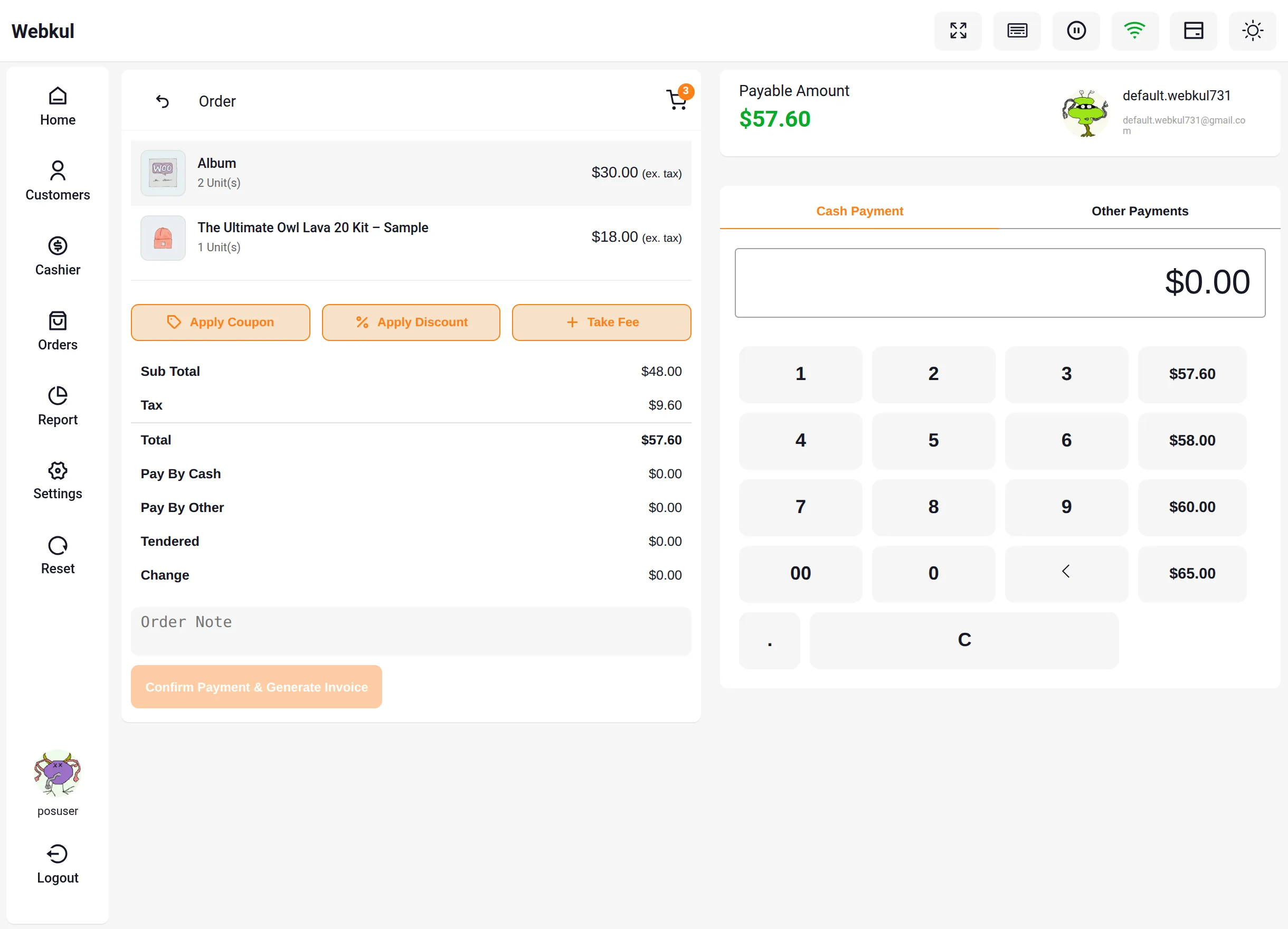
POS Checkout Page


2. Add a Custom Fee

  1. Click Take Fee on the checkout page.
  2. The Add Custom Fee popup appears with the following options:
FieldDescription
Fee NameThe label shown in the order summary and on the WooCommerce order (e.g., Service Fee, Card Surcharge).
Fee TypeChoose Percent (%) to charge a percentage of the order total, or Fixed to charge a flat amount in the store currency.
Fee ValueThe percentage or the fixed amount to charge.
  1. Click Apply to add the fee to the sale, or Delete to remove a fee that was applied earlier.
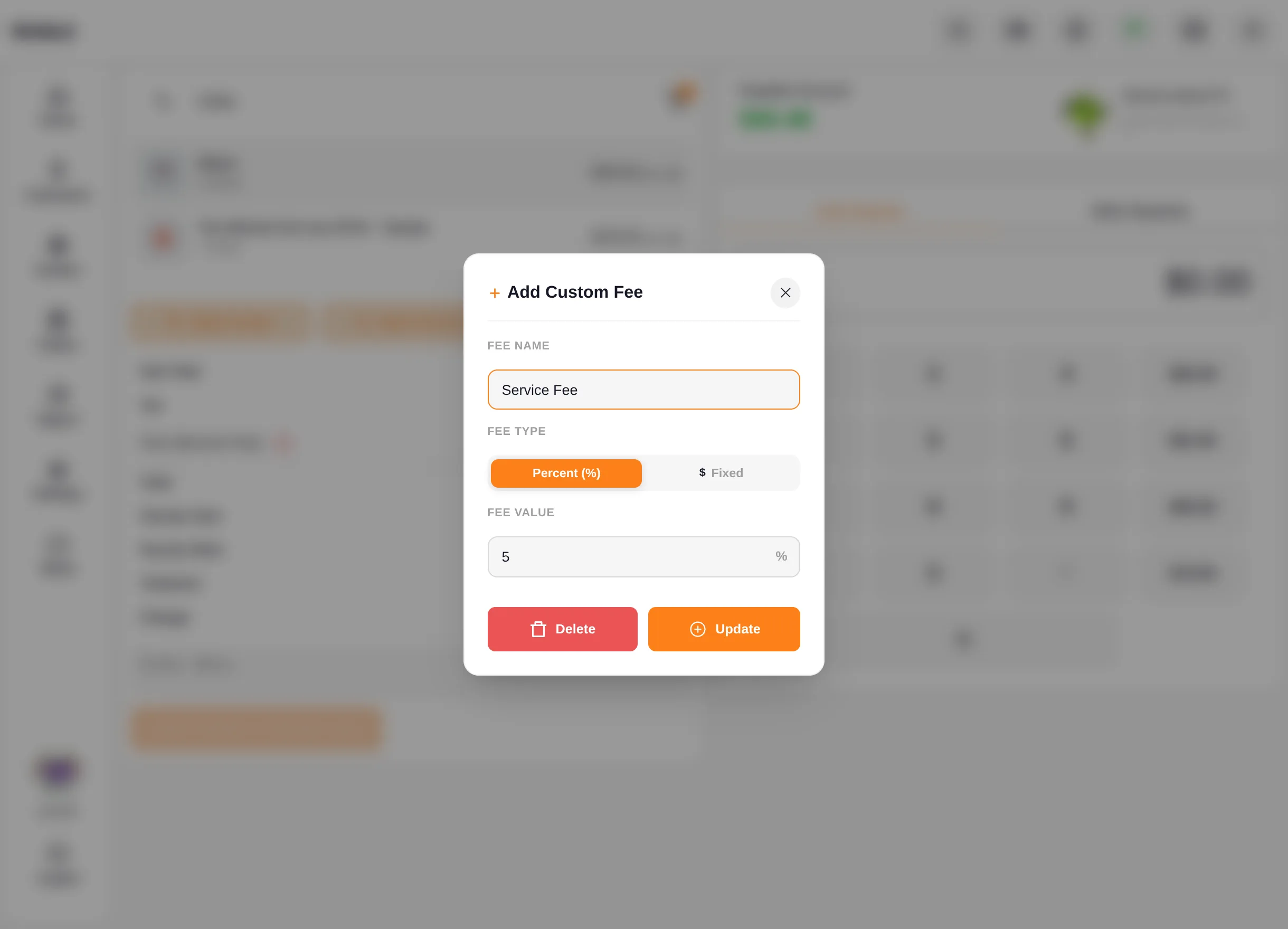
Add Custom Fee Popup


3. Review the Fee in the Order Summary

Once applied, the fee appears as its own line in the checkout totals — for example, a 5% Service Fee on a $57.60 order adds Fee (Service Fee) +$2.88 — and the payable amount updates instantly.

If a discount or coupon is applied afterwards, the percentage fee is recalculated automatically on the new total, so the customer is never overcharged.
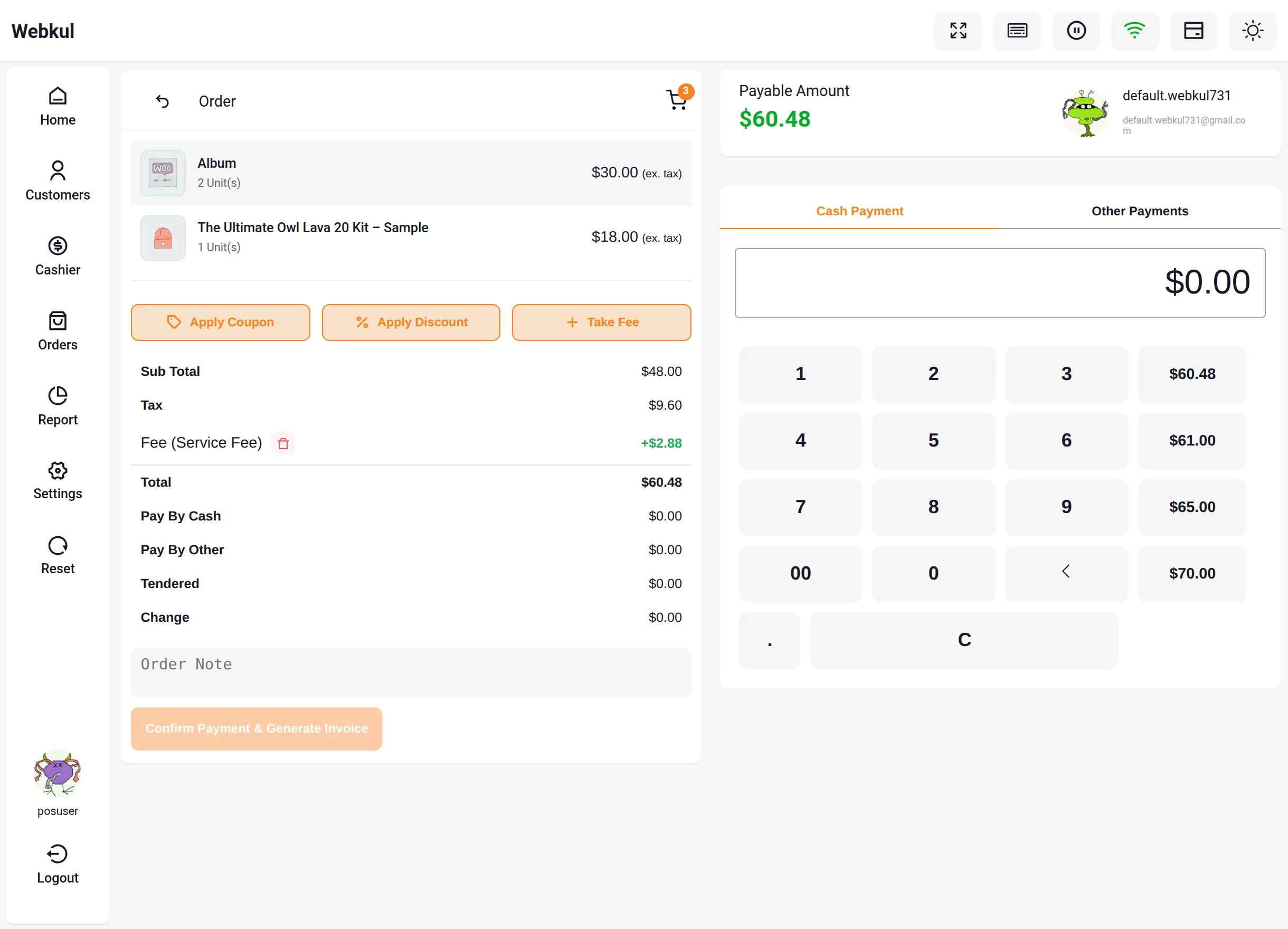
Fee Applied to Checkout Totals


Benefits

  • Transparent surcharges: The customer sees the named fee on screen before paying, and it prints on the receipt as part of the order.
  • Flexible charging: Percentage fees suit card surcharges that scale with the order; fixed fees suit flat services like gift wrapping.
  • Accurate records: The fee is stored on the WooCommerce order as a fee line item, so admin reports and accounting reconcile without manual adjustments.

Related Features

  • Checkout Discounts & Coupons — Reduce the order total with manual discounts or WooCommerce coupons at checkout.
  • Orders & Cash Drawers — Complete the payment and manage the resulting POS order.
Prev
Checkout Discounts & Coupons
Next
WooCommerce POS - Cashier Management