WooCommerce POS DocumentationWooCommerce POS Documentation
Buy Now
View Demo
  • WooCommerce POS

    • Point Of Sale
    • Overview
    • Features
    • Installation
    • Admin Configuration
    • Outlets & Users
    • Reports
    • POS Agent Guide
    • Products & Inventory
    • Hardware Support
    • Paymemt Terminal
    • Paymemt Terminal Integration
    • Cash Drawer
    • Multisite Compatibility
    • Orders & Drawers
    • Hold Cart
    • WhatsApp Notification
    • Dynamic Theme
    • Cash Management
    • Custom Products
    • Desktop & Mobile
    • FAQ & Notes
  • Core POS System

    • WooCommerce POS Outlet Manager
    • WooCommerce POS Warehouse Management
  • Mobile Apps

    • WooCommerce Flutter Native POS Mobile App
  • Printer Integrations

    • WooCommerce POS Cloud Printer
  • Payment Terminal Integrations

    • WooCommerce Stripe POS Terminal Connector
    • WooCommerce POS Square Payment Terminal Plugin
    • WooCommerce POS PayPal Terminal Reader
    • WooCommerce POS Linkly Terminal Connector
    • WooCommerce POS Stripe Reader M2 Integration
  • Order & Transaction Management

    • POS Order Return & Exchange for WooCommerce
    • WooCommerce POS Partial Payment Plugin
    • POS Booking Reservation Plugin for WooCommerce
    • WooCommerce POS Multicurrency
  • Customer & Loyalty Features

    • WooCommerce & POS Loyalty Management
    • WooCommerce POS Gift Card Plugin
    • WooCommerce POS Happy Hours
    • WooCommerce POS Complimentary Goods
  • Hardware & Barcode Solutions

    • WooCommerce POS Configurable Barcode
    • WooCommerce POS Barcode RFGun
    • WooCommerce POS RFID Card Add-on
    • WooCommerce POS Cloud Printer Add-on
  • Customer Interface & Kiosk

    • WooCommerce POS Customer Kiosk Checkout
    • WooCommerce POS Customer Cart Screen
    • WooCommerce POS QR Code Ordering System
  • Industry-Specific Solutions

    • WooCommerce Restaurant Kitchen POS
    • Delivery Management Addon for WooCommerce POS
  • Advanced Features

    • POS AI Reporting for WooCommerce
Buy Now
View Demo
  • WooCommerce POS

    • Point Of Sale
    • Overview
    • Features
    • Installation
    • Admin Configuration
    • Outlets & Users
    • Reports
    • POS Agent Guide
    • Products & Inventory
    • Hardware Support
    • Paymemt Terminal
    • Paymemt Terminal Integration
    • Cash Drawer
    • Multisite Compatibility
    • Orders & Drawers
    • Hold Cart
    • WhatsApp Notification
    • Dynamic Theme
    • Cash Management
    • Custom Products
    • Desktop & Mobile
    • FAQ & Notes
  • Core POS System

    • WooCommerce POS Outlet Manager
    • WooCommerce POS Warehouse Management
  • Mobile Apps

    • WooCommerce Flutter Native POS Mobile App
  • Printer Integrations

    • WooCommerce POS Cloud Printer
  • Payment Terminal Integrations

    • WooCommerce Stripe POS Terminal Connector
    • WooCommerce POS Square Payment Terminal Plugin
    • WooCommerce POS PayPal Terminal Reader
    • WooCommerce POS Linkly Terminal Connector
    • WooCommerce POS Stripe Reader M2 Integration
  • Order & Transaction Management

    • POS Order Return & Exchange for WooCommerce
    • WooCommerce POS Partial Payment Plugin
    • POS Booking Reservation Plugin for WooCommerce
    • WooCommerce POS Multicurrency
  • Customer & Loyalty Features

    • WooCommerce & POS Loyalty Management
    • WooCommerce POS Gift Card Plugin
    • WooCommerce POS Happy Hours
    • WooCommerce POS Complimentary Goods
  • Hardware & Barcode Solutions

    • WooCommerce POS Configurable Barcode
    • WooCommerce POS Barcode RFGun
    • WooCommerce POS RFID Card Add-on
    • WooCommerce POS Cloud Printer Add-on
  • Customer Interface & Kiosk

    • WooCommerce POS Customer Kiosk Checkout
    • WooCommerce POS Customer Cart Screen
    • WooCommerce POS QR Code Ordering System
  • Industry-Specific Solutions

    • WooCommerce Restaurant Kitchen POS
    • Delivery Management Addon for WooCommerce POS
  • Advanced Features

    • POS AI Reporting for WooCommerce
  • WooCommerce POS

    • WooCommerce Point of Sale (POS)
    • Overview
    • Features
    • Installation
    • Admin Configuration
    • Outlets & POS Users
    • WooCommerce Point of Sale – Products & Inventory Management
    • WooCommerce POS - Hardware Support
    • WooCommerce POS – Payment Methods & Checkout Configuration
    • WooCommerce POS – Payment Terminal Integration
    • WooCommerce POS – Cash Drawer & Cashier Management
    • WooCommerce POS - Multisite Compatibility
    • Orders & Cash Drawer
    • WooCommerce POS - Hold Cart
    • WhatsApp Notifications in WooCommerce Point of Sale
    • Dynamic Theme in WooCommerce Point of Sale
    • WooCommerce POS - Cashier Management
    • WooCommerce POS - Custom Product
    • Reports & Analytics
    • POS Agent Guide
    • Desktop & Mobile POS
    • FAQ & Notes

PWA Desktop & Mobile App for WooCommerce POS

WooCommerce POS provides both desktop and mobile Progressive Web Application (PWA) support, allowing users to access POS features seamlessly across devices with enhanced performance and offline capabilities.


Desktop Application
alt text

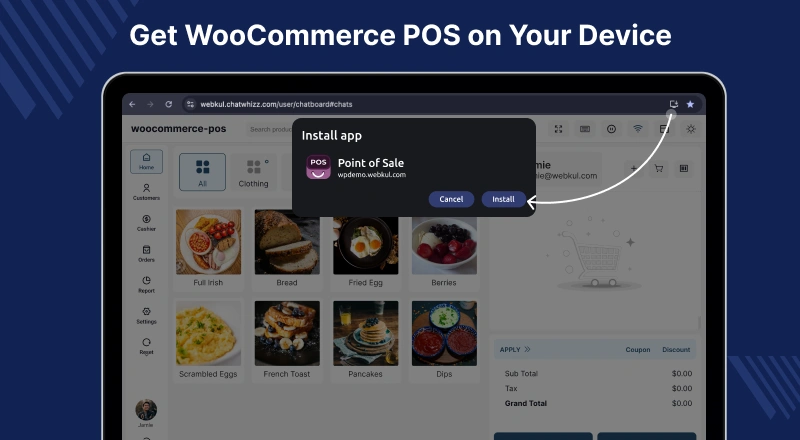
The POS Desktop App allows sales agents to manage POS operations faster and more efficiently from any operating system.

Key Features:

  • Install the desktop app directly from Google Chrome by clicking the “+” sign in the browser
  • Opens a dedicated desktop window for POS operations
  • Manage products, orders, transactions, and more from the desktop interface

This creates a smooth, native-like desktop experience for high-performance POS usage.


System Requirements

  • Screen Resolution: Minimum 1280 px
  • Compatible Devices: iPads, tablets, laptops, Macs, desktop PCs
  • Minimum Screen Size: 7.5 inches
  • Minimum Resolution: 1280×800 pixels

The PWA POS ensures compatibility across multiple devices while providing a seamless and responsive POS experience for both desktop and tablet users.

Tablet Application

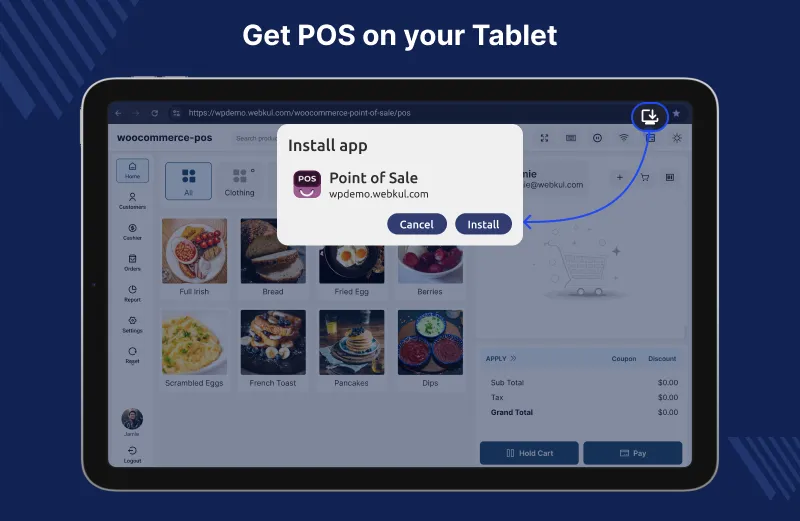
POS Dashboard

The POS Tablet App enables sales staff to run POS operations smoothly on tablets, offering mobility, speed, and an intuitive touch-friendly experience.

Key Features:

  • Install the tablet app directly from Google Chrome using the “+” (Add to Home Screen) option
  • Launches in a full-screen, app-like interface optimized for tablet displays
  • Touch-friendly layout designed for quick billing and order management
  • Easily manage products, orders, customers, and payments on the go
  • Ideal for in-store counters, kiosks, and mobile sales setups

This provides a seamless, native-like POS experience on tablets, combining portability with high-performance checkout operations.

POS Mobile App
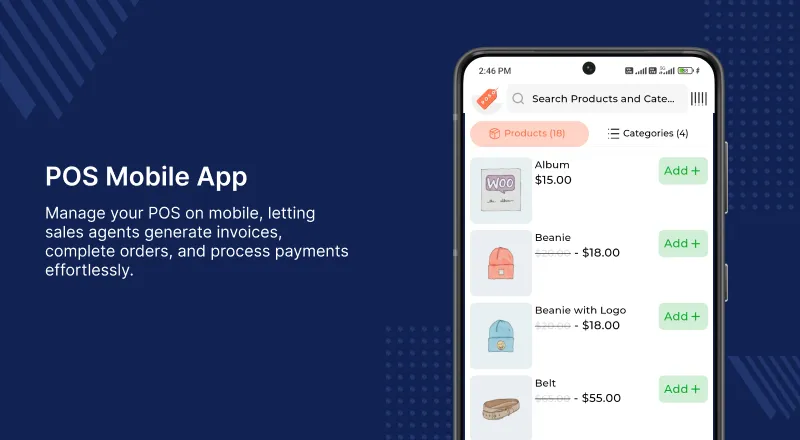
Mobile PWA

WooCommerce Flutter Native POS Mobile App

Manage your WooCommerce POS directly from Android & iOS mobile devices using a fast, Flutter-native app. you should check checkout our store for more details here.

How to Use:

  • Install the WooCommerce POS plugin on your web store
  • Download and open the POS Mobile App
  • Log in using your store credentials
  • Open the cash drawer and start billing
  • Add products, apply discounts, collect payment, and generate invoices
  • Orders sync in real time with the web store

Ideal for busy physical stores—extra sales agents can instantly start checkout using their phones.

Supported Platforms: Android & iOS Current Version: 1.5.0


Mobile Development Options

  • Users can develop a custom mobile POS application for enhanced functionality
  • For assistance, contact the mobile development team at [email protected]
  • Alternatively, purchase the WooCommerce Flutter Native POS Mobile App for ready-to-use mobile POS solutions

Performance Optimization

  • POS frontend is built using React for a modern, responsive, and user-friendly interface
  • Optimized for high-speed performance, ensuring smooth operations for sales agents

Prev
POS Agent Guide
Next
FAQ & Notes