
Key Features of WooCommerce POS
Multi-Outlet Management
Store Network Management
- Create Multiple Outlets: Set up unlimited physical store locations
- Centralized Control: Manage all outlets from a single WordPress admin
Outlet-Specific Settings:
- Unique opening/closing times
- Location-specific inventory
- Individual agent assignments
- Custom pricing per outlet
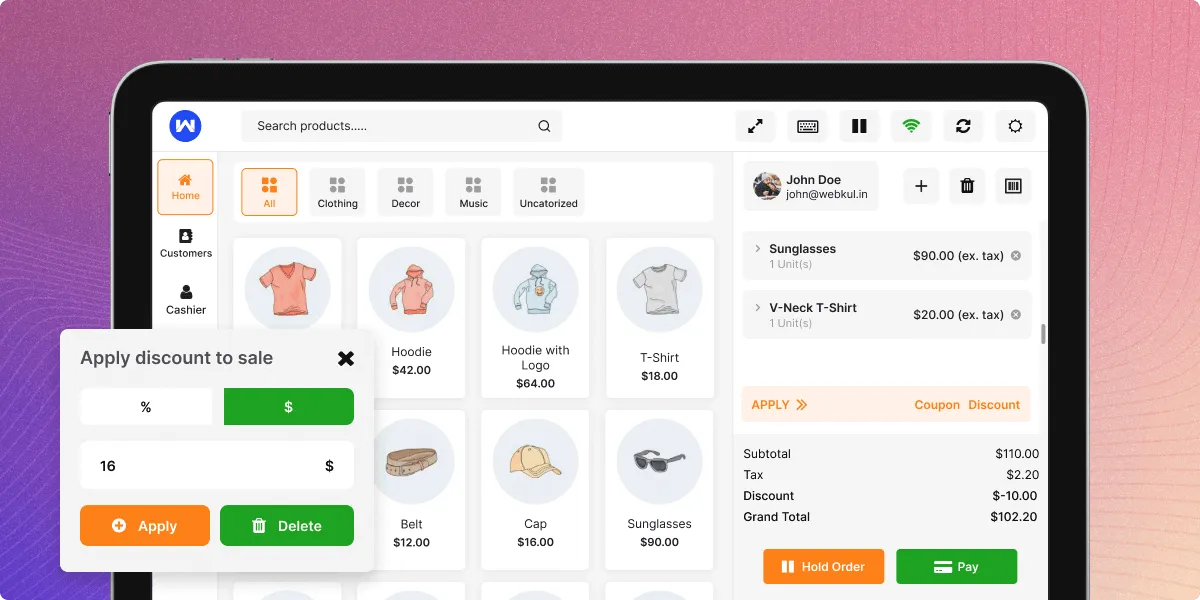
Agent Assignment & Permissions
- Role-Based Access: Assign specific agents to specific outlets
- Multi-Agent Support: Multiple agents per outlet for shift management
- Permission Levels: Control what each agent can access and modify
- Performance Tracking: Monitor sales performance per agent per outlet
Outlet-Specific Operations
- Local Inventory: Track stock levels for each outlet independently
- Outlet Reports: Generate location-specific sales and performance reports
- Custom Receipts: Configure receipt templates per outlet
- Local Tax Rules: Apply location-specific tax rates where applicable
Online + Offline Mode
Seamless Dual Operation
- Internet Independent: Continue sales during internet outages
- Automatic Sync: Data synchronization when connection is restored
- Queue Management: Offline orders queued for later processing
- Conflict Resolution: Smart merge logic for simultaneous online/offline updates
Offline Capabilities
- Full POS Functions: Complete sales processing without internet
- Local Data Storage: Secure temporary storage on device
- Cash Drawer Management: Track cash transactions offline
- Customer Lookup: Access cached customer data
Sync Features
- One-Click Sync: Manual sync option for agents
- Auto-Sync: Automatic background synchronization
- Conflict Handling: Resolve data conflicts intelligently
- Progress Tracking: Monitor sync status in real-time
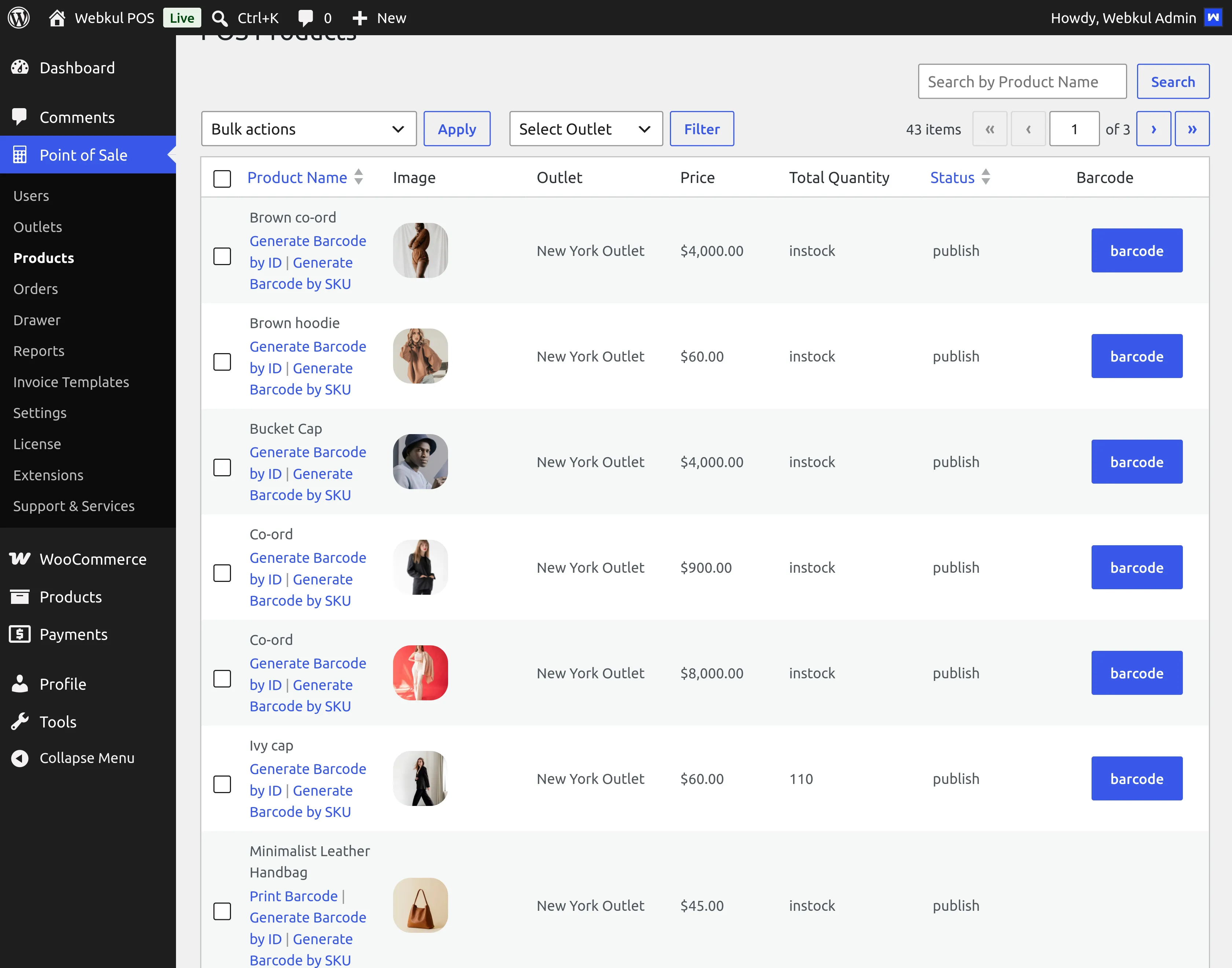
Barcode System (Product ID & SKU)
Dual Barcode Support
- Product ID Barcodes: Generate barcodes based on WooCommerce product IDs
- SKU Barcodes: Create barcodes using product SKU numbers
- Code-128 Format: Industry-standard barcode format support
- Batch Generation: Create barcodes for multiple products simultaneously
Scanning Features
- Quick Product Lookup: Instant product identification via scanner
- Cart Addition: Scan directly to add items to cart
- Inventory Checks: Quick stock level verification
- Price Verification: Confirm pricing during scanning
Customization Options
- Barcode Size: Adjustable dimensions for different label types
- Text Positioning: Control barcode text location
- Print Preview: Visual preview before printing
- Background Colors: Customizable barcode appearance
Real-Time Sync
Live Data Synchronization
- Inventory Updates: Immediate stock level changes across all channels
- Order Synchronization: Real-time order data sharing
- Customer Updates: Unified customer database
- Price Changes: Instant price updates across all outlets
Sync Components
- Product Data: Sync product details, images, and variations
- Stock Levels: Real-time inventory tracking
- Customer Information: Unified customer profiles
- Order History: Complete sales data synchronization
Advanced Sync Features
- Selective Sync: Choose what data to synchronize
- Schedule Sync: Set specific sync intervals
- Manual Override: Force sync when needed
- Error Logging: Track and resolve sync issues
Customer & Payment Management
Customer Management
- Unified Profiles: Single customer database across all channels
- Customer Search: Find customers by name, email, or phone
- Purchase History: View complete transaction history
- Customer Groups: Segment customers for targeted offers
- Default Customers: Set frequent customers for quick checkout
Payment Processing
Multiple Payment Methods:
Cash
Credit/Debit Cards
Digital Wallets
Custom payment types
Split Payments: Combine multiple payment methods per transaction
Payment Recording: Track all payment types for accounting
Partial Payments: Accept deposits or partial payments
Checkout Features
- Coupon Application: Apply discount codes at POS
- Price Override: Manager approval for price adjustments
- Tax Calculation: Automatic tax computation
- Receipt Generation: Customizable printed/email receipts
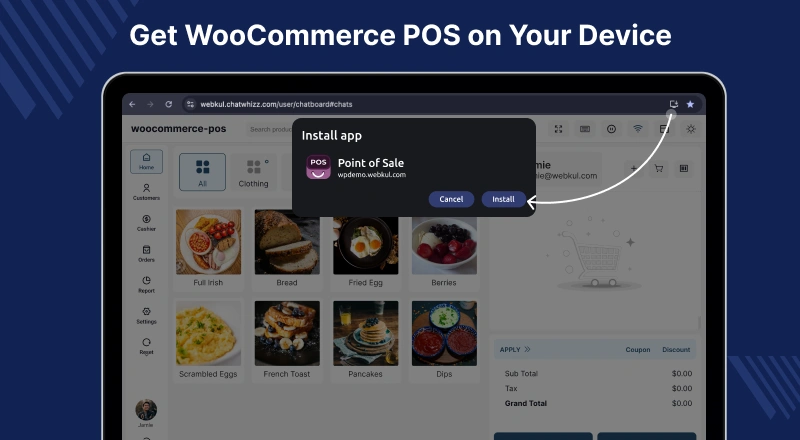
PWA Desktop & Mobile Apps
Progressive Web App Technology
- Cross-Platform: Works on desktop, tablet, and mobile
- Home Screen Installation: Add to home screen like native apps
- Offline Capability: Full functionality without internet
- Push Notifications: Real-time updates and alerts
Desktop Application
- Standalone App: Install as separate desktop application
- System Tray: Quick access from system tray
- Multiple Windows: Open multiple POS sessions
- Keyboard Focus: Optimized for keyboard navigation
Mobile Experience
- Touch-Optimized: Designed for touchscreen devices
- Portrait/Landscape: Responsive to orientation changes
- Camera Integration: Use device camera for barcode scanning
- Mobile Printing: Connect to Bluetooth printers
Installation Options
- Chrome Installation: Install from Chrome browser
- Manual Setup: Custom installation for specific devices
- Auto-Updates: Automatic app updates
- Custom Icons: Branded app icons
HPOS Compatibility
High-Performance Order Storage
- Native Support: Fully compatible with WooCommerce HPOS
- Performance Boost: Faster order processing and queries
- Data Consistency: Improved data integrity and reliability
- Future-Proof: Ready for WooCommerce’s evolving architecture
Technical Integration
- Custom Order Tables: Utilizes HPOS custom tables
- Data Migration: Seamless migration from legacy order storage
- Backward Compatibility: Maintains compatibility with traditional setup
- Sync Optimization: Enhanced synchronization with HPOS
Benefits
- Improved Performance: Faster loading of order lists and reports
- Better Scalability: Handles large order volumes efficiently
- Enhanced Reliability: Reduced database conflicts
- Streamlined Operations: Optimized for modern hosting environments
Dynamic Theme Support
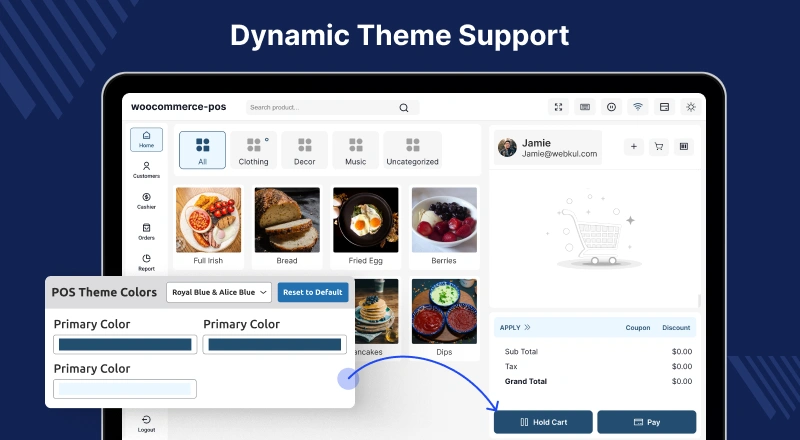
Visual Customization
- Light/Dark Modes: Switch between themes based on preference or system settings
- Theme Colors: Customizable color schemes for branding
- UI Modes: Different layout options for categories and products
- Responsive Design: Adapts to different screen sizes and resolutions
Theme Features
- System Theme Detection: Auto-switch based on device settings
- Manual Theme Selection: User-controlled theme switching
- Brand Alignment: Match POS interface with store branding
- Accessibility: High contrast modes for better visibility
Customization Options
- CSS Customization: Add custom styles for unique branding
- JavaScript Injection: Extend functionality with custom scripts
- Logo Integration: Display store logo in POS interface
- Font Customization: Change typography to match brand identity
UI Components
- Product Display: Square, circle, or rounded product images
- Grid/List Views: Multiple ways to display products
- Payment Interface: Customizable payment method display
- Cart Design: Flexible cart layout options