
WooCommerce POS DocumentationWooCommerce POS Documentation
Buy Now
View Demo
  • WooCommerce POS

    • Point Of Sale
    • Overview
    • Features
    • Installation
    • Admin Configuration
    • Outlets & Users
    • Reports
    • POS Agent Guide
    • Products & Inventory
    • Hardware Support
    • Paymemt Terminal
    • Paymemt Terminal Integration
    • Cash Drawer
    • Multisite Compatibility
    • Orders & Drawers
    • Hold Cart
    • WhatsApp Notification
    • Dynamic Theme
    • Cash Management
    • Custom Products
    • Desktop & Mobile
    • FAQ & Notes
  • Core POS System

    • WooCommerce POS Outlet Manager
    • WooCommerce POS Warehouse Management
  • Mobile Apps

    • WooCommerce Flutter Native POS Mobile App
  • Printer Integrations

    • WooCommerce POS Cloud Printer
  • Payment Terminal Integrations

    • WooCommerce Stripe POS Terminal Connector
    • WooCommerce POS Square Payment Terminal Plugin
    • WooCommerce POS PayPal Terminal Reader
    • WooCommerce POS Linkly Terminal Connector
    • WooCommerce POS Stripe Reader M2 Integration
  • Order & Transaction Management

    • POS Order Return & Exchange for WooCommerce
    • WooCommerce POS Partial Payment Plugin
    • POS Booking Reservation Plugin for WooCommerce
    • WooCommerce POS Multicurrency
  • Customer & Loyalty Features

    • WooCommerce & POS Loyalty Management
    • WooCommerce POS Gift Card Plugin
    • WooCommerce POS Happy Hours
    • WooCommerce POS Complimentary Goods
  • Hardware & Barcode Solutions

    • WooCommerce POS Configurable Barcode
    • WooCommerce POS Barcode RFGun
    • WooCommerce POS RFID Card Add-on
    • WooCommerce POS Cloud Printer Add-on
  • Customer Interface & Kiosk

    • WooCommerce POS Customer Kiosk Checkout
    • WooCommerce POS Customer Cart Screen
    • WooCommerce POS QR Code Ordering System
  • Industry-Specific Solutions

    • WooCommerce Restaurant Kitchen POS
    • Delivery Management Addon for WooCommerce POS
  • Advanced Features

    • POS AI Reporting for WooCommerce
Buy Now
View Demo
  • WooCommerce POS

    • Point Of Sale
    • Overview
    • Features
    • Installation
    • Admin Configuration
    • Outlets & Users
    • Reports
    • POS Agent Guide
    • Products & Inventory
    • Hardware Support
    • Paymemt Terminal
    • Paymemt Terminal Integration
    • Cash Drawer
    • Multisite Compatibility
    • Orders & Drawers
    • Hold Cart
    • WhatsApp Notification
    • Dynamic Theme
    • Cash Management
    • Custom Products
    • Desktop & Mobile
    • FAQ & Notes
  • Core POS System

    • WooCommerce POS Outlet Manager
    • WooCommerce POS Warehouse Management
  • Mobile Apps

    • WooCommerce Flutter Native POS Mobile App
  • Printer Integrations

    • WooCommerce POS Cloud Printer
  • Payment Terminal Integrations

    • WooCommerce Stripe POS Terminal Connector
    • WooCommerce POS Square Payment Terminal Plugin
    • WooCommerce POS PayPal Terminal Reader
    • WooCommerce POS Linkly Terminal Connector
    • WooCommerce POS Stripe Reader M2 Integration
  • Order & Transaction Management

    • POS Order Return & Exchange for WooCommerce
    • WooCommerce POS Partial Payment Plugin
    • POS Booking Reservation Plugin for WooCommerce
    • WooCommerce POS Multicurrency
  • Customer & Loyalty Features

    • WooCommerce & POS Loyalty Management
    • WooCommerce POS Gift Card Plugin
    • WooCommerce POS Happy Hours
    • WooCommerce POS Complimentary Goods
  • Hardware & Barcode Solutions

    • WooCommerce POS Configurable Barcode
    • WooCommerce POS Barcode RFGun
    • WooCommerce POS RFID Card Add-on
    • WooCommerce POS Cloud Printer Add-on
  • Customer Interface & Kiosk

    • WooCommerce POS Customer Kiosk Checkout
    • WooCommerce POS Customer Cart Screen
    • WooCommerce POS QR Code Ordering System
  • Industry-Specific Solutions

    • WooCommerce Restaurant Kitchen POS
    • Delivery Management Addon for WooCommerce POS
  • Advanced Features

    • POS AI Reporting for WooCommerce
  • WooCommerce POS

    • WooCommerce Point of Sale (POS)
    • Overview
    • Features
    • Installation
    • Admin Configuration
    • Outlets & POS Users
    • WooCommerce Point of Sale – Products & Inventory Management
    • WooCommerce POS - Hardware Support
    • WooCommerce POS – Payment Methods & Checkout Configuration
    • WooCommerce POS – Payment Terminal Integration
    • WooCommerce POS – Cash Drawer & Cashier Management
    • WooCommerce POS - Multisite Compatibility
    • Orders & Cash Drawer
    • WooCommerce POS - Hold Cart
    • WhatsApp Notifications in WooCommerce Point of Sale
    • Dynamic Theme in WooCommerce Point of Sale
    • WooCommerce POS - Cashier Management
    • WooCommerce POS - Custom Product
    • Reports & Analytics
    • POS Agent Guide
    • Desktop & Mobile POS
    • FAQ & Notes

WooCommerce POS - Hold Cart
alt text

Cart On Hold Feature

The Hold Cart feature allows POS users to temporarily save a customer's cart for future processing. This is useful when a transaction needs to be paused and completed later.

How to Hold a Cart

Holding Process

The user can put a cart "on hold" to process it after some time by simply clicking on the Hold Cart option in the panel.

Adding Order Notes

After clicking the Hold Cart option, an "Order Note" tab opens. The POS user can:

  • Enter relevant notes about the order
  • Add customer-specific information
  • Include special instructions
  • Document reason for holding

Once the order note is entered, the cart is put on hold and can be processed later.

Accessing Hold Carts

Quick Access

Users can see the hold carts in the top right corner of the cart interface and can directly visit them from there.

Navigation Path

Alternatively, users can navigate through:

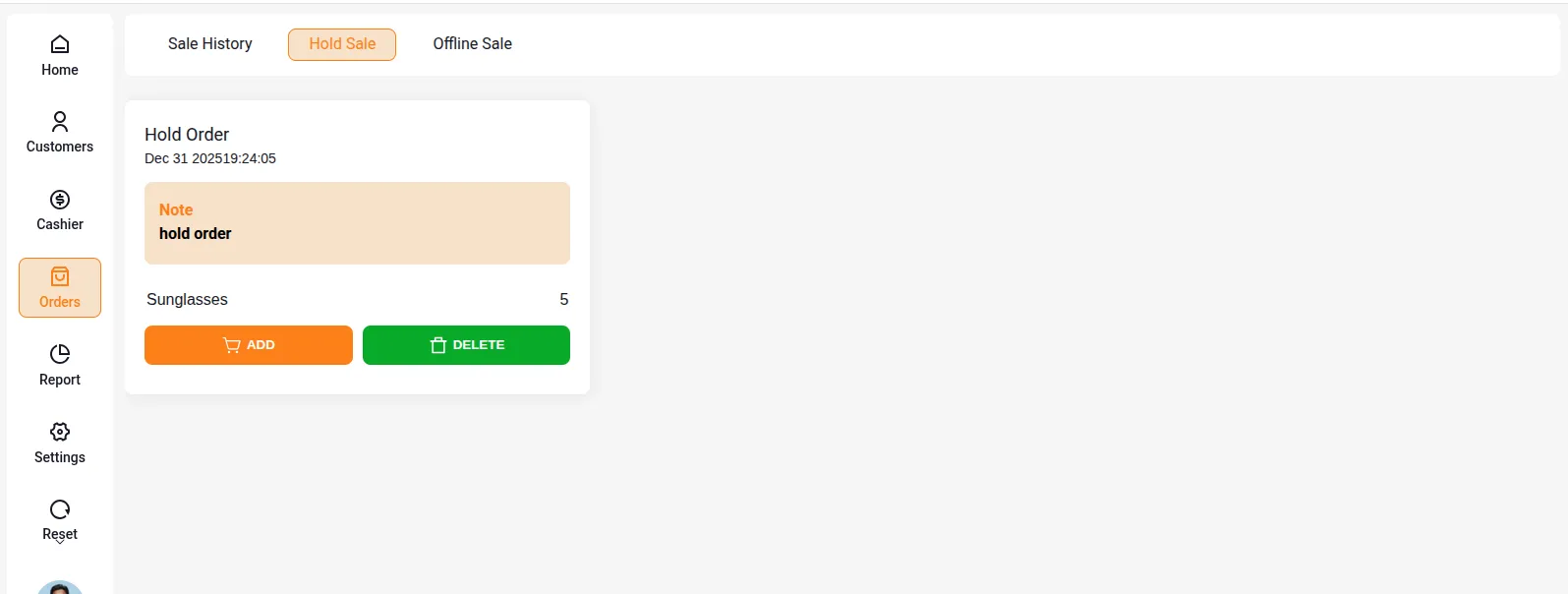
POS → Order → Hold Sale

Hold Sale Management

Viewing Hold Sales

All carts that have been put on hold are visible under the Hold Sale section. From here, POS users can:

  • View all pending hold carts
  • Resume processing any hold cart
  • Review order notes associated with each hold
  • Complete the transaction when customer returns

Use Cases

When to Use Hold Cart

  • Customer needs to get additional items
  • Payment method not immediately available
  • Customer needs to verify price or details
  • Managing multiple customers simultaneously
  • Temporary interruption in service

Benefits

  • Better sales management
  • Improved customer service
  • Efficient multi-tasking capability
  • No loss of cart data
  • Easy retrieval of pending orders
Prev
Orders & Cash Drawer
Next
WhatsApp Notifications in WooCommerce Point of Sale