WooCommerce POS DocumentationWooCommerce POS Documentation
Buy Now
View Demo
  • WooCommerce POS

    • Point Of Sale
    • Overview
    • Features
    • Installation
    • Admin Configuration
    • Outlets & Users
    • Reports
    • POS Agent Guide
    • Products & Inventory
    • Hardware Support
    • Paymemt Terminal
    • Paymemt Terminal Integration
    • Cash Drawer
    • Multisite Compatibility
    • Orders & Drawers
    • Hold Cart
    • WhatsApp Notification
    • Dynamic Theme
    • Cash Management
    • Custom Products
    • Desktop & Mobile
    • FAQ & Notes
  • Core POS System

    • WooCommerce POS Outlet Manager
    • WooCommerce POS Warehouse Management
  • Mobile Apps

    • WooCommerce Flutter Native POS Mobile App
  • Printer Integrations

    • WooCommerce POS Cloud Printer
  • Payment Terminal Integrations

    • WooCommerce Stripe POS Terminal Connector
    • WooCommerce POS Square Payment Terminal Plugin
    • WooCommerce POS PayPal Terminal Reader
    • WooCommerce POS Linkly Terminal Connector
    • WooCommerce POS Stripe Reader M2 Integration
  • Order & Transaction Management

    • POS Order Return & Exchange for WooCommerce
    • WooCommerce POS Partial Payment Plugin
    • POS Booking Reservation Plugin for WooCommerce
    • WooCommerce POS Multicurrency
  • Customer & Loyalty Features

    • WooCommerce & POS Loyalty Management
    • WooCommerce POS Gift Card Plugin
    • WooCommerce POS Happy Hours
    • WooCommerce POS Complimentary Goods
  • Hardware & Barcode Solutions

    • WooCommerce POS Configurable Barcode
    • WooCommerce POS Barcode RFGun
    • WooCommerce POS RFID Card Add-on
    • WooCommerce POS Cloud Printer Add-on
  • Customer Interface & Kiosk

    • WooCommerce POS Customer Kiosk Checkout
    • WooCommerce POS Customer Cart Screen
    • WooCommerce POS QR Code Ordering System
  • Industry-Specific Solutions

    • WooCommerce Restaurant Kitchen POS
    • Delivery Management Addon for WooCommerce POS
  • Advanced Features

    • POS AI Reporting for WooCommerce
Buy Now
View Demo
  • WooCommerce POS

    • Point Of Sale
    • Overview
    • Features
    • Installation
    • Admin Configuration
    • Outlets & Users
    • Reports
    • POS Agent Guide
    • Products & Inventory
    • Hardware Support
    • Paymemt Terminal
    • Paymemt Terminal Integration
    • Cash Drawer
    • Multisite Compatibility
    • Orders & Drawers
    • Hold Cart
    • WhatsApp Notification
    • Dynamic Theme
    • Cash Management
    • Custom Products
    • Desktop & Mobile
    • FAQ & Notes
  • Core POS System

    • WooCommerce POS Outlet Manager
    • WooCommerce POS Warehouse Management
  • Mobile Apps

    • WooCommerce Flutter Native POS Mobile App
  • Printer Integrations

    • WooCommerce POS Cloud Printer
  • Payment Terminal Integrations

    • WooCommerce Stripe POS Terminal Connector
    • WooCommerce POS Square Payment Terminal Plugin
    • WooCommerce POS PayPal Terminal Reader
    • WooCommerce POS Linkly Terminal Connector
    • WooCommerce POS Stripe Reader M2 Integration
  • Order & Transaction Management

    • POS Order Return & Exchange for WooCommerce
    • WooCommerce POS Partial Payment Plugin
    • POS Booking Reservation Plugin for WooCommerce
    • WooCommerce POS Multicurrency
  • Customer & Loyalty Features

    • WooCommerce & POS Loyalty Management
    • WooCommerce POS Gift Card Plugin
    • WooCommerce POS Happy Hours
    • WooCommerce POS Complimentary Goods
  • Hardware & Barcode Solutions

    • WooCommerce POS Configurable Barcode
    • WooCommerce POS Barcode RFGun
    • WooCommerce POS RFID Card Add-on
    • WooCommerce POS Cloud Printer Add-on
  • Customer Interface & Kiosk

    • WooCommerce POS Customer Kiosk Checkout
    • WooCommerce POS Customer Cart Screen
    • WooCommerce POS QR Code Ordering System
  • Industry-Specific Solutions

    • WooCommerce Restaurant Kitchen POS
    • Delivery Management Addon for WooCommerce POS
  • Advanced Features

    • POS AI Reporting for WooCommerce
  • WooCommerce POS

    • WooCommerce Point of Sale (POS)
    • Overview
    • Features
    • Installation
    • Admin Configuration
    • Outlets & POS Users
    • WooCommerce Point of Sale – Products & Inventory Management
    • WooCommerce POS - Hardware Support
    • WooCommerce POS – Payment Methods & Checkout Configuration
    • WooCommerce POS – Payment Terminal Integration
    • WooCommerce POS – Cash Drawer & Cashier Management
    • WooCommerce POS - Multisite Compatibility
    • Orders & Cash Drawer
    • WooCommerce POS - Hold Cart
    • WhatsApp Notifications in WooCommerce Point of Sale
    • Dynamic Theme in WooCommerce Point of Sale
    • WooCommerce POS - Cashier Management
    • WooCommerce POS - Custom Product
    • Reports & Analytics
    • POS Agent Guide
    • Desktop & Mobile POS
    • FAQ & Notes

WooCommerce POS - Reports & Analytics Guide

Sales Reports (By Date/Product/Category)
POS Dashboard

Overview

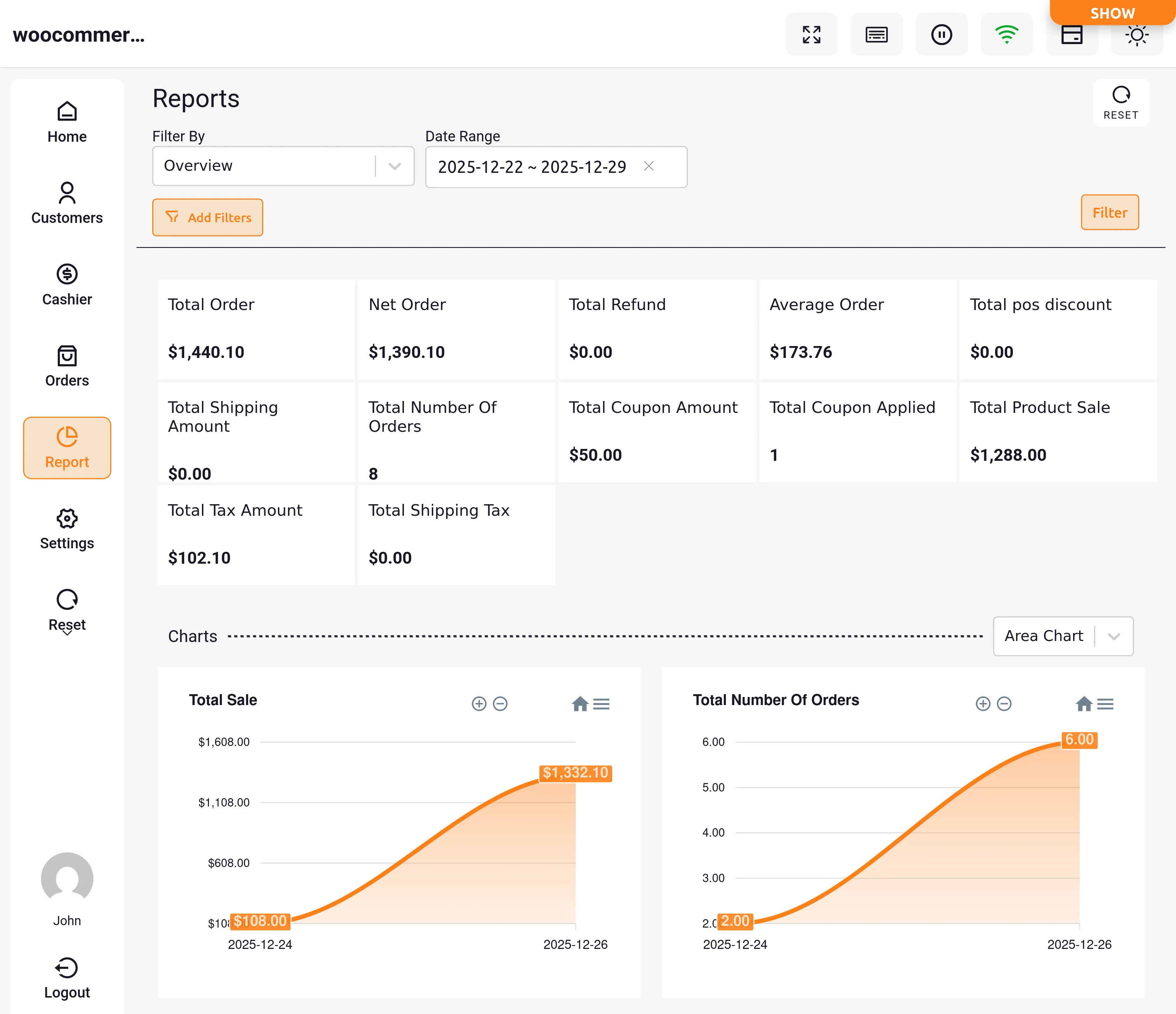
Admin can view comprehensive POS Reports for specific time durations (yearly, monthly, weekly) or custom durations to analyze business performance.

Accessing Sales Reports

Admin Access:

  • Navigate to Point of Sale > Reports
  • Select report type (Sales, Customer, Stock)
  • Choose date range and filters

Sales Agent Access:

  • POS Reports at sales agent end: Helps sales agent analyze sales made with reports represented by line and bar charts
  • Performance analysis: Sales agent can analyze store reports directly through POS end
  • Access through POS panel menu

Available Sales Metrics

Key Performance Indicators:

The following metrics are available with help of charts:

  • Gross Revenue: Total sales before deductions
  • Net Revenue: Sales after refunds and discounts
  • Orders: Total number of orders
  • Average Order Value: Average transaction amount
  • Items Sold: Total products sold
  • Refunds: Total refund amount
  • Discounted Orders: Orders with discounts applied
  • Gross Discount: Total discount amount given
  • Total Tax: All taxes collected
  • Order Tax: Taxes on orders
  • Cash Payments: Cash transaction totals
  • Other Payment Reports: Non-cash payment methods

Time Duration Selection

Preset Time Periods:

Admin can choose to view reports for particular period:

  1. Yearly: Full year overview
  2. Monthly: Month-by-month breakdown
  3. Weekly: Week-by-week analysis
  4. Daily: Day-by-day details

Custom Date Range

Selecting Custom Dates:

Custom Date Range Option:

  • Sales agent can select Custom Date Range option to specify which dates included to view reports
  • Custom date range selection for desired date range reports
  • Flexible reporting periods

Using the Date Picker:

  1. Manual Entry: Manually enter start and end date using input fields
  2. Calendar Selection: Use calendar to pick dates visually
  3. Quick Ranges: Select from preset ranges
  4. Update Button: Click after choosing preset or custom date range to modify data in report

Custom Date Features:

  • Date Range option: Sales agent can specify for which dates included to view reports
  • No limitations on date range length
  • Historical data access

Report Filtering

Available Filters:

Sales agent can filter out reports based on requirements:

  • By Product: Filter by product name
  • By Category: Filter by product category
  • By Review: Filter by customer reviews
  • By Orders: Filter by order status
  • By Coupon: Filter by coupon usage
  • By Amount: Filter by order total or product amount

Filter Options Detail:

Filter reports depending on requirement:

  • Product name
  • Coupon amount
  • Order total
  • Order status
  • Product amount
  • Payment method

Report Display Features

Data Presentation:

  • Date range and outlet wise details shown in reports
  • Outlet-specific filtering
  • Multi-outlet comparison
  • Combined outlet reports

Transaction Summary:

Includes:

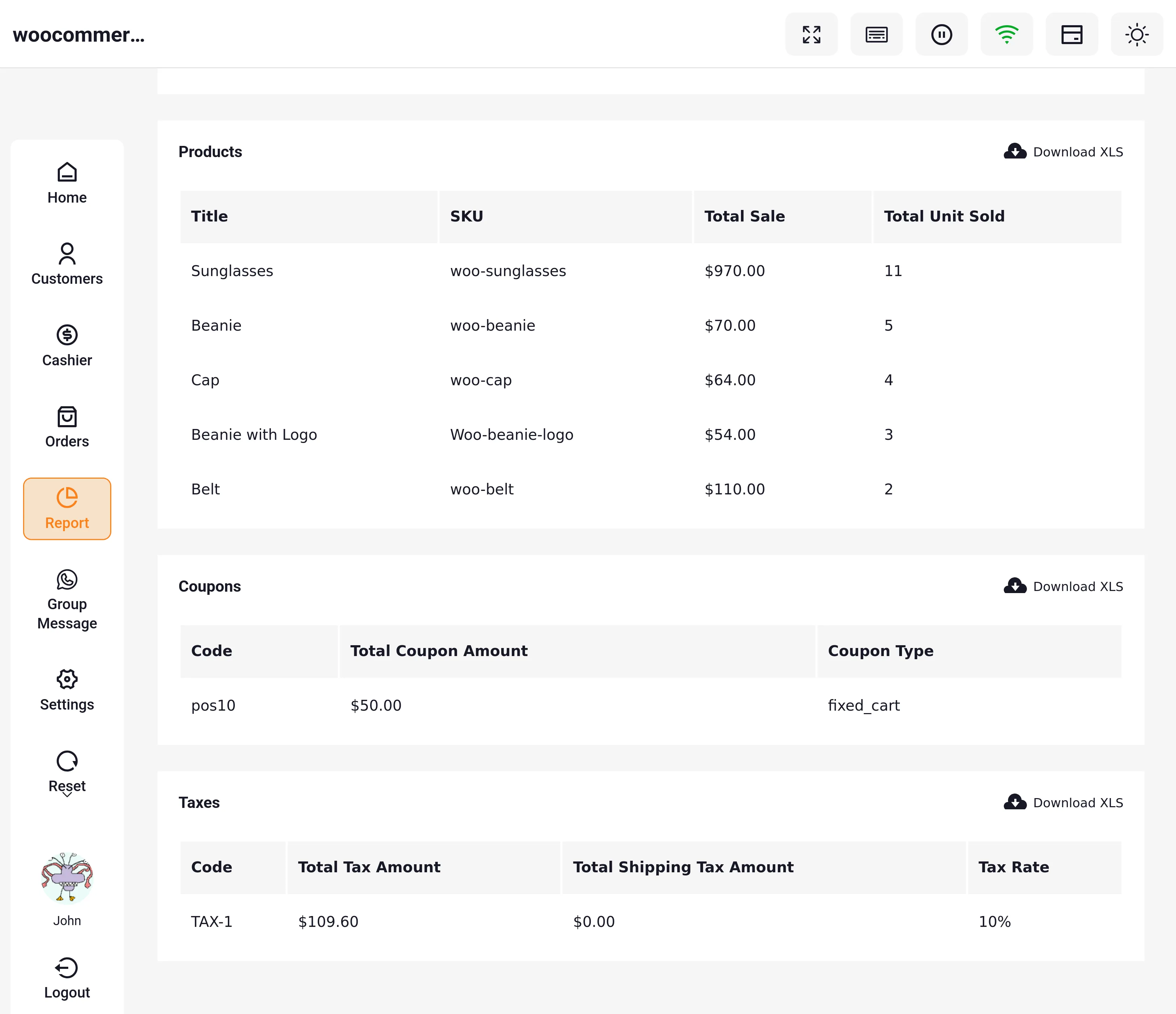
  • Total order count
  • Net order value
  • Average order value
  • Total refund amount
  • Discount totals
  • Tax breakdowns

Chart Visualization

Chart Types Available:

Three chart types available for data visualization:

  1. Area Charts: Show trends over time with filled areas
  2. Line Charts: Display trends with connected lines
  3. Bar Charts: Compare values with vertical bars

Charts Available For:

  • Gross Revenue: Total sales trends
  • Net Sale: Revenue after deductions
  • Total Number of Orders: Order volume trends
  • Total Number of Products: Products sold over time

Chart Features:

  • Interactive hover tooltips
  • Zoom and pan capabilities
  • Export chart images
  • Print-friendly views

Customer Reports

Overview

Comprehensive customer analytics to understand customer behavior and preferences.

Accessing Customer Reports

Navigation:

  • In Customer section: Admin can view list of customers
  • Customer reports: Available in report section
  • Admin can view customer reports along with order and stock reports

Customer List Views

Outlet Filtering:

  • View customers of all outlets
  • Filter for selected outlet
  • Multi-outlet customer analysis

Customer Metrics

Available Data:

  • Total customers
  • New customers (by period)
  • Returning customers
  • Customer purchase frequency
  • Average customer value
  • Customer lifetime value

Customer Segmentation:

  • By purchase history
  • By location (outlet)
  • By spending level
  • By visit frequency

Customer Analysis

Key Insights:

  • Top customers by revenue
  • Customer retention rates
  • Purchase patterns
  • Preferred payment methods
  • Average order value per customer

Accessing Stock Reports

Navigation:

  • Stock report section: Admin can view order, customer, and stock reports
  • Navigate to Point of Sale > Reports > Stock
  • Filter by outlet or view all outlets

Low Stock Warning Configuration

Setting Thresholds:

  • Low stock warnings: Quantity For Low Stock Warning setting for maximum quantity to show warnings
  • Set per product or globally
  • Configure alert levels
  • Automated notifications


Reports

Prev
WooCommerce POS - Custom Product
Next
POS Agent Guide