
WooCommerce POS DocumentationWooCommerce POS Documentation
Buy Now
View Demo
  • WooCommerce POS

    • Point Of Sale
    • Overview
    • Features
    • Installation
    • Admin Configuration
    • Outlets & Users
    • Reports
    • POS Agent Guide
    • Products & Inventory
    • Hardware Support
    • Paymemt Terminal
    • Paymemt Terminal Integration
    • Cash Drawer
    • Multisite Compatibility
    • Orders & Drawers
    • Hold Cart
    • WhatsApp Notification
    • Dynamic Theme
    • Cash Management
    • Custom Products
    • Desktop & Mobile
    • FAQ & Notes
  • Core POS System

    • WooCommerce POS Outlet Manager
    • WooCommerce POS Warehouse Management
  • Mobile Apps

    • WooCommerce Flutter Native POS Mobile App
  • Printer Integrations

    • WooCommerce POS Cloud Printer
  • Payment Terminal Integrations

    • WooCommerce Stripe POS Terminal Connector
    • WooCommerce POS Square Payment Terminal Plugin
    • WooCommerce POS PayPal Terminal Reader
    • WooCommerce POS Linkly Terminal Connector
    • WooCommerce POS Stripe Reader M2 Integration
  • Order & Transaction Management

    • POS Order Return & Exchange for WooCommerce
    • WooCommerce POS Partial Payment Plugin
    • POS Booking Reservation Plugin for WooCommerce
    • WooCommerce POS Multicurrency
  • Customer & Loyalty Features

    • WooCommerce & POS Loyalty Management
    • WooCommerce POS Gift Card Plugin
    • WooCommerce POS Happy Hours
    • WooCommerce POS Complimentary Goods
  • Hardware & Barcode Solutions

    • WooCommerce POS Configurable Barcode
    • WooCommerce POS Barcode RFGun
    • WooCommerce POS RFID Card Add-on
    • WooCommerce POS Cloud Printer Add-on
  • Customer Interface & Kiosk

    • WooCommerce POS Customer Kiosk Checkout
    • WooCommerce POS Customer Cart Screen
    • WooCommerce POS QR Code Ordering System
  • Industry-Specific Solutions

    • WooCommerce Restaurant Kitchen POS
    • Delivery Management Addon for WooCommerce POS
  • Advanced Features

    • POS AI Reporting for WooCommerce
Buy Now
View Demo
  • WooCommerce POS

    • Point Of Sale
    • Overview
    • Features
    • Installation
    • Admin Configuration
    • Outlets & Users
    • Reports
    • POS Agent Guide
    • Products & Inventory
    • Hardware Support
    • Paymemt Terminal
    • Paymemt Terminal Integration
    • Cash Drawer
    • Multisite Compatibility
    • Orders & Drawers
    • Hold Cart
    • WhatsApp Notification
    • Dynamic Theme
    • Cash Management
    • Custom Products
    • Desktop & Mobile
    • FAQ & Notes
  • Core POS System

    • WooCommerce POS Outlet Manager
    • WooCommerce POS Warehouse Management
  • Mobile Apps

    • WooCommerce Flutter Native POS Mobile App
  • Printer Integrations

    • WooCommerce POS Cloud Printer
  • Payment Terminal Integrations

    • WooCommerce Stripe POS Terminal Connector
    • WooCommerce POS Square Payment Terminal Plugin
    • WooCommerce POS PayPal Terminal Reader
    • WooCommerce POS Linkly Terminal Connector
    • WooCommerce POS Stripe Reader M2 Integration
  • Order & Transaction Management

    • POS Order Return & Exchange for WooCommerce
    • WooCommerce POS Partial Payment Plugin
    • POS Booking Reservation Plugin for WooCommerce
    • WooCommerce POS Multicurrency
  • Customer & Loyalty Features

    • WooCommerce & POS Loyalty Management
    • WooCommerce POS Gift Card Plugin
    • WooCommerce POS Happy Hours
    • WooCommerce POS Complimentary Goods
  • Hardware & Barcode Solutions

    • WooCommerce POS Configurable Barcode
    • WooCommerce POS Barcode RFGun
    • WooCommerce POS RFID Card Add-on
    • WooCommerce POS Cloud Printer Add-on
  • Customer Interface & Kiosk

    • WooCommerce POS Customer Kiosk Checkout
    • WooCommerce POS Customer Cart Screen
    • WooCommerce POS QR Code Ordering System
  • Industry-Specific Solutions

    • WooCommerce Restaurant Kitchen POS
    • Delivery Management Addon for WooCommerce POS
  • Advanced Features

    • POS AI Reporting for WooCommerce
  • WooCommerce POS

    • WooCommerce Point of Sale (POS)
    • Overview
    • Features
    • Installation
    • Admin Configuration
    • Outlets & POS Users
    • WooCommerce Point of Sale – Products & Inventory Management
    • WooCommerce POS - Hardware Support
    • WooCommerce POS – Payment Methods & Checkout Configuration
    • WooCommerce POS – Payment Terminal Integration
    • WooCommerce POS – Cash Drawer & Cashier Management
    • WooCommerce POS - Multisite Compatibility
    • Orders & Cash Drawer
    • WooCommerce POS - Hold Cart
    • WhatsApp Notifications in WooCommerce Point of Sale
    • Dynamic Theme in WooCommerce Point of Sale
    • WooCommerce POS - Cashier Management
    • WooCommerce POS - Custom Product
    • Reports & Analytics
    • POS Agent Guide
    • Desktop & Mobile POS
    • FAQ & Notes

Overview of WooCommerce Point of Sale

What is WooCommerce POS?

WooCommerce Point of Sale (POS) is a specialized extension that transforms your WooCommerce store into a complete omnichannel retail solution. It enables store owners to manage both online and physical store operations from a single, unified platform. The system provides a modern, React-based POS interface for in-person transactions that seamlessly synchronizes with your WooCommerce backend.
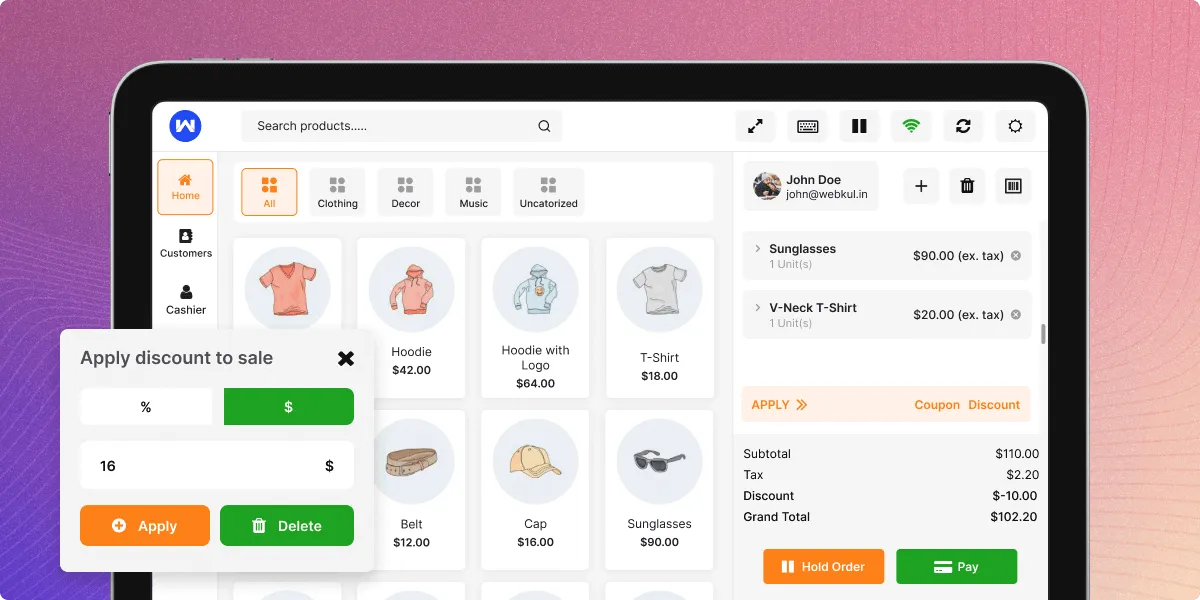

POS Dashboard

Who is it for?

This solution is ideal for:

  • Brick-and-mortar retailers expanding online with WooCommerce
  • Online store owners opening physical retail locations
  • Multi-location businesses needing centralized inventory control
  • Store managers and administrators overseeing hybrid sales channels
  • POS agents/cashiers handling in-person transactions
  • Businesses seeking to unify online and offline customer experiences

Benefits for Store Owners

Unified Sales Management

  • Manage online and physical store sales from one dashboard
  • Real-time inventory synchronization across all channels
  • Consistent pricing and product information

Centralized Control

  • Single admin panel for all outlets and agents
  • Master stock management for bulk inventory control
  • Comprehensive reporting for all sales channels

Increased Sales Opportunities

  • Serve customers both online and in-person
  • Process transactions offline with automatic sync
  • Multiple payment methods including split payments

Operational Efficiency

  • Fast, modern POS interface for quick transactions
  • Barcode scanning for rapid product lookup
  • Hold cart functionality for interrupted sales
  • Keyboard shortcuts for experienced users

Flexible Access

  • Web-based POS accessible from any browser
  • Desktop application for dedicated systems
  • Mobile PWA for tablets and handheld devices
  • Works both online and offline

System Requirements

Minimum Hardware Requirements

  • Screen Resolution: 1280×800 pixels or higher
  • Screen Size: Minimum 7.5-inch display

Devices Supported:

  • Desktop PCs and Laptops
  • Mac Computers
  • iPads and Tablets
  • Compatible with barcode scanners and cash drawers

Software Requirements

  • Modern web browser (Chrome, Firefox, Safari, Edge)
  • For PWA features: Chrome 70+ or equivalent
  • For WhatsApp features: Twilio API credentials
  • For thermal printing: Compatible printer drivers

Recommended Setup

  • Stable internet connection for initial sync
  • Barcode scanner for efficient product lookup
  • Thermal printer for receipts
  • Cash drawer for cash management
  • Touchscreen device for optimal POS experience

WordPress & WooCommerce Compatibility

Current Version Compatibility

ComponentMinimum VersionTested Up To
WordPress5.06.8.3
WooCommerce4.010.2.2
PHP7.48.0+

Required WooCommerce Settings

  • WooCommerce installed and activated
  • Products configured (Simple and Variable types only)
  • Payment gateways configured (for online sync)
  • Shipping methods set up (if required)

Server Requirements

  • PHP Memory Limit: 256MB minimum (512MB recommended)
  • MySQL: 5.6+ or MariaDB 10.1+
  • WordPress Permalinks: Must be set (not Plain)
  • SSL Certificate: Recommended for secure transactions
Prev
WooCommerce Point of Sale (POS)
Next
Features