Advance Import and Export for WooCommerce DocumentationAdvance Import and Export for WooCommerce Documentation
Buy Now
View Demo
  • Getting Started

    • Introduction
    • Quick Start
    • Features
    • Installation
    • First-Time Setup
    • CSV Preparation
    • Sample Files
    • Use Cases
    • Common Mistakes
  • Tutorials

    • Google Sheets Live Sync
    • Shopify Migration
    • Daily Backup to S3
    • Multi-Store Sync
  • Using the Plugin

    • Dashboard
    • Quick Import Wizard
    • Quick Export
    • Settings
    • Compatibility
  • Import In Detail

    • Import Sources
    • Import Modes
    • Column Mapping
    • Transformations
    • Migration Presets
    • Delta Import
  • Export In Detail

    • Export Features
    • Export Destinations
    • Browser Download
    • Server Path (REST / CLI)
  • Data Types

    • Products
    • Variable Products
    • Orders
    • Customers
    • Categories & Tags
    • Coupons
    • Reviews
    • Posts
    • Pages
    • Users
    • Subscriptions
    • Bookings
    • Memberships
    • Menus
  • Automation

    • Scheduled Jobs
    • History & Logs
    • Rollback
    • Health Check
  • Cloud Service Setup

    • Google API Setup
    • Amazon S3 Setup
    • Dropbox Setup
    • Email / SMTP Setup
  • Server Configuration

    • PHP Configuration
    • Server Cron Setup
    • Image Handling
  • Developer

    • REST API
    • WP-CLI Commands
  • Compare

    • vs WP All Import
    • vs Product Import Export (WebToffee)
  • Help

    • Troubleshooting
    • FAQ
    • Glossary
    • Security
    • Changelog
Support
Buy Now
View Demo
  • Getting Started

    • Introduction
    • Quick Start
    • Features
    • Installation
    • First-Time Setup
    • CSV Preparation
    • Sample Files
    • Use Cases
    • Common Mistakes
  • Tutorials

    • Google Sheets Live Sync
    • Shopify Migration
    • Daily Backup to S3
    • Multi-Store Sync
  • Using the Plugin

    • Dashboard
    • Quick Import Wizard
    • Quick Export
    • Settings
    • Compatibility
  • Import In Detail

    • Import Sources
    • Import Modes
    • Column Mapping
    • Transformations
    • Migration Presets
    • Delta Import
  • Export In Detail

    • Export Features
    • Export Destinations
    • Browser Download
    • Server Path (REST / CLI)
  • Data Types

    • Products
    • Variable Products
    • Orders
    • Customers
    • Categories & Tags
    • Coupons
    • Reviews
    • Posts
    • Pages
    • Users
    • Subscriptions
    • Bookings
    • Memberships
    • Menus
  • Automation

    • Scheduled Jobs
    • History & Logs
    • Rollback
    • Health Check
  • Cloud Service Setup

    • Google API Setup
    • Amazon S3 Setup
    • Dropbox Setup
    • Email / SMTP Setup
  • Server Configuration

    • PHP Configuration
    • Server Cron Setup
    • Image Handling
  • Developer

    • REST API
    • WP-CLI Commands
  • Compare

    • vs WP All Import
    • vs Product Import Export (WebToffee)
  • Help

    • Troubleshooting
    • FAQ
    • Glossary
    • Security
    • Changelog
Support
  • Getting Started

    • Introduction
    • Quick Start — Your First Import in 5 Minutes
    • Features — Full Tour
    • Installation — Full Setup Guide
    • First-Time Setup — Complete Checklist
    • CSV Preparation — How to Make a Good Import File
    • Sample Files — Download Ready-to-Use Templates
    • Use Cases — "I Want To..." Quick Reference
    • Common Mistakes — Things To Watch Out For
  • Tutorials

    • Tutorial — Google Sheets Live Sync
    • Tutorial — Migrate from Shopify to WooCommerce
    • Tutorial — Daily Backup to Amazon S3
    • Tutorial — Sync Between Two WooCommerce Stores
  • Using the Plugin

    • Dashboard — What You See First
    • Quick Import Wizard — 5 Steps to Import Any File
    • Quick Export — One-Page Export Tool
    • Settings — Every Option Explained
    • Compatibility — Third-Party Plugin Support
  • Import In Detail

    • Import Sources — 11 Ways to Pull Data In
    • Import Modes — Create, Update, Delete, Replace
    • Column Mapping — Connect Your Columns to WooCommerce
    • Transformations — Change Values During Import
    • Migration Presets — Move From Shopify, Magento, BigCommerce
    • Delta Import — Skip Unchanged Rows
  • Export In Detail

    • Export Features
    • Export Destinations — Where Your Files Go
    • Export Download — One-Click Browser Download
    • Export to Server Path — WP-CLI
  • Data Types

    • Products Import — Full Field Reference
    • Variable Products — The Complete Guide
    • Orders Import — Historical Orders and Line Items
    • Customers Import — With Addresses and Notes
    • Categories and Tags Import
    • Coupons Import — Discount Codes
    • Reviews Import — Product Reviews and Ratings
    • Posts Import — WordPress Blog Posts
    • Pages Import — WordPress Pages
    • Users Import — WordPress User Accounts
    • Subscriptions Import — WooCommerce Subscriptions
    • Bookings Import — WooCommerce Bookings
    • Memberships Import — WooCommerce Memberships
    • Menus Import — WordPress Navigation Menus
  • Automation

    • Jobs — Saved and Scheduled Imports and Exports
    • History — Every Run You Have Ever Done
    • Rollback — Undo Any Import in One Click
    • Health Check — Data Integrity Checks With Auto-Fix
  • Cloud Service Setup

    • Google API Setup — Sheets, Drive, OAuth
    • Amazon S3 Setup — IAM User and Bucket Permissions
    • Dropbox Setup — API Token for Private Files
    • Email Setup — Making Notifications Actually Work
  • Server Configuration

    • PHP Configuration — Memory, Execution Time, Upload Size
    • Server Cron Setup — Reliable Scheduled Imports
    • Image Handling — Download, Resize, Watermark
  • Developer

    • REST API — Developer Reference
    • WP-CLI Commands — Command Line Automation
  • Compare

    • Advance Import and Export vs WP All Import
    • Advance Import and Export vs Product Import Export for WooCommerce
  • Help

    • Troubleshooting — Fix Common Problems
    • FAQ — Common Questions
    • Glossary — Every Term Explained
    • Security — How Your Data Is Protected
    • Changelog — What Changed

Categories and Tags Import

Import product categories (with parent-child hierarchy), tags, and attributes.
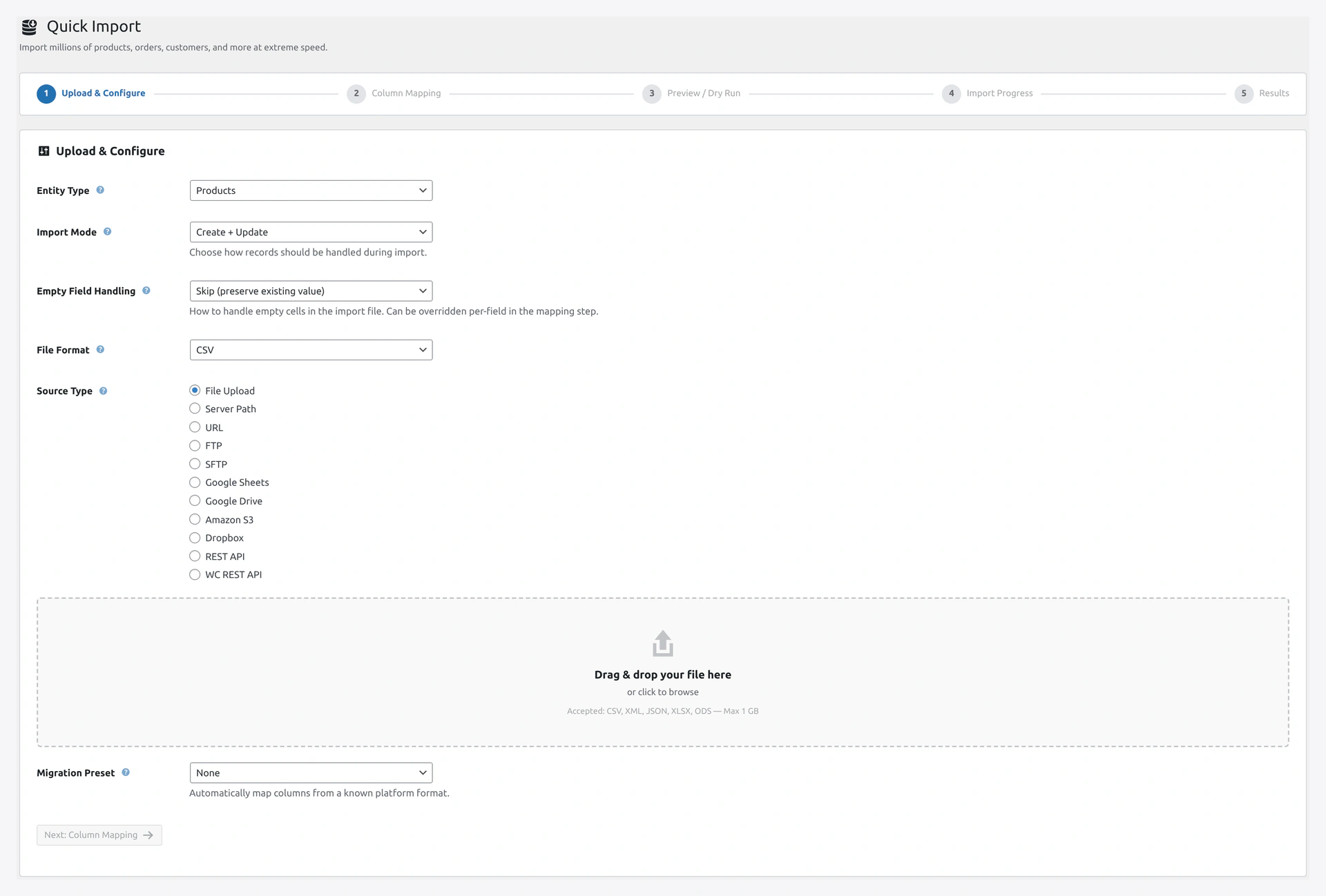
Quick Import wizard step 1 — upload and configureStep 1 of the Quick Import wizard: select Categories, Tags, or Attributes and upload your taxonomy file.

Three Related Entity Types

EntityWhat It Is
CategoriesProduct categories (hierarchical, e.g., Clothing > Men's > Shirts)
TagsProduct tags (flat, e.g., summer, cotton, sale)
AttributesAttribute definitions (Color, Size, Material) and their values (Red, Small, Cotton)

Categories

Column Reference

ColumnRequiredExample
NameYesMen's T-Shirts
SlugNomens-t-shirts
DescriptionNoPremium men's t-shirts
ParentNoMen's (parent name) or 42 (parent ID)
Image URLNohttps://example.com/mens-tshirts.jpg
Display TypeNodefault, products, subcategories, both
Sort OrderNo1, 2, 3

Full Path in One Column

Instead of using a Parent column, use the full path:

Name
Clothing > Men's > T-Shirts
Clothing > Men's > Pants
Clothing > Women's > Dresses

Plugin creates all parent categories automatically.

Change the Separator

Default is >. Change in wizard → Step 2 → Separators.

Auto-Create Missing Parents

If you import Clothing > Men's > T-Shirts but Clothing and Men's do not exist yet, the plugin creates them automatically.

You never need to create parents first.

Tags

Tags are flat. No hierarchy.

Column Reference

ColumnRequiredExample
NameYessummer
SlugNosummer-collection
DescriptionNoSummer 2026 collection

Multiple Tags per Product

When importing products, use a comma-separated list:

SKU,Name,Tags
WK-001,Cotton Tee,"cotton, summer, casual"
WK-002,Denim Jeans,"denim, casual, men"

Tags that do not exist are auto-created.

Attributes

Attributes are more complex. They have:

  • Name (e.g., Color)
  • Slug (e.g., pa_color)
  • Terms (the actual values: Red, Blue, Green)

Creating Attributes

Create the attribute first, then add terms.

Attribute Import File

Name,Slug,Type,Order By,Has Archives
Color,pa_color,select,menu_order,1
Size,pa_size,select,menu_order,1
Material,pa_material,text,name,0

Attribute Term Import

Attribute,Term Name,Term Slug,Description
Color,Red,red,Bright red
Color,Blue,blue,Ocean blue
Size,Small,s,
Size,Medium,m,
Size,Large,l,

Attribute Types

TypeDescription
selectDropdown
textFree text

Order By

ValueWhat It Does
menu_orderUse the sort order you set
nameAlphabetical by name
name_numAlphabetical, treating numbers as numbers
idOrder by creation date

Has Archives

Set to 1 if you want a page like /pa_color/red/ showing all red products.
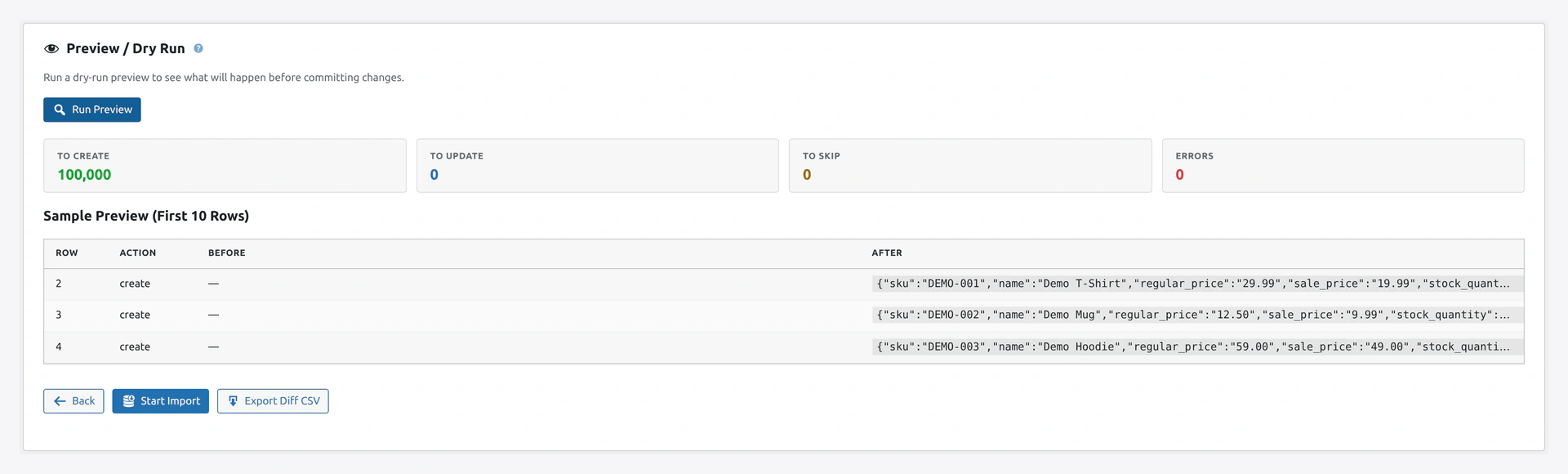
Wizard step 3 — dry run preview with sample rows and create/update countsThe dry run shows exactly which parent categories will be auto-created, which existing terms will be updated, and which rows would error.

Category Images

Upload via URL

Name,Image URL
Men's Shirts,https://example.com/mens-shirts.jpg
Women's Dresses,https://example.com/womens-dresses.jpg

Plugin downloads and attaches the image.

Re-use Media Library

If the image is already in your Media Library, use the attachment URL.

Display Types

TypeExample
defaultShow both products and subcategories
productsShow only products
subcategoriesShow only subcategory tiles
bothShow subcategories first, then products

Custom Taxonomy Fields

For ACF, Yoast, or custom meta on categories:

Name,Meta: category_banner,_yoast_wpseo_title
Men's Shirts,https://example.com/banner.jpg,Men's Shirts - Shop Now

Sort Order

Set the order of categories in menus and product lists:

Name,Sort Order
Men's,1
Women's,2
Kids,3
Sale,4

Lower numbers appear first.

Updating Existing Categories

Use Match Key = Slug or Name in Update Only mode.

Name,Description
Men's T-Shirts,Updated description for the men's tees category

Troubleshooting

ProblemFix
Categories created at top level instead of nestedCheck your separator in Step 2 (default is >)
Duplicate categories createdSlug matching is case-sensitive. Use Update mode with Slug match key
Images did not downloadCheck Settings → Image handling → Download Images is on
Tags not applied to productsTags must be imported first, OR tags auto-create must be on in Step 3
Attribute term not showingAttribute must exist first. Import attributes, then terms

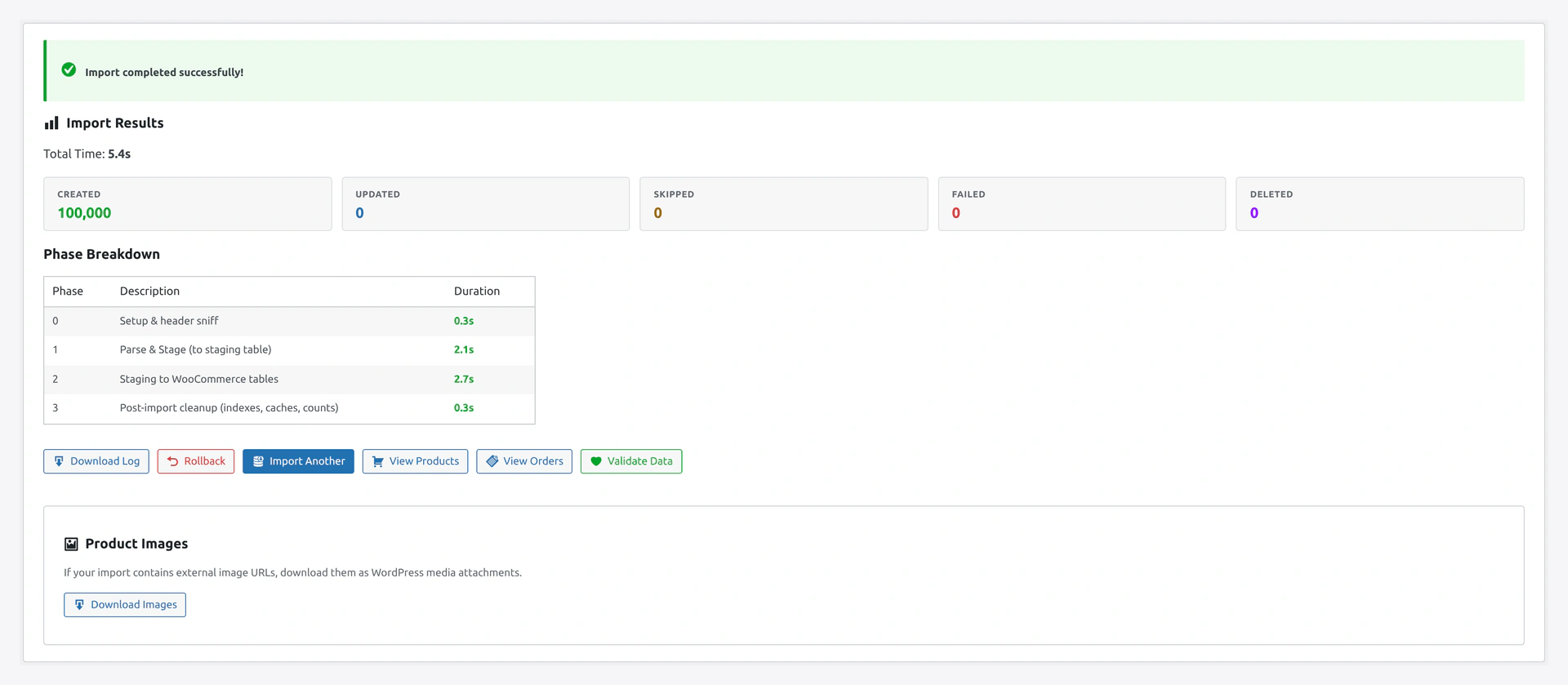
Wizard step 5 — import results summaryResults screen confirms how many categories, tags, or attribute terms were created or updated — and surfaces any slug conflicts to resolve.

Related Pages

  • Products Import — Assign categories to products
  • Column Mapping — Map custom columns
  • Import Modes — Create vs Update
Prev
Customers Import — With Addresses and Notes
Next
Coupons Import — Discount Codes