Advance Import and Export for WooCommerce DocumentationAdvance Import and Export for WooCommerce Documentation
Buy Now
View Demo
  • Getting Started

    • Introduction
    • Quick Start
    • Features
    • Installation
    • First-Time Setup
    • CSV Preparation
    • Sample Files
    • Use Cases
    • Common Mistakes
  • Tutorials

    • Google Sheets Live Sync
    • Shopify Migration
    • Daily Backup to S3
    • Multi-Store Sync
  • Using the Plugin

    • Dashboard
    • Quick Import Wizard
    • Quick Export
    • Settings
    • Compatibility
  • Import In Detail

    • Import Sources
    • Import Modes
    • Column Mapping
    • Transformations
    • Migration Presets
    • Delta Import
  • Export In Detail

    • Export Features
    • Export Destinations
    • Browser Download
    • Server Path (REST / CLI)
  • Data Types

    • Products
    • Variable Products
    • Orders
    • Customers
    • Categories & Tags
    • Coupons
    • Reviews
    • Posts
    • Pages
    • Users
    • Subscriptions
    • Bookings
    • Memberships
    • Menus
  • Automation

    • Scheduled Jobs
    • History & Logs
    • Rollback
    • Health Check
  • Cloud Service Setup

    • Google API Setup
    • Amazon S3 Setup
    • Dropbox Setup
    • Email / SMTP Setup
  • Server Configuration

    • PHP Configuration
    • Server Cron Setup
    • Image Handling
  • Developer

    • REST API
    • WP-CLI Commands
  • Compare

    • vs WP All Import
    • vs Product Import Export (WebToffee)
  • Help

    • Troubleshooting
    • FAQ
    • Glossary
    • Security
    • Changelog
Support
Buy Now
View Demo
  • Getting Started

    • Introduction
    • Quick Start
    • Features
    • Installation
    • First-Time Setup
    • CSV Preparation
    • Sample Files
    • Use Cases
    • Common Mistakes
  • Tutorials

    • Google Sheets Live Sync
    • Shopify Migration
    • Daily Backup to S3
    • Multi-Store Sync
  • Using the Plugin

    • Dashboard
    • Quick Import Wizard
    • Quick Export
    • Settings
    • Compatibility
  • Import In Detail

    • Import Sources
    • Import Modes
    • Column Mapping
    • Transformations
    • Migration Presets
    • Delta Import
  • Export In Detail

    • Export Features
    • Export Destinations
    • Browser Download
    • Server Path (REST / CLI)
  • Data Types

    • Products
    • Variable Products
    • Orders
    • Customers
    • Categories & Tags
    • Coupons
    • Reviews
    • Posts
    • Pages
    • Users
    • Subscriptions
    • Bookings
    • Memberships
    • Menus
  • Automation

    • Scheduled Jobs
    • History & Logs
    • Rollback
    • Health Check
  • Cloud Service Setup

    • Google API Setup
    • Amazon S3 Setup
    • Dropbox Setup
    • Email / SMTP Setup
  • Server Configuration

    • PHP Configuration
    • Server Cron Setup
    • Image Handling
  • Developer

    • REST API
    • WP-CLI Commands
  • Compare

    • vs WP All Import
    • vs Product Import Export (WebToffee)
  • Help

    • Troubleshooting
    • FAQ
    • Glossary
    • Security
    • Changelog
Support
  • Getting Started

    • Introduction
    • Quick Start — Your First Import in 5 Minutes
    • Features — Full Tour
    • Installation — Full Setup Guide
    • First-Time Setup — Complete Checklist
    • CSV Preparation — How to Make a Good Import File
    • Sample Files — Download Ready-to-Use Templates
    • Use Cases — "I Want To..." Quick Reference
    • Common Mistakes — Things To Watch Out For
  • Tutorials

    • Tutorial — Google Sheets Live Sync
    • Tutorial — Migrate from Shopify to WooCommerce
    • Tutorial — Daily Backup to Amazon S3
    • Tutorial — Sync Between Two WooCommerce Stores
  • Using the Plugin

    • Dashboard — What You See First
    • Quick Import Wizard — 5 Steps to Import Any File
    • Quick Export — One-Page Export Tool
    • Settings — Every Option Explained
    • Compatibility — Third-Party Plugin Support
  • Import In Detail

    • Import Sources — 11 Ways to Pull Data In
    • Import Modes — Create, Update, Delete, Replace
    • Column Mapping — Connect Your Columns to WooCommerce
    • Transformations — Change Values During Import
    • Migration Presets — Move From Shopify, Magento, BigCommerce
    • Delta Import — Skip Unchanged Rows
  • Export In Detail

    • Export Features
    • Export Destinations — Where Your Files Go
    • Export Download — One-Click Browser Download
    • Export to Server Path — WP-CLI
  • Data Types

    • Products Import — Full Field Reference
    • Variable Products — The Complete Guide
    • Orders Import — Historical Orders and Line Items
    • Customers Import — With Addresses and Notes
    • Categories and Tags Import
    • Coupons Import — Discount Codes
    • Reviews Import — Product Reviews and Ratings
    • Posts Import — WordPress Blog Posts
    • Pages Import — WordPress Pages
    • Users Import — WordPress User Accounts
    • Subscriptions Import — WooCommerce Subscriptions
    • Bookings Import — WooCommerce Bookings
    • Memberships Import — WooCommerce Memberships
    • Menus Import — WordPress Navigation Menus
  • Automation

    • Jobs — Saved and Scheduled Imports and Exports
    • History — Every Run You Have Ever Done
    • Rollback — Undo Any Import in One Click
    • Health Check — Data Integrity Checks With Auto-Fix
  • Cloud Service Setup

    • Google API Setup — Sheets, Drive, OAuth
    • Amazon S3 Setup — IAM User and Bucket Permissions
    • Dropbox Setup — API Token for Private Files
    • Email Setup — Making Notifications Actually Work
  • Server Configuration

    • PHP Configuration — Memory, Execution Time, Upload Size
    • Server Cron Setup — Reliable Scheduled Imports
    • Image Handling — Download, Resize, Watermark
  • Developer

    • REST API — Developer Reference
    • WP-CLI Commands — Command Line Automation
  • Compare

    • Advance Import and Export vs WP All Import
    • Advance Import and Export vs Product Import Export for WooCommerce
  • Help

    • Troubleshooting — Fix Common Problems
    • FAQ — Common Questions
    • Glossary — Every Term Explained
    • Security — How Your Data Is Protected
    • Changelog — What Changed

Use Cases — I Want To...

Pick your goal. Jump to the right page.
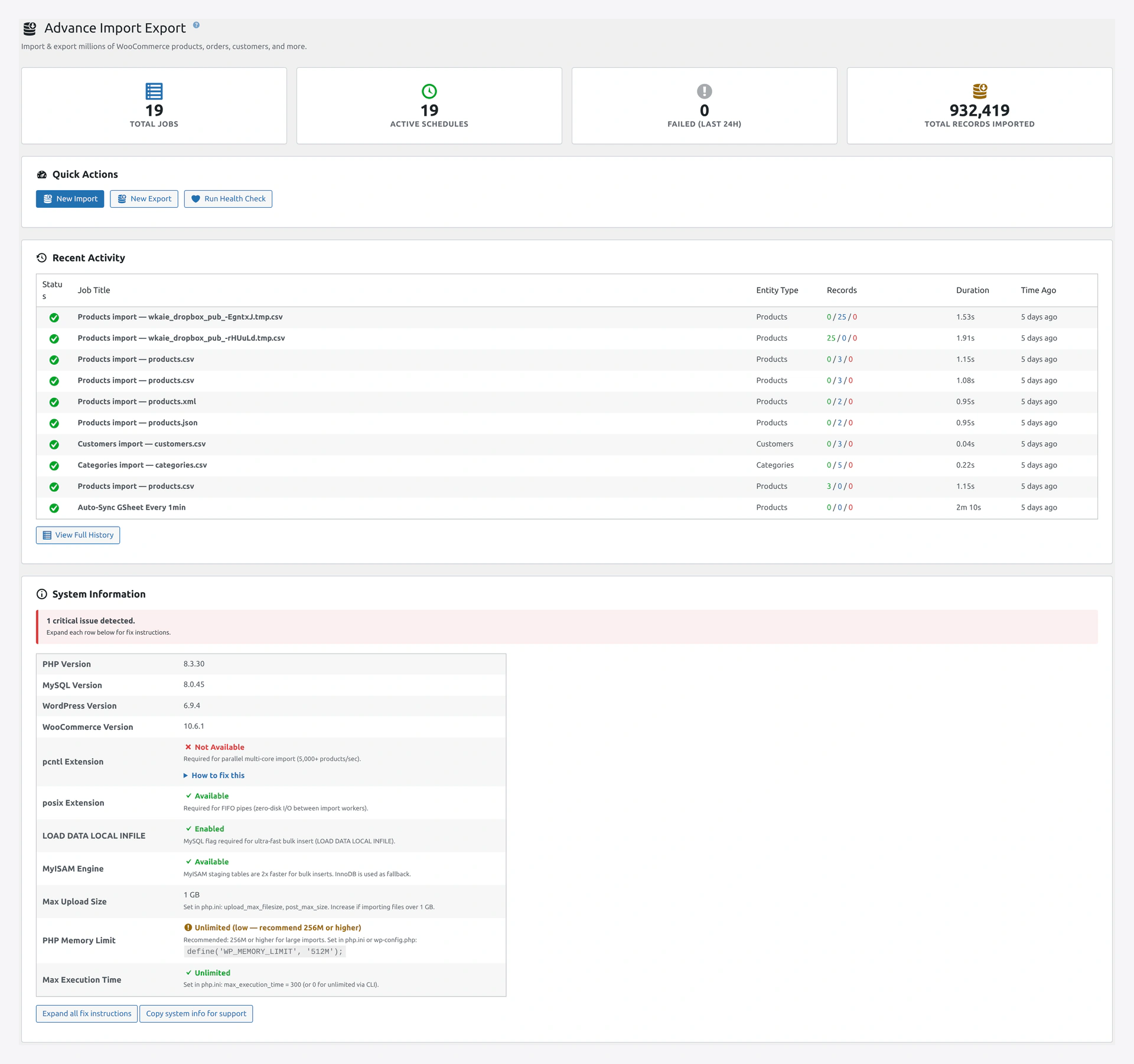
Dashboard top with quick actionsMost tasks start from the Dashboard — stat cards and Quick Action tiles jump you straight to Import, Export, Jobs, or Health Check.

Moving Data In (Import)

I Want To...

TaskGo to
Upload products from a spreadsheetQuick Import Wizard → File Upload
Update all my prices in one goQuick Import Wizard → Update Only mode
Import only products that changedDelta Import
Import orders from another platformOrders Import
Import customers from a CRMCustomers Import
Import reviews from Trustpilot / YotpoReviews Import
Import 1 million productsProducts Import + PHP Configuration
Use a CSV with strange columnsColumn Mapping
Change "rouge" to "red" during importTransformations
Add 20% markup during importTransformations → Price Rules

Moving Data Out (Export)

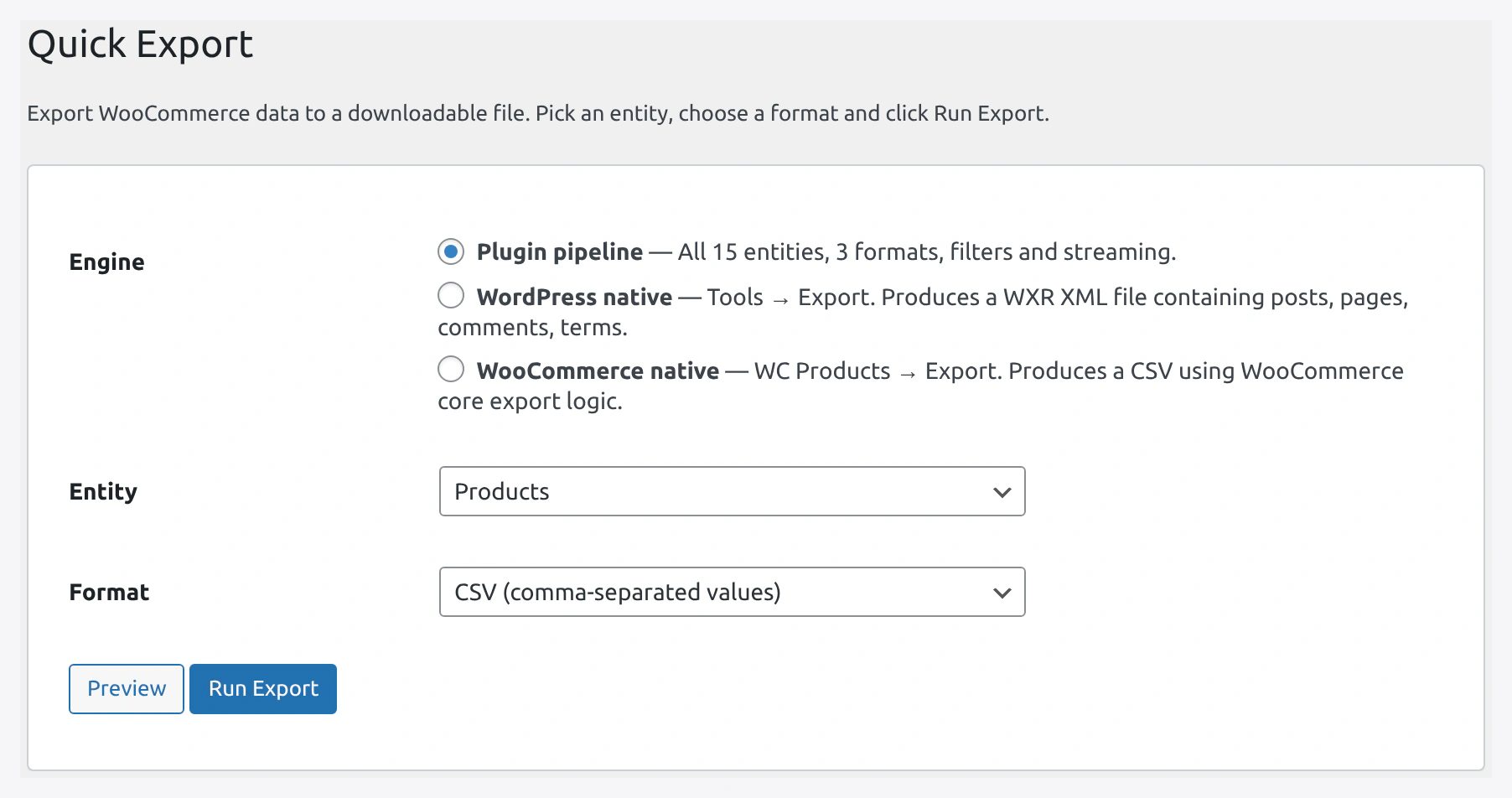
Quick Export pageQuick Export — pick entity, format, filters, and destination in one screen.

I Want To...

TaskGo to
Download all my products as CSVQuick Export
Export orders from last monthQuick Export + filters
Back up the whole store dailyTutorial: Daily Backup
Export to an absolute server pathExport Server Path
Hand off file to rsync / S3 cronExport Server Path

Sync With Other Platforms

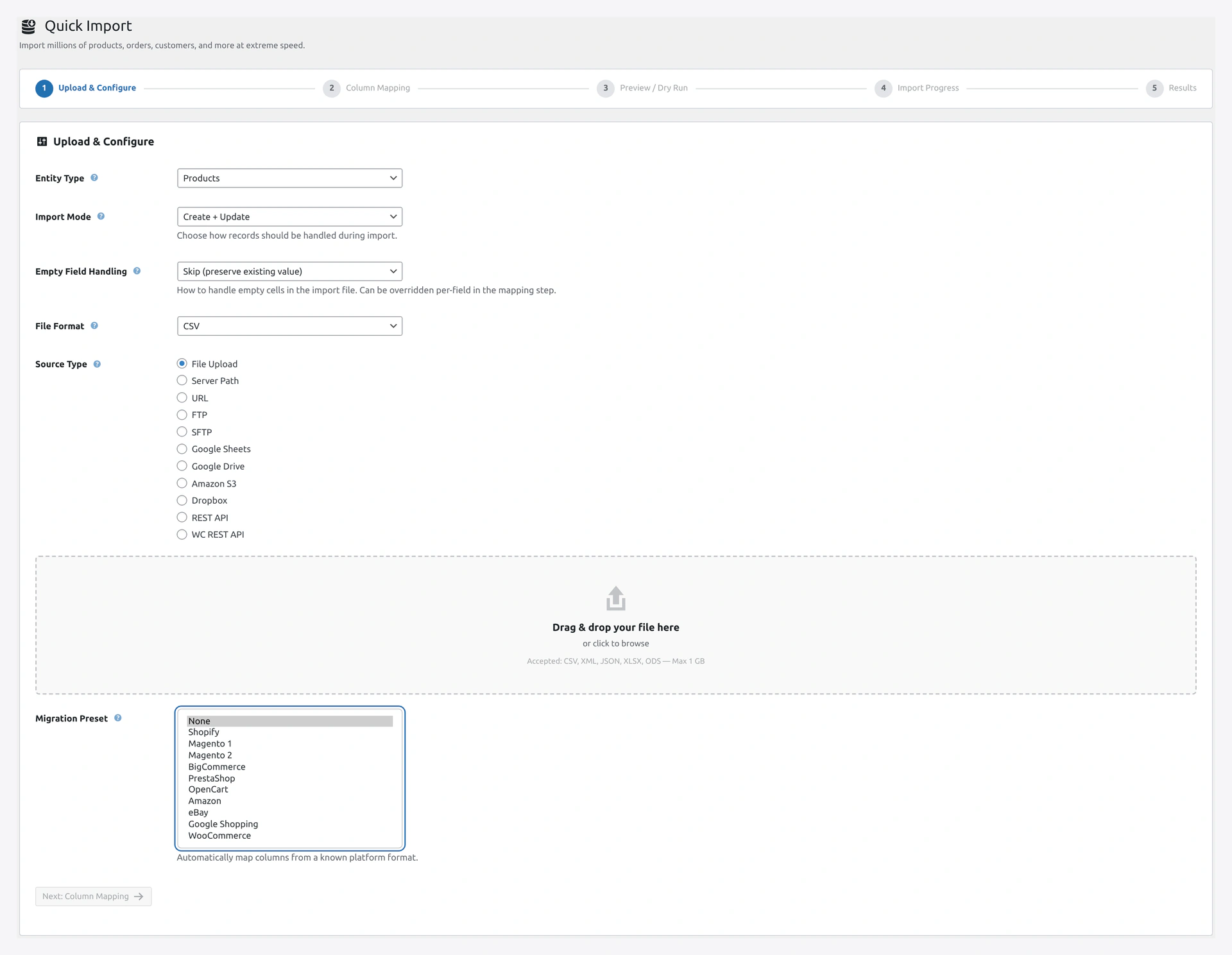
Migration preset dropdownMigration presets auto-map columns from Shopify, Magento 1/2, BigCommerce, PrestaShop, OpenCart, Amazon, eBay, and Google Shopping.

I Want To...

TaskGo to
Auto-sync products with a Google SheetTutorial: Google Sheets Sync
Migrate from Shopify to WooCommerceTutorial: Shopify Migration
Migrate from MagentoMigration Presets
Migrate from BigCommerceMigration Presets
Keep two WooCommerce stores in syncTutorial: Multi-Store Sync
Pull products from my supplier's APIImport Sources → REST API
Import from an FTP feedImport Sources → FTP

Schedule and Automate

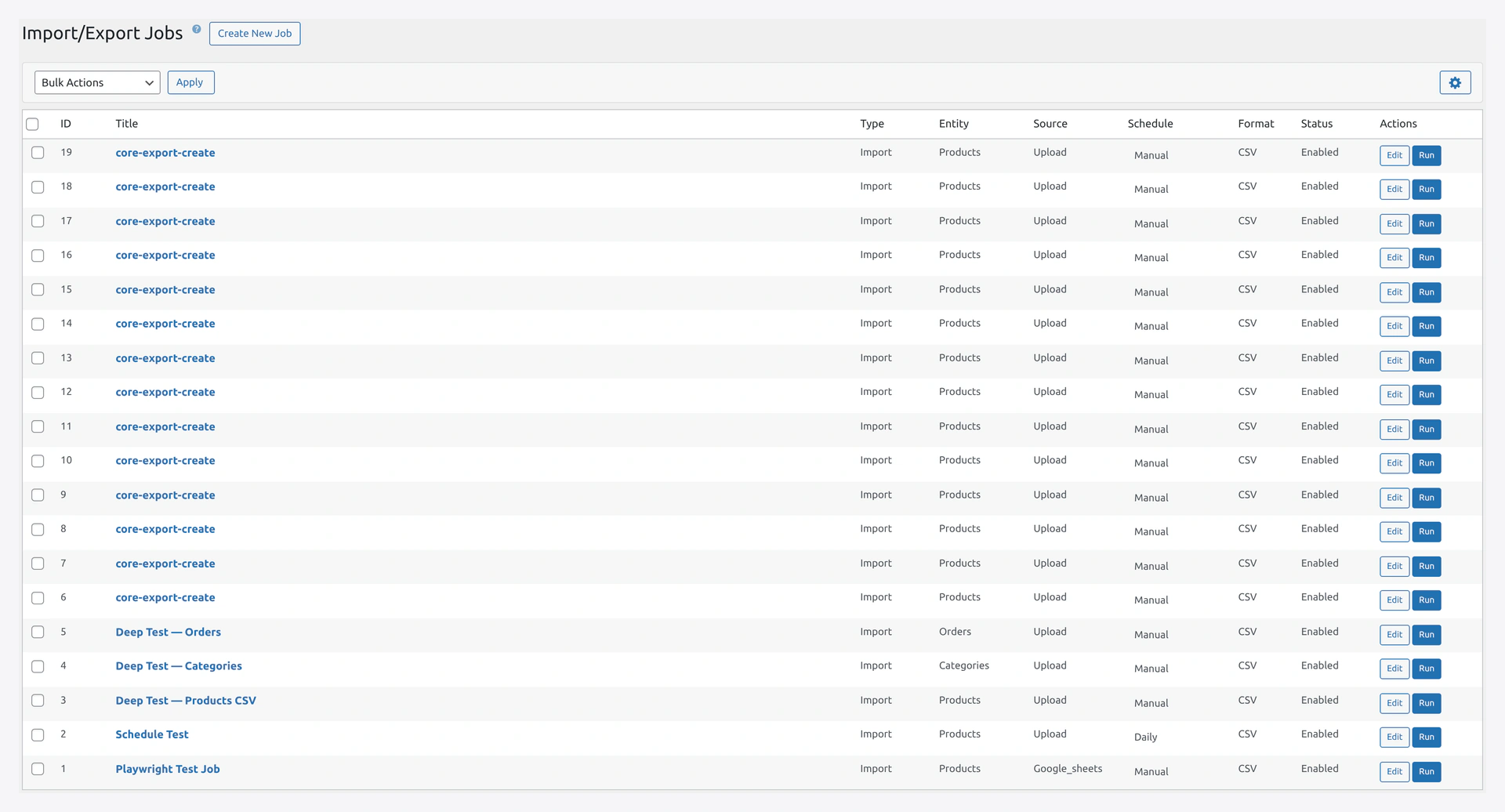
Jobs pageThe Jobs grid holds every saved import/export with inline schedule, status toggle, and Run Now.

I Want To...

TaskGo to
Run imports automatically every nightJobs → Schedule
Run jobs every 5 minutesJobs + Server Cron Setup
Trigger a job when a new order comes inJobs → Event Triggers
Set up a webhook for push importsJobs → Webhook Trigger
Run jobs from Zapier / MakeREST API

Safety and Recovery

I Want To...

TaskGo to
Undo an import I just ranRollback
See what I imported last TuesdayHistory
Fix orphaned data after a crashHealth Check
Test an import before committingQuick Import Wizard → Step 3 Preview
Check if my CSV is validCSV Preparation

Admin Tasks

I Want To...

TaskGo to
Change default import modeSettings → General
Get email when imports failSettings → Email Notifications
Add Yoast SEO columns to importsCompatibility
Grant another user accessWordPress Users → add manage_woocommerce capability
Increase upload file size limitPHP Configuration
Improve import speedPHP Configuration + check Dashboard system info

Integration Setup

I Want To...

TaskGo to
Connect Google SheetsGoogle API Setup
Connect Amazon S3Amazon S3 Setup
Connect DropboxDropbox Setup
Set up email deliveryEmail Setup
Use Yoast SEO in importsCompatibility → Yoast
Use ACF in importsCompatibility → ACF
Assign vendors in DokanCompatibility → Dokan

Developer Tasks

I Want To...

TaskGo to
Trigger an import from codeREST API
Run imports from the command lineWP-CLI
Build a custom integrationREST API
Get a webhook when import finishesSettings → Notification Channels → Custom Webhook

Troubleshooting

My Problem Is...

ProblemGo to
Import fails immediatelyTroubleshooting
Images not downloadingImage Handling
Scheduled jobs not runningServer Cron Setup
Email notifications not arrivingEmail Setup
Running out of memoryPHP Configuration
Variable products brokenVariable Products
CSV won't parseCSV Preparation

First Time Here?

Brand new to the plugin? Start with:

  1. First-Time Setup — complete checklist
  2. Quick Start — 5-minute first import
  3. Sample Files — download test data

Related Pages

  • Introduction — What the plugin does
  • Features — Full feature list
  • FAQ — Common questions
  • Glossary — All terms explained
Prev
Sample Files — Download Ready-to-Use Templates
Next
Common Mistakes — Things To Watch Out For