
Security
This page explains how the plugin keeps your data safe.
User Permissions
Only users with the manage_woocommerce capability can use the plugin. By default this includes:
- Administrators
- Shop Managers
Custom roles with manage_woocommerce also have access.
Users without this capability see nothing — no menu items, no REST API access, no WP-CLI commands.
Fine-Grained Control
To restrict further:
// In functions.php — remove shop managers from plugin access
add_filter( 'wkaie_user_can_access', function( $can, $user_id ) {
    $user = get_userdata( $user_id );
    if ( in_array( 'shop_manager', $user->roles, true ) ) {
        return false;
    }
    return $can;
}, 10, 2 );
Form and Request Security
Nonce Verification
Every form and AJAX request includes a WordPress nonce. The plugin validates the nonce before processing.
Protects against CSRF (Cross-Site Request Forgery) attacks where a malicious site tries to trigger actions on your site.
Capability Checks
Every REST endpoint and WP-CLI command checks the user's capability before running.
Nonce Timeouts
Nonces expire after 12-24 hours. Stale nonces are rejected.
File Upload Security
When you upload a file:
- Type validation — File extension must match the claimed format
- Size check — Rejected if bigger than PHP
upload_max_filesize - MIME sniffing — The actual file content is checked, not just the extension
- Directory traversal block — Filenames with
../or\..\are rejected - Isolated storage — Files save to
wp-content/uploads/wkaie-imports/with a random prefix - Auto-cleanup — Files delete after import (configurable retention)
Credential Encryption
API keys, passwords, and tokens are encrypted before saving to the database.
What's Encrypted
- Google API credentials
- OAuth Client IDs and Secrets
- Dropbox app keys and tokens
- Amazon S3 access keys and secret keys
- FTP and SFTP passwords
- SMTP passwords
- Notification channel tokens (Slack, Teams, Telegram, WhatsApp webhooks)
How It Works
The plugin uses AES-256 encryption with a key derived from WordPress salts (AUTH_KEY, AUTH_SALT in wp-config.php).
Decryption happens only in memory at runtime. Values never appear in plain text in:
- The database
- Log files
- Error messages
- Debug output
Rotating Encryption Keys
To rotate:
- Change WordPress salts in
wp-config.php - Re-save each credential in the plugin Settings
- Old encrypted blobs become unreadable
SQL Injection Protection
Every database query uses WordPress's prepared statement API ($wpdb->prepare()).
User input never gets concatenated into SQL. The plugin is safe against SQL injection.
Independent Audit
The plugin has been scanned for:
- SQL injection
- XSS (Cross-Site Scripting)
- Path traversal
- Insecure deserialization
- Command injection
XSS Protection
All user-facing output is escaped:
esc_html()for text contentesc_attr()for HTML attributesesc_url()for URLswp_kses()for allowed HTML
User input is sanitized before storage:
sanitize_text_field()for single-line textsanitize_textarea_field()for multi-linesanitize_email()for emailsesc_url_raw()for URLs in the database
Customer Password Handling
When importing customers with passwords, the plugin:
- Plain text passwords — Hashed with WordPress's
wp_hash_password()before saving - Pre-hashed passwords — If the hash starts with
$P$,$2y$, or$2a$, stored as-is - Empty passwords — Auto-generates a random password
Passwords NEVER appear in:
- Database in plain text
- Log files
- Email notifications
- Export files (passwords are never exported)
Export File Security
Access Control
Exported files download via a signed admin-ajax URL:
- Per-file nonce required
manage_woocommercecapability check- Path traversal block (filename cannot contain
../) - Realpath containment check (file must be inside
wkaie-exports/folder)
Someone who steals the URL cannot use it without the nonce and admin login.
Auto-Cleanup
Exports are deleted after a configurable retention period (default 24 hours).
Not Public by Default
Export files save to wp-content/uploads/wkaie-exports/ with .htaccess denying direct access. Files are only served via the signed download URL.
Rollback Security
Rollback snapshots are stored in the database, not as files. They:
- Are tied to a specific run ID
- Require
manage_woocommerceto access - Cannot be triggered across sites
- Auto-delete after retention period
REST API Security
Authentication Methods
| Method | Security |
|---|---|
| Cookie + nonce | Standard WordPress auth |
| Application Password | HTTPS required, revocable |
| WooCommerce Consumer Key | HTTPS required, revocable |
| JWT tokens | Short-lived, revocable |
Rate Limiting
WordPress doesn't rate-limit REST by default. For heavy integrations, use:
- Cloudflare rate limiting
- Nginx
limit_reqdirective - A plugin like WP REST Cache
Webhook Security
If you use the webhook source:
- Each webhook URL includes a secret key
- Requests without the secret are rejected
- The secret is rotated when you regenerate the webhook
Database Table Isolation
The plugin creates these tables:
wp_wkaie_jobswp_wkaie_historywp_wkaie_scheduleswp_wkaie_mappingswp_wkaie_row_hasheswp_wkaie_stg_*(per-run staging, auto-dropped)
Staging tables are isolated per import. Two concurrent imports do not interfere.
Log File Security
Log files save to wp-content/uploads/wkaie-logs/.
What's In Logs
- Import timestamps
- Row counts and errors
- Phase timing
- Memory usage
What's NOT In Logs
- Passwords (even hashed ones)
- API keys or tokens
- Credit card info (if it sneaks into CSVs)
- Private customer data
Log Retention
Old logs auto-delete based on Settings → Performance & Advanced → Log Retention (Days).
GDPR / Privacy Compliance
What Data the Plugin Stores
| Data | Where | Purpose |
|---|---|---|
| Job configurations | wp_wkaie_jobs | Saved imports/exports |
| Run history | wp_wkaie_history | Audit trail |
| Column mappings | wp_wkaie_mappings | Reusable presets |
| Row hashes | wp_wkaie_row_hashes | Delta import fingerprints |
| Log files | wp-content/uploads/wkaie-logs/ | Debugging |
| Rollback snapshots | Database | Undo imports |
None of this data is sent to external servers (Webkul or anyone).
Right to Erasure
To fully remove plugin data:
- Settings → Advanced → Reset Plugin
- Deactivate the plugin
- Delete it
This wipes:
- All plugin database tables
- Log files
- Staging tables
- Rollback snapshots
Customer data in wp_users and wp_usermeta is NOT touched (that's WooCommerce core).
Right to Export
WooCommerce's built-in export tools handle customer data export for GDPR requests.
The plugin itself does not store additional customer PII beyond what WooCommerce already stores.
Data Processing Agreement (DPA)
Webkul offers a DPA for EU customers. Contact [email protected] to request.
HTTPS and TLS
- OAuth flows require HTTPS
- The plugin refuses to save OAuth credentials on HTTP sites
- Cloud service APIs (Google, AWS) always use TLS 1.2+
Audit Trail
Every action is logged:
- Who triggered the run (user ID, "Schedule", or "API")
- When (timestamp)
- What (job ID, entity type, row counts)
This audit log is queryable via:
- WordPress admin → History page
- WP-CLI:
wp wkaie history list - REST API:
GET /wp-json/wkaie/v1/history
Compliance Certifications
- PCI DSS — the plugin does not store or process payment data
- HIPAA — not certified (not intended for healthcare data)
- SOC 2 — WooCommerce's compliance applies, plugin adds no new scope
- ISO 27001 — the plugin follows secure coding practices
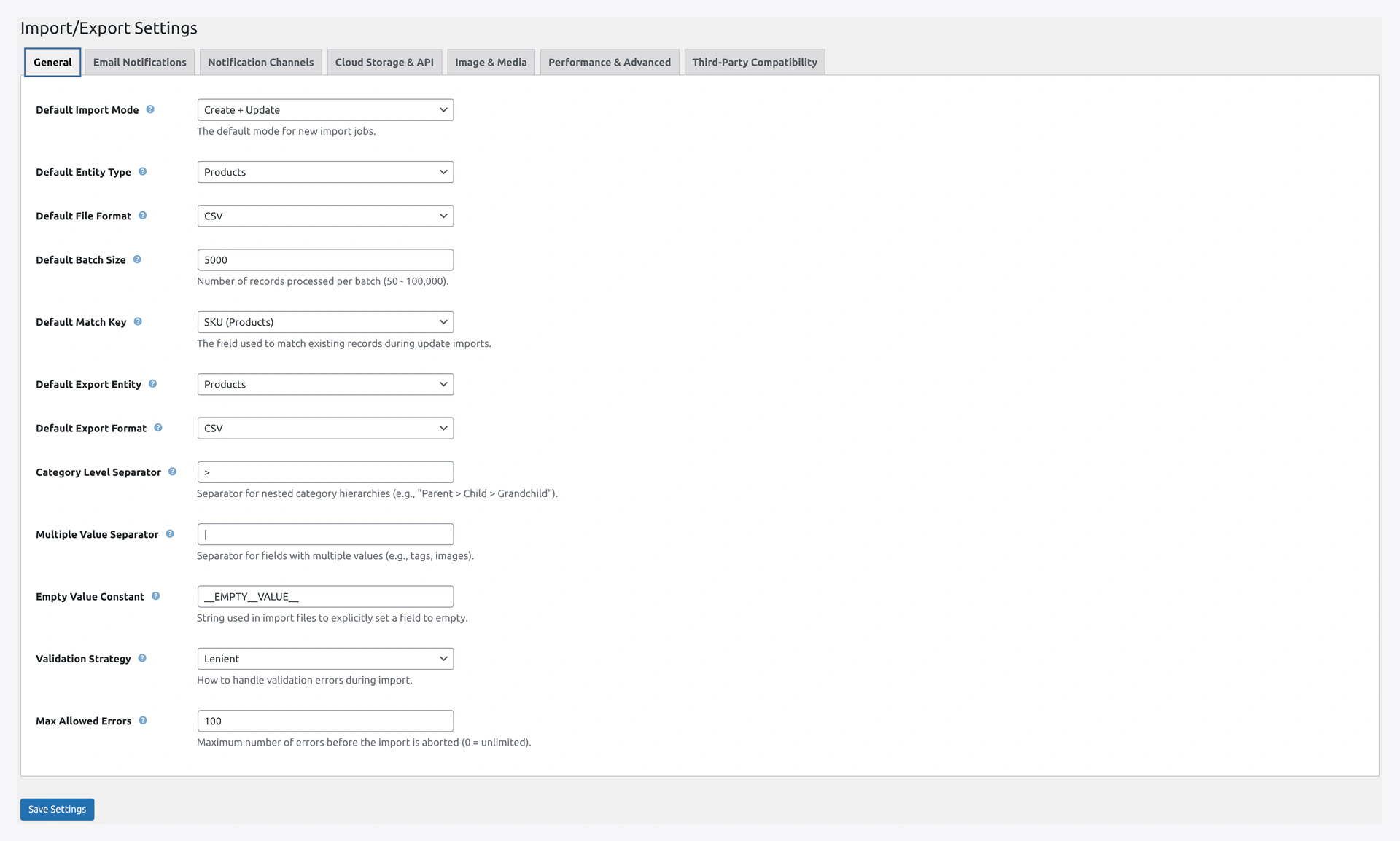 Settings → General — Validation Strategy and Max Allowed Errors are your first line of defence against bad data.
Security Best Practices
As a store owner:
- Use strong WP admin passwords — the plugin inherits WP's security
- Enable 2FA — on WordPress admin and AWS/Google accounts
- Use HTTPS — required for OAuth, recommended everywhere
- Rotate API keys — every 90-180 days
- Minimum IAM permissions — only grant what's needed (see Amazon S3 Setup)
- Limit user roles — only grant
manage_woocommerceto trusted staff - Monitor the audit log — check History weekly for unexpected runs
- Keep WordPress + WooCommerce updated — security patches matter
- Back up regularly — UpdraftPlus or similar
Reporting Security Issues
Found a bug that might be a security issue? Please report responsibly:
- Email [email protected]
- Do NOT post in public forums
- Include: plugin version, WordPress version, steps to reproduce
We respond within 48 hours and release patches quickly for confirmed issues.