
Advance Import and Export for WooCommerce DocumentationAdvance Import and Export for WooCommerce Documentation
Buy Now
View Demo
  • Getting Started

    • Introduction
    • Quick Start
    • Features
    • Installation
    • First-Time Setup
    • CSV Preparation
    • Sample Files
    • Use Cases
    • Common Mistakes
  • Tutorials

    • Google Sheets Live Sync
    • Shopify Migration
    • Daily Backup to S3
    • Multi-Store Sync
  • Using the Plugin

    • Dashboard
    • Quick Import Wizard
    • Quick Export
    • Settings
    • Compatibility
  • Import In Detail

    • Import Sources
    • Import Modes
    • Column Mapping
    • Transformations
    • Migration Presets
    • Delta Import
  • Export In Detail

    • Export Features
    • Export Destinations
    • Browser Download
    • Server Path (REST / CLI)
  • Data Types

    • Products
    • Variable Products
    • Orders
    • Customers
    • Categories & Tags
    • Coupons
    • Reviews
    • Posts
    • Pages
    • Users
    • Subscriptions
    • Bookings
    • Memberships
    • Menus
  • Automation

    • Scheduled Jobs
    • History & Logs
    • Rollback
    • Health Check
  • Cloud Service Setup

    • Google API Setup
    • Amazon S3 Setup
    • Dropbox Setup
    • Email / SMTP Setup
  • Server Configuration

    • PHP Configuration
    • Server Cron Setup
    • Image Handling
  • Developer

    • REST API
    • WP-CLI Commands
  • Compare

    • vs WP All Import
    • vs Product Import Export (WebToffee)
  • Help

    • Troubleshooting
    • FAQ
    • Glossary
    • Security
    • Changelog
Support
Buy Now
View Demo
  • Getting Started

    • Introduction
    • Quick Start
    • Features
    • Installation
    • First-Time Setup
    • CSV Preparation
    • Sample Files
    • Use Cases
    • Common Mistakes
  • Tutorials

    • Google Sheets Live Sync
    • Shopify Migration
    • Daily Backup to S3
    • Multi-Store Sync
  • Using the Plugin

    • Dashboard
    • Quick Import Wizard
    • Quick Export
    • Settings
    • Compatibility
  • Import In Detail

    • Import Sources
    • Import Modes
    • Column Mapping
    • Transformations
    • Migration Presets
    • Delta Import
  • Export In Detail

    • Export Features
    • Export Destinations
    • Browser Download
    • Server Path (REST / CLI)
  • Data Types

    • Products
    • Variable Products
    • Orders
    • Customers
    • Categories & Tags
    • Coupons
    • Reviews
    • Posts
    • Pages
    • Users
    • Subscriptions
    • Bookings
    • Memberships
    • Menus
  • Automation

    • Scheduled Jobs
    • History & Logs
    • Rollback
    • Health Check
  • Cloud Service Setup

    • Google API Setup
    • Amazon S3 Setup
    • Dropbox Setup
    • Email / SMTP Setup
  • Server Configuration

    • PHP Configuration
    • Server Cron Setup
    • Image Handling
  • Developer

    • REST API
    • WP-CLI Commands
  • Compare

    • vs WP All Import
    • vs Product Import Export (WebToffee)
  • Help

    • Troubleshooting
    • FAQ
    • Glossary
    • Security
    • Changelog
Support
  • Getting Started

    • Introduction
    • Quick Start — Your First Import in 5 Minutes
    • Features — Full Tour
    • Installation — Full Setup Guide
    • First-Time Setup — Complete Checklist
    • CSV Preparation — How to Make a Good Import File
    • Sample Files — Download Ready-to-Use Templates
    • Use Cases — "I Want To..." Quick Reference
    • Common Mistakes — Things To Watch Out For
  • Tutorials

    • Tutorial — Google Sheets Live Sync
    • Tutorial — Migrate from Shopify to WooCommerce
    • Tutorial — Daily Backup to Amazon S3
    • Tutorial — Sync Between Two WooCommerce Stores
  • Using the Plugin

    • Dashboard — What You See First
    • Quick Import Wizard — 5 Steps to Import Any File
    • Quick Export — One-Page Export Tool
    • Settings — Every Option Explained
    • Compatibility — Third-Party Plugin Support
  • Import In Detail

    • Import Sources — 11 Ways to Pull Data In
    • Import Modes — Create, Update, Delete, Replace
    • Column Mapping — Connect Your Columns to WooCommerce
    • Transformations — Change Values During Import
    • Migration Presets — Move From Shopify, Magento, BigCommerce
    • Delta Import — Skip Unchanged Rows
  • Export In Detail

    • Export Features
    • Export Destinations — Where Your Files Go
    • Export Download — One-Click Browser Download
    • Export to Server Path — WP-CLI
  • Data Types

    • Products Import — Full Field Reference
    • Variable Products — The Complete Guide
    • Orders Import — Historical Orders and Line Items
    • Customers Import — With Addresses and Notes
    • Categories and Tags Import
    • Coupons Import — Discount Codes
    • Reviews Import — Product Reviews and Ratings
    • Posts Import — WordPress Blog Posts
    • Pages Import — WordPress Pages
    • Users Import — WordPress User Accounts
    • Subscriptions Import — WooCommerce Subscriptions
    • Bookings Import — WooCommerce Bookings
    • Memberships Import — WooCommerce Memberships
    • Menus Import — WordPress Navigation Menus
  • Automation

    • Jobs — Saved and Scheduled Imports and Exports
    • History — Every Run You Have Ever Done
    • Rollback — Undo Any Import in One Click
    • Health Check — Data Integrity Checks With Auto-Fix
  • Cloud Service Setup

    • Google API Setup — Sheets, Drive, OAuth
    • Amazon S3 Setup — IAM User and Bucket Permissions
    • Dropbox Setup — API Token for Private Files
    • Email Setup — Making Notifications Actually Work
  • Server Configuration

    • PHP Configuration — Memory, Execution Time, Upload Size
    • Server Cron Setup — Reliable Scheduled Imports
    • Image Handling — Download, Resize, Watermark
  • Developer

    • REST API — Developer Reference
    • WP-CLI Commands — Command Line Automation
  • Compare

    • Advance Import and Export vs WP All Import
    • Advance Import and Export vs Product Import Export for WooCommerce
  • Help

    • Troubleshooting — Fix Common Problems
    • FAQ — Common Questions
    • Glossary — Every Term Explained
    • Security — How Your Data Is Protected
    • Changelog — What Changed

Sample Files

Download these ready-made sample files to test the plugin or use as templates for your own imports. All files are real, working templates from the plugin's test suite.
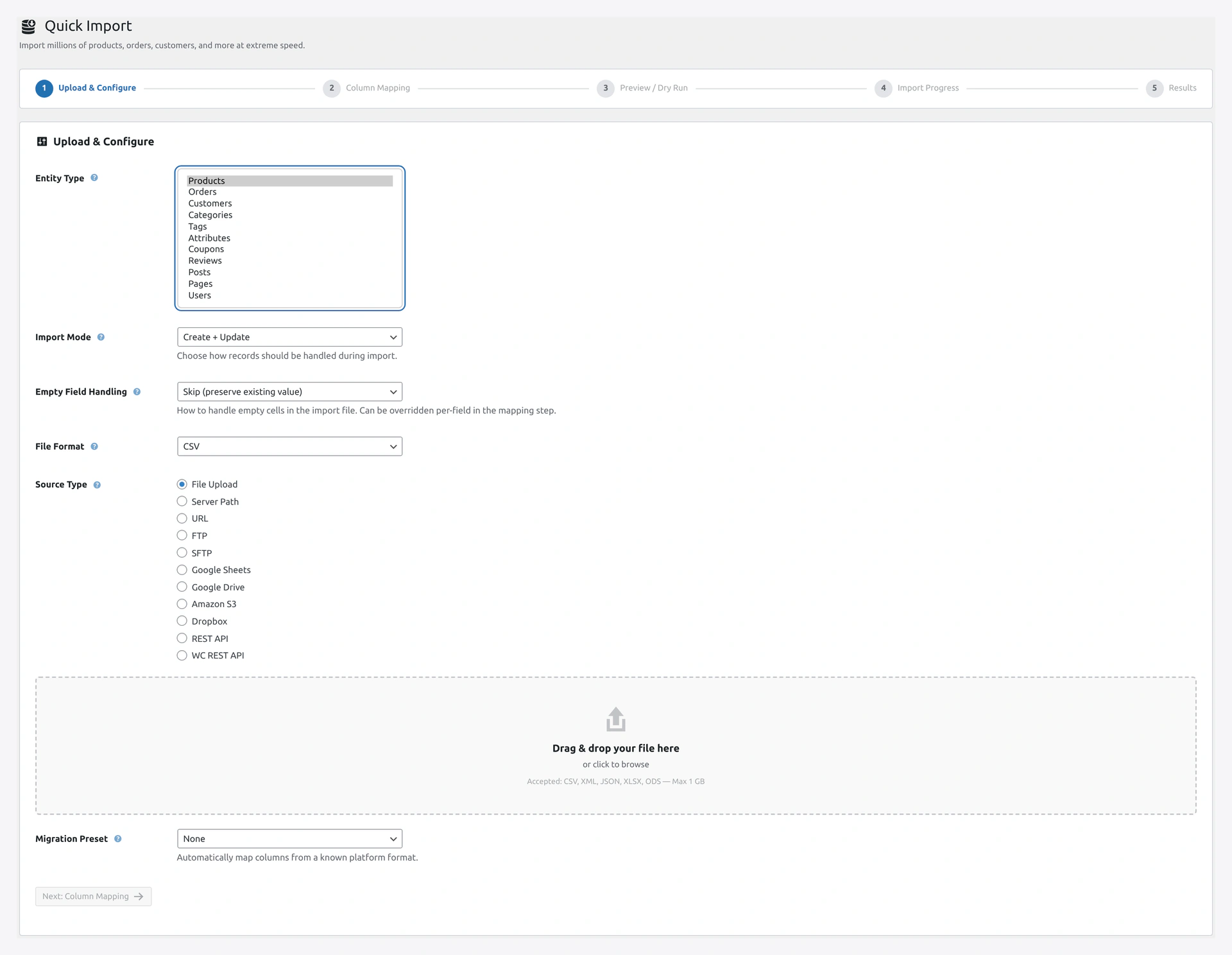
Entity type dropdownPick the matching entity in the wizard before uploading a sample — all 11 entity types are supported.
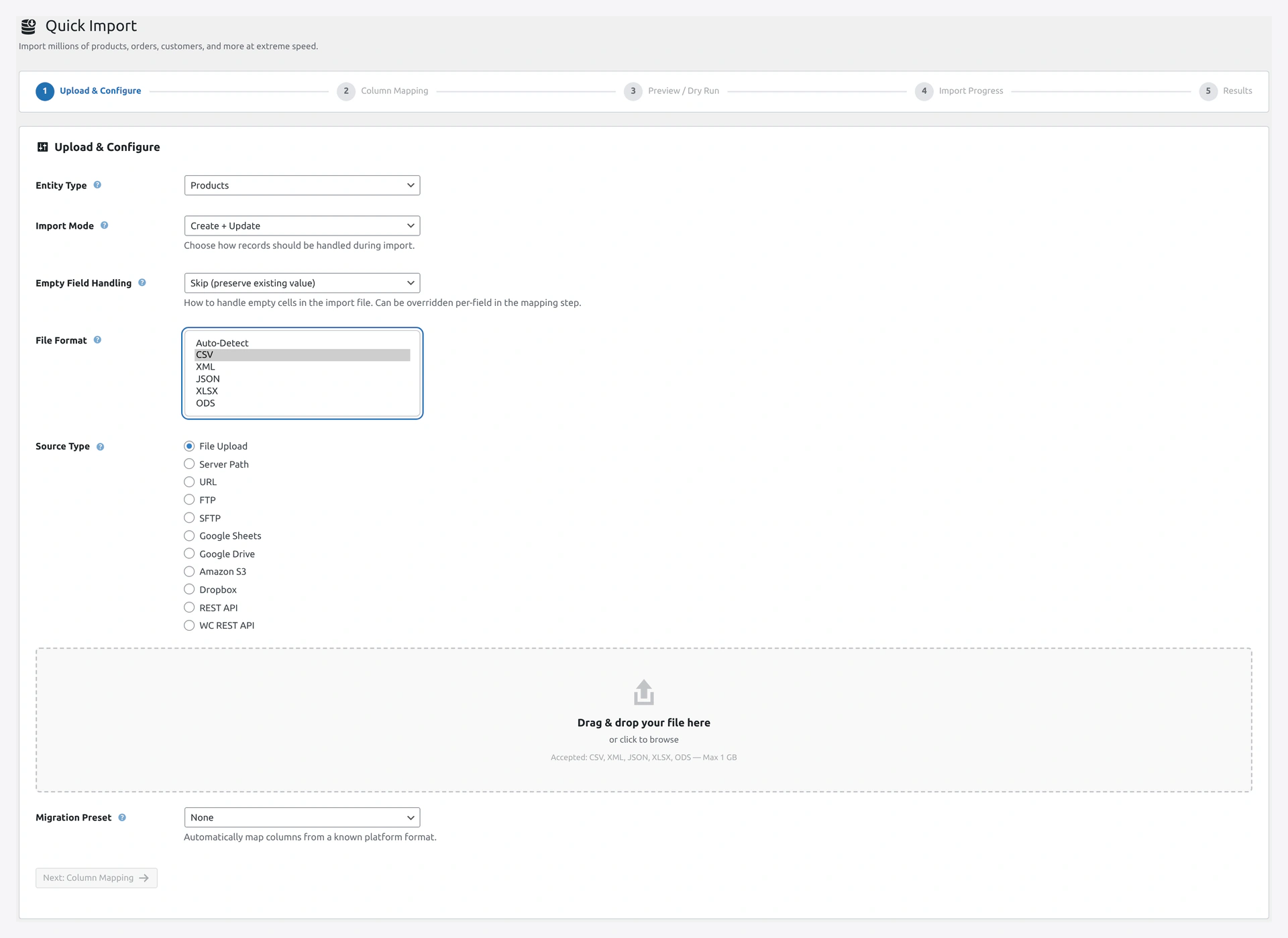
File format dropdownSamples ship in CSV, XML, JSON, and XLSX — set File Format to Auto-Detect or pick the exact format.

Core WooCommerce Samples

These match WooCommerce's standard import format.

FileFormatRowsWhat's In It
products-sample.xmlXML10Products in XML structure
products-sample.jsonJSON10Products in JSON structure
products-sample.xlsxXLSX10Products in Excel format
wc-official-sample.csvCSV51WooCommerce's official WC-standard 88-column format
Woo_Product_Dummy_Data_Set_Simple_and_Variable.xlsxXLSX200+Large dummy dataset with simple AND variable products

Entity-Specific Samples

One file per entity type.

EntityFileRowsContents
Categoriescategories-sample.csv~20Nested product categories
Tagstags-sample.csv~10Product tags
Attributesattributes-sample.csv~5Color, Size, Material
Couponscoupons-sample.csv~10Discount codes
Customerscustomers-sample.csv~10With billing and shipping addresses
Usersusers-sample.csv~5WordPress users with roles
Ordersorders-sample.csv~5Full orders with line items
Orders (5)orders-5-sample.csv5Order status update example
Reviewsreviews-sample.csv~10Product reviews with ratings
Postsposts-sample.csv~20WordPress blog posts
Pagespages-sample.csv~15WordPress pages

Migration Templates (From Other Platforms)

Use these with the matching Migration Preset in the Quick Import Wizard Step 1.

PlatformFileUse With Preset
Shopifyshopify-products-sample.csvShopify
Magento 1magento1-products-sample.csvMagento 1
Magento 2magento2-products-sample.csvMagento 2
BigCommercebigcommerce-products-sample.csvBigCommerce
PrestaShopprestashop-products-sample.csvPrestaShop
OpenCartopencart-products-sample.csvOpenCart
Amazon Selleramazon-products-sample.csvAmazon Seller
eBayebay-products-sample.csveBay
Google Shoppinggoogle-shopping-products-sample.csvGoogle Shopping

Alternative Formats

Simple, minimal versions for quick testing.

FileWhat's Special
Sample-Coupons.csvMinimal coupons CSV
Sample-Order-CSV.csvMinimal orders CSV
Sample-Product-review-CSV-2.csvSimplest possible reviews
Sample-Users.csvMinimal users CSV

Edge Case Samples (For Testing)

FileUse Case
categories-meta-test.csvCategories with custom meta fields
categories-update-empty-test.csvTesting "empty value" handling
gdrive-products.csvGoogle Drive source test

How to Use

Step 1 — Download

Click any link above. Your browser downloads the file.

Step 2 — Open (Optional)

Open the file to see the structure:

  • Excel — double-click
  • Google Sheets — File → Open → Upload
  • LibreOffice Calc — double-click
  • Text editor — Notepad, VS Code, Sublime, etc.

Step 3 — Import

  1. WordPress admin → Webkul WC Addons → Quick Import
  2. Pick the matching Entity Type (Products, Customers, etc.)
  3. Source Type: File Upload
  4. Click Choose File → pick the sample
  5. For migration templates, also pick the matching Migration Preset
  6. Click Next, map columns, import

Recommended First Test

If you are brand new to the plugin, start with products-sample.xlsx or wc-official-sample.csv. These are the most common formats.

  1. Download one of these
  2. Run through the Quick Import Wizard
  3. Check the imported products in WooCommerce → Products
  4. If you like the result, you are ready for your real data

Sample Data Disclaimer

All sample data is fictional:

  • Made-up product names and SKUs
  • Fake customer emails
  • Generic category names

Safe to test on any site without copyright or privacy concerns.

Modify for Your Data

These files are templates. To make your own:

  1. Keep the header row (first line with column names)
  2. Delete the sample rows
  3. Add your own rows
  4. Save as CSV (UTF-8 encoding)
  5. Import

See CSV Preparation for formatting tips.

Bulk Test Data (For Performance Testing)

Need to test with 10,000 or 1 million products? The plugin ships with a script to generate test data.

Find it at wp-content/plugins/woocommerce-importer/generate-million.php.

Or use:

# Generate 10,000 test products
wp eval-file wp-content/plugins/woocommerce-importer/generate-million.php

Related Pages

  • CSV Preparation — Format your CSV correctly
  • Quick Import Wizard — How to use the wizard
  • Migration Presets — Shopify, Magento, BigCommerce
  • Products Import — Full field reference
  • Variable Products — Variable product imports
Prev
CSV Preparation — How to Make a Good Import File
Next
Use Cases — "I Want To..." Quick Reference