
Frequently Asked Questions
Can't find your answer?
Check Troubleshooting for specific error fixes, or open a ticket at Webkul Support.
| Category | Questions |
|---|---|
| Getting Started | Install, licenses, compatibility |
| File Formats and Sizes | CSV, XML, JSON, XLSX, big files |
| Products | Simple, variable, variations, images |
| Customers and Orders | Historical data, passwords |
| Performance | Speed, hosting, batch size |
| Automation | Schedules, Google Sheets, cron |
| Compatibility | Yoast, ACF, Dokan, multilingual |
| Security | Passwords, API keys, rollback |
| Licensing | Support, updates |
Getting Started
Do I need WooCommerce?
Yes. This is a WooCommerce plugin. It does not work with regular WordPress alone. You need WooCommerce 8.0 or higher.
Does it work with WooCommerce HPOS?
Yes. The plugin fully supports High-Performance Order Storage (HPOS) for orders.
Can I try it before buying?
Yes. Visit the demo site at wpdemo.webkul.com to try it. Or buy it with the 30-day money-back guarantee.
Is this plugin compatible with WordPress Multisite?
Yes. Each site on the network has its own jobs, history, and settings.
Do I need to be a developer to use it?
No. The wizard UI is designed for shop owners and managers. You never need to write code. Advanced users can use WP-CLI and REST API, but those are optional.
File Formats and Sizes
What file formats are supported?
- CSV (most common)
- TSV (tab-separated)
- XML (with XSLT transformation)
- JSON
- XLSX (Excel)
- ODS (OpenOffice)
- ZIP archives (auto-extracts)
- TAR archives (auto-extracts)
What is the max file size?
Two limits apply:
- Your PHP
upload_max_filesize(usually 64MB-1GB) - Your PHP
post_max_size(usually same as above)
For files over 1GB, upload via FTP and use "Server Path" source in the wizard.
Do I need UTF-8?
Yes, but the plugin auto-converts Latin-1 and UTF-16 to UTF-8. BOM (Byte Order Mark) is also handled automatically.
What if my CSV uses semicolons instead of commas?
The plugin auto-detects the delimiter. Supported: comma, tab, semicolon, pipe. You can also set it manually in Step 2 → Separators.
Products
Can I import variable products?
Yes. Two ways:
- Separate rows for the parent + each variation
- Only simple rows + auto-create parent from SKU pattern
See Products Import.
Does it import product images?
Yes. Provide image URLs in the Images column. The plugin downloads them to the Media Library.
For faster imports, turn on "Deferred Image Import" — the import finishes in seconds, images download in background.
Can images be on another CDN?
Yes. The plugin downloads from any URL, including CDNs. If you want to skip download and use URLs directly, turn on "Use External URLs" in Settings.
What happens to products not in my import file?
By default, nothing. But you can configure the plugin to:
- Set them out of stock
- Disable them (draft)
- Delete them
See Import Modes.
Can I auto-create variable products from simple rows?
Yes. Upload simple rows with a common parent identifier (SKU pattern, parent SKU column, shared attributes). The plugin groups them and creates the variable parent automatically.
Customers and Orders
Can I import historical orders?
Yes. Use the Orders entity type. Include order status, dates, line items, addresses, and payment info.
Can I import customer passwords?
Yes. Three options:
- Plain text (plugin hashes them)
- Pre-hashed (WordPress format)
- Auto-generate (plugin creates random passwords and emails customers)
Will customers get a welcome email?
Only if you turn it on in Step 3 of the wizard. Otherwise the import is silent.
How are customers matched?
By email, by default. You can change to match by ID or Username in Step 3.
Can I import orders without importing customers first?
Yes, but it is better to import customers first. Otherwise orders are linked by email but have no customer record.
Performance
How fast is this plugin?
- 10,000 products in under 10 seconds (on proper hardware with pcntl)
- 1 million products in under 4 minutes
Actual speed depends on:
- Server CPU cores
- RAM
- MySQL speed
- File format (CSV is fastest)
- Image downloads (slower if enabled)
Why does pcntl matter?
pcntl is a PHP extension that enables parallel processing. Without it, the plugin falls back to single-process mode which is 10x slower.
Most dedicated and VPS hosts have pcntl. Most shared hosts do NOT have pcntl.
What's the recommended server?
For stores with:
- Under 10,000 products: Shared hosting works
- 10,000-100,000 products: VPS with 4GB RAM, 2 cores
- Over 100,000 products: Dedicated or VPS with 8GB+ RAM, 4+ cores
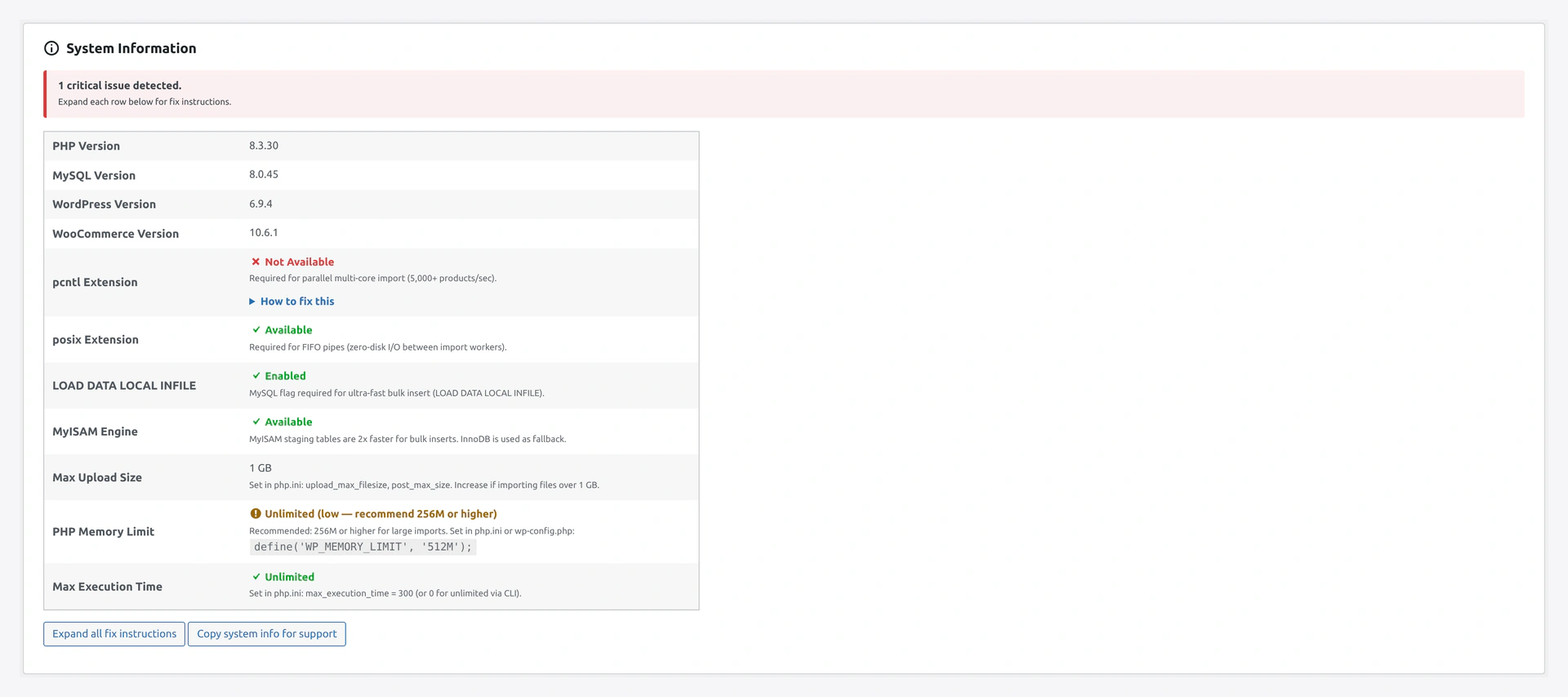 The Dashboard's System Information card shows PHP version, memory limit, and whether pcntl is available on your server.
What batch size should I use?
| Store size | Batch |
|---|---|
| Small (under 10K) | 500 |
| Medium (10K-100K) | 1000 |
| Large (100K-1M) | 2000 |
| Very large (over 1M) | 5000 |
Can I run multiple imports at the same time?
Yes. Each import uses its own staging table so they don't conflict. The plugin uses multiple CPU cores if available.
Automation
How does Google Sheets auto-sync work?
- Create a scheduled job with source = Google Sheets
- Set schedule (every 5 minutes, for example)
- Each run reads the sheet. If changes detected, store updates.
Can I trigger an import from Zapier or Make?
Yes. Use the REST API endpoint POST /wp-json/wkaie/v1/jobs/{id}/run.
How do I set up a daily export?
- Quick Export → configure it once
- Save as Job → set schedule to Daily
- Set destination (email, FTP, S3)
WordPress cron is unreliable — what can I do?
Set up real server cron. Add this to your server's crontab:
*/5 * * * * curl -s https://your-site.com/wp-cron.php > /dev/null
This calls WordPress cron every 5 minutes from the server, not dependent on site visits.
Can I chain multiple jobs together?
Yes. Job Editor → Tab: Advanced → "After this job runs, run Job X". Job X starts when Job 1 finishes.
Compatibility
Does this plugin work with Yoast SEO?
Yes. Turn on compat in Settings → Compatibility → Yoast SEO. The plugin imports/exports 10 Yoast meta fields.
Does it work with WPML?
Partially. WPML core (sitepress-multilingual-cms) is a paid plugin. If you have it, all features work.
The free woocommerce-multilingual add-on gives basic support — language code and translation group.
For full translation import/export, we recommend Polylang (free) instead of WPML.
Does it work with Dokan / WCFM / WC Vendors?
Yes. All three multi-vendor plugins are supported. Turn on compat and add vendor ID or email columns to your CSV.
Does it work with ACF (Advanced Custom Fields)?
Yes. Turn on ACF compat. Prefix your CSV columns with acf_ (e.g., acf_my_field). All ACF field types are supported.
Does it work with page builders?
- Gutenberg: basic support (post_content is imported as HTML)
- Elementor, WPBakery, Beaver Builder: not yet supported
For page builder content, export to CSV and manually rebuild in the target site.
Security
Are passwords stored safely?
Yes. Customer passwords are hashed with WordPress's default hasher ($P$ or bcrypt). Plain text passwords are never stored.
Are API credentials encrypted?
Yes. All API keys (Google, S3, Dropbox, FTP) are encrypted with AES-256 before saving to the database. They are never logged.
What if I import wrong data by mistake?
Use Rollback. Every import saves a snapshot. One click undoes it. See Rollback.
Does the plugin validate file uploads?
Yes. File type, size, MIME, and content are all validated before import. Malicious files are rejected.
Does rollback work for all entity types?
Products, categories, tags, customers, and posts support rollback. Orders do not (to prevent double-payment issues).
Licensing
Is it a one-time purchase?
Yes. Pay once, use forever. No recurring fees.
How do I get updates?
Updates are free for the license duration. Download from your Webkul account or CodeCanyon.
Is there a developer license?
Yes. Contact Webkul for multi-site or agency licenses.
What does support include?
Standard support covers 3-12 months of:
- Bug fixes
- Install help
- Compatibility issues
Custom features are handled as paid work.
Can I use this on multiple stores?
With the standard license: 1 store. For multiple stores, buy the developer license or multiple single licenses.
Do you offer refunds?
Yes. 30-day money-back guarantee, no questions asked.
More Common Questions
Can I pause a scheduled job?
Yes. On the Jobs page, toggle the job status to "Disabled." The job stays saved but will not run on schedule. Run Now still works manually.
What happens if I close the browser during an import?
The import keeps running on the server. You can come back to the wizard URL and see current progress or the final result.
Can I cancel a running import?
Yes. On Step 4 of the wizard, click Cancel Import. Rows already processed stay. You can rollback if you want.
How do I migrate from WP All Import?
Our plugin reads the same CSV format as WP All Import. Export your existing mappings from WP All Import as JSON, then manually re-create them in our Column Mapping presets. Or just re-do mapping in our wizard (often faster).
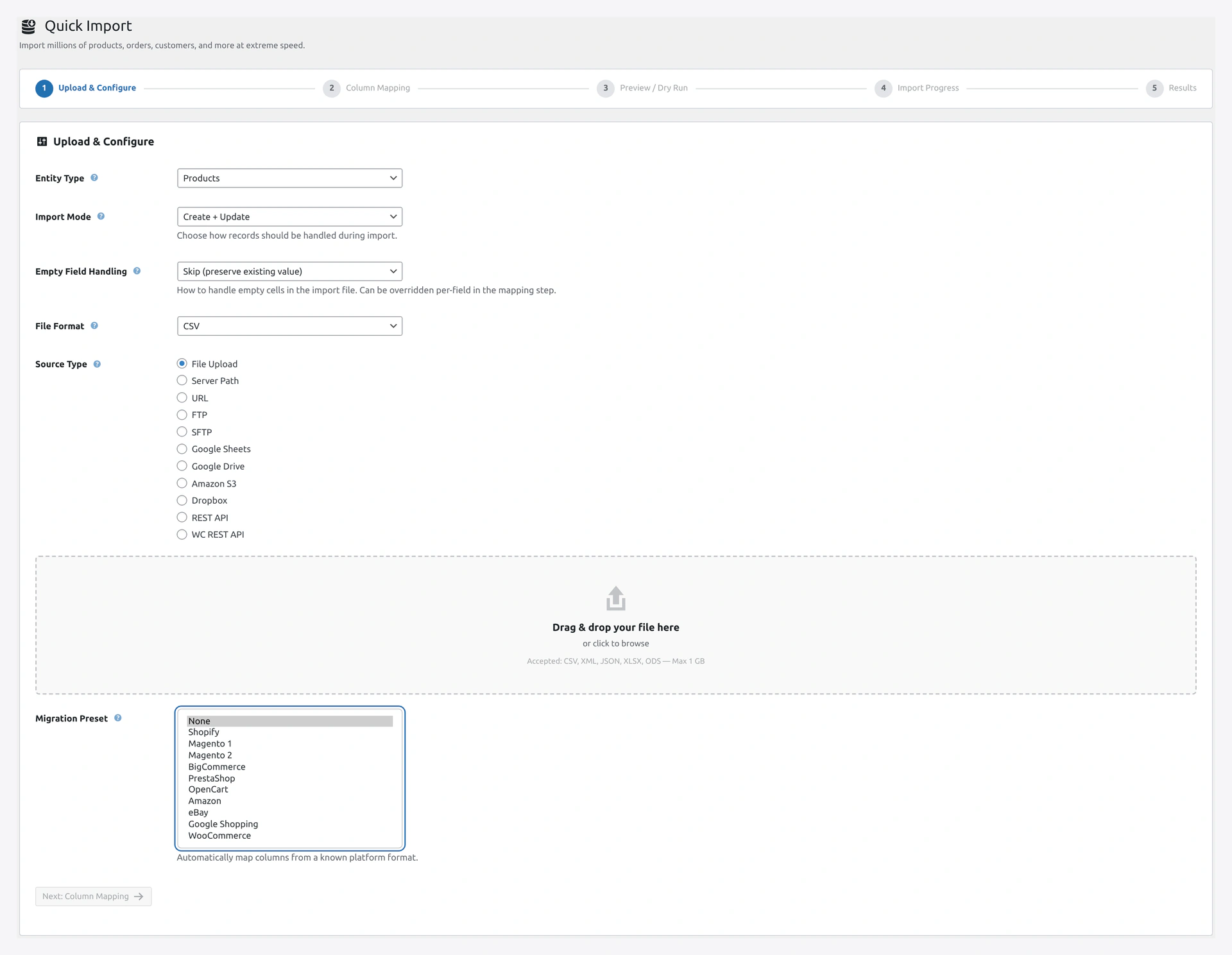 The Migration Preset dropdown in Step 1 covers Shopify, Magento 1/2, BigCommerce, PrestaShop, OpenCart, Amazon, eBay, Google Shopping, and WooCommerce exports.
Does the plugin support WooCommerce Subscriptions auto-renewal?
You can import subscriptions with their recurring schedule. The actual auto-renewal still runs through WC Subscriptions plugin logic.
Can I schedule exports with email delivery?
Yes. Create a job with Export type, set a schedule, and pick Email as the destination. The file is attached to the email.
Does the plugin work with WooCommerce Analytics?
Yes. Imported products and orders appear in WooCommerce Analytics after the next Analytics refresh. The Health Check includes a "WooCommerce Lookup Table Sync" check to verify this.
Can I use this plugin on WordPress Multisite?
Yes. Each site in the network has its own settings, jobs, history, and sample files. Network activation is supported.
Does the plugin slow down my store?
No. Scheduled jobs run in the background. Live event triggers add a few milliseconds per trigger. Imports are isolated so they don't impact frontend visitors.
What PHP version do I need?
PHP 8.1 minimum. PHP 8.3 recommended.
Will my hosting provider support this?
Most managed WordPress hosts work fine. For the fastest imports, you need pcntl PHP extension — available on most VPS and dedicated hosts, less common on shared hosting. Check the Dashboard System Info after installing to see your situation.
Can I use the same CSV file twice without duplicating products?
Yes. Use Create + Update mode. The plugin matches by SKU and updates existing products instead of creating duplicates.
What if my CSV has 100 columns but I only need 20?
Map only the 20 you want. Unmapped columns are ignored during import.
Can I rename product SKUs during import?
Yes. Map the new SKU column to SKU, and use a transformation to apply a pattern (e.g., prepend NEW-).
Do exports include product images?
Exports include image URLs (not the image files themselves). The importing store downloads the images from those URLs.
Can I export customer passwords?
No. Passwords are never exported for security. Customers on the new store will need to reset their password via "Forgot Password."
Will WooCommerce email customers when I import orders?
No. Imports are silent — no emails sent to customers. Useful when migrating historical orders.
How do I know when a scheduled job last ran?
Go to the Jobs page. The "Last Run" column shows the timestamp. Click the job to see full run history.
Can I import products without images first, then add images later?
Yes. Two approaches:
- Use Deferred Image Import mode — images download in background after the main import
- Run one import without the Images column, then a second import later with only SKU + Images columns
What if an import fails halfway through?
Rows processed before the failure are kept. You can:
- Fix the CSV
- Re-run with Create + Update mode
- Or rollback and start over
Does the plugin support WooCommerce High-Performance Order Storage (HPOS)?
Yes. The plugin detects HPOS and uses the right tables automatically.
Can I export only products modified in the last 7 days?
Yes. Use the date filter in Quick Export or a saved job with a date range filter.
Still Have Questions?
- Read Troubleshooting
- Browse the Glossary
- Open a ticket at webkul.uvdesk.com
- Email [email protected]