
REST API
The plugin exposes 16 REST endpoints so external apps can automate imports, exports, and monitoring.
Base URL
https://your-site.com/wp-json/wkaie/v1
Authentication
All endpoints require manage_woocommerce capability. Three auth methods supported:
Method 1 — WordPress Cookie + Nonce
Best for admin dashboards and browser apps.
fetch('/wp-json/wkaie/v1/jobs', {
  credentials: 'same-origin',
  headers: {
    'X-WP-Nonce': wpApiSettings.nonce
  }
})
Method 2 — Application Password (Basic Auth)
For external scripts.
- WordPress admin → Users → Your Profile → Application Passwords
- Create a password for "Import Plugin"
- Use as HTTP Basic Auth:
curl https://your-site.com/wp-json/wkaie/v1/jobs \
  -u "admin:APPLICATION_PASSWORD_HERE"
Method 3 — WooCommerce Consumer Key
curl https://your-site.com/wp-json/wkaie/v1/jobs \
  -u "ck_xxx:cs_xxx"
Endpoint Summary
| Resource | Method | Endpoint | Purpose |
|---|---|---|---|
| Jobs | GET | /jobs | List all jobs |
| POST | /jobs | Create a job | |
| GET | /jobs/{id} | Get a single job | |
| POST / PUT | /jobs/{id} | Update a job | |
| DELETE | /jobs/{id} | Delete a job | |
| POST | /jobs/{id}/run | Run a job (supports async param) | |
| POST | /jobs/{id}/validate | Validate without running | |
| GET | /jobs/{id}/progress | Live progress | |
| POST | /jobs/{id}/cancel | Cancel a running job | |
| History | GET | /history | List all runs |
| GET | /history/{id} | Get run details | |
| POST | /history/{id}/rollback | Rollback a run (supports record_ids for selective) | |
| Direct | POST | /import | Direct import (file upload with mapping) |
| POST | /export | Direct export | |
| GET | /export/preview?entity=X | Preview an export | |
| Webhook | POST | /webhook/{job_id} | Receive external data push |
Jobs — Create
curl -X POST https://your-site.com/wp-json/wkaie/v1/jobs \
  -H "X-WP-Nonce: YOUR_NONCE" \
  -H "Content-Type: application/json" \
  -d '{
    "name": "Daily Google Sheets Sync",
    "type": "import",
    "entity": "products",
    "source_type": "google_sheets",
    "source_config": {
      "url": "https://docs.google.com/spreadsheets/d/1ABC.../edit",
      "sheet_name": "Sheet1"
    },
    "import_mode": "create_update",
    "schedule_config": {
      "frequency": "hourly"
    }
  }'
Response:
{
  "id": 42,
  "name": "Daily Google Sheets Sync",
  "type": "import",
  "entity": "products",
  "status": "enabled",
  "created_at": "2026-04-14T10:30:00Z"
}
Jobs — List
curl https://your-site.com/wp-json/wkaie/v1/jobs \
  -H "X-WP-Nonce: YOUR_NONCE"
Query parameters:
page— page number (default 1)per_page— page size (default 20, max 100)status— filter byenabledordisabledtype— filter byimportorexportentity— filter by entity type
Jobs — Get One
curl https://your-site.com/wp-json/wkaie/v1/jobs/42 \
  -H "X-WP-Nonce: YOUR_NONCE"
Jobs — Update
curl -X PUT https://your-site.com/wp-json/wkaie/v1/jobs/42 \
  -H "X-WP-Nonce: YOUR_NONCE" \
  -H "Content-Type: application/json" \
  -d '{"name": "Updated", "status": "disabled"}'
Jobs — Delete
curl -X DELETE https://your-site.com/wp-json/wkaie/v1/jobs/42 \
  -H "X-WP-Nonce: YOUR_NONCE"
Jobs — Run
Start a job. Returns immediately — the job runs in the background.
curl -X POST https://your-site.com/wp-json/wkaie/v1/jobs/42/run \
  -H "X-WP-Nonce: YOUR_NONCE"
With async flag (schedules as a background event):
curl -X POST https://your-site.com/wp-json/wkaie/v1/jobs/42/run \
  -H "X-WP-Nonce: YOUR_NONCE" \
  -H "Content-Type: application/json" \
  -d '{"async": true}'
Response:
{
  "run_id": 123,
  "job_id": 42,
  "status": "running"
}
Jobs — Validate
Run validation only. No data is imported.
curl -X POST https://your-site.com/wp-json/wkaie/v1/jobs/42/validate \
  -H "X-WP-Nonce: YOUR_NONCE"
Response:
{
  "valid": true,
  "row_count": 10000,
  "warnings": ["12 rows have empty descriptions"],
  "errors": []
}
Jobs — Progress
Get live progress of a running job. Poll this every 2-5 seconds for a progress bar.
curl https://your-site.com/wp-json/wkaie/v1/jobs/42/progress \
  -H "X-WP-Nonce: YOUR_NONCE"
Response:
{
  "job_id": 42,
  "run_id": 123,
  "status": "running",
  "phase": 2,
  "progress": 72,
  "records_processed": 720000,
  "records_total": 1000000,
  "speed": 4850,
  "eta_seconds": 58,
  "started_at": "2026-04-14T10:30:00Z"
}
Jobs — Cancel
curl -X POST https://your-site.com/wp-json/wkaie/v1/jobs/42/cancel \
  -H "X-WP-Nonce: YOUR_NONCE"
History — List
curl https://your-site.com/wp-json/wkaie/v1/history \
  -H "X-WP-Nonce: YOUR_NONCE"
Query parameters:
job_id— filter by jobstatus— filter by statusdate_from,date_to— filter by date
History — Get
curl https://your-site.com/wp-json/wkaie/v1/history/123 \
  -H "X-WP-Nonce: YOUR_NONCE"
History — Rollback
Rollback a run.
curl -X POST https://your-site.com/wp-json/wkaie/v1/history/123/rollback \
  -H "X-WP-Nonce: YOUR_NONCE"
Selective rollback (only specific records):
curl -X POST https://your-site.com/wp-json/wkaie/v1/history/123/rollback \
  -H "X-WP-Nonce: YOUR_NONCE" \
  -H "Content-Type: application/json" \
  -d '{"record_ids": [100, 101, 102]}'
Direct Import
Import without saving a job. Good for one-off imports.
curl -X POST https://your-site.com/wp-json/wkaie/v1/import \
  -H "X-WP-Nonce: YOUR_NONCE" \
  -F "entity=products" \
  -F "source_type=file" \
  -F "import_mode=create_update" \
  -F "file=@/path/to/products.csv"
Direct Export
curl -X POST https://your-site.com/wp-json/wkaie/v1/export \
  -H "X-WP-Nonce: YOUR_NONCE" \
  -H "Content-Type: application/json" \
  -d '{
    "entity": "products",
    "format": "csv",
    "columns": ["sku", "name", "price"],
    "filters": {"status": "publish"},
    "limit": 1000,
    "offset": 0
  }'
Response:
{
  "status": "completed",
  "file_size": 1048576,
  "row_count": 10000,
  "download_url": "https://your-site.com/wp-admin/admin-ajax.php?action=wkaie_download&file=..."
}
Export Preview
Get a preview without running the full export.
curl "https://your-site.com/wp-json/wkaie/v1/export/preview?entity=products" \
  -H "X-WP-Nonce: YOUR_NONCE"
Response:
{
  "entity": "products",
  "label": "Products",
  "total_records": 10000,
  "column_count": 42,
  "columns": ["ID", "SKU", "Name", "Regular price", "..."]
}
Using a REST API as an Import Source
You can also consume a third-party REST endpoint directly from the import wizard — no code needed.
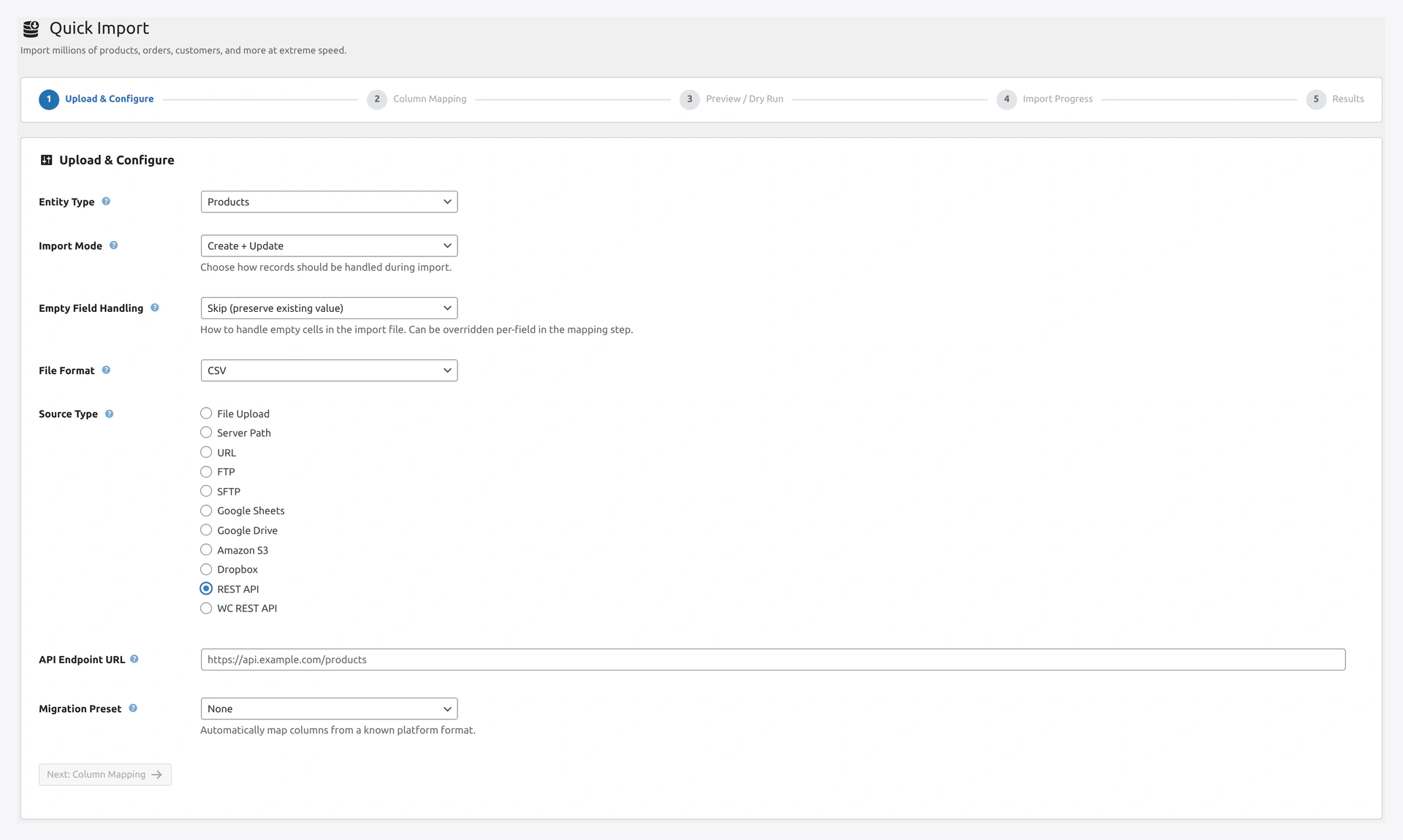 REST API source — endpoint URL, method, headers, auth, and optional JSON path.
WooCommerce REST API Source
For store-to-store sync, pick the WooCommerce REST API source and paste the target store's consumer key and secret.
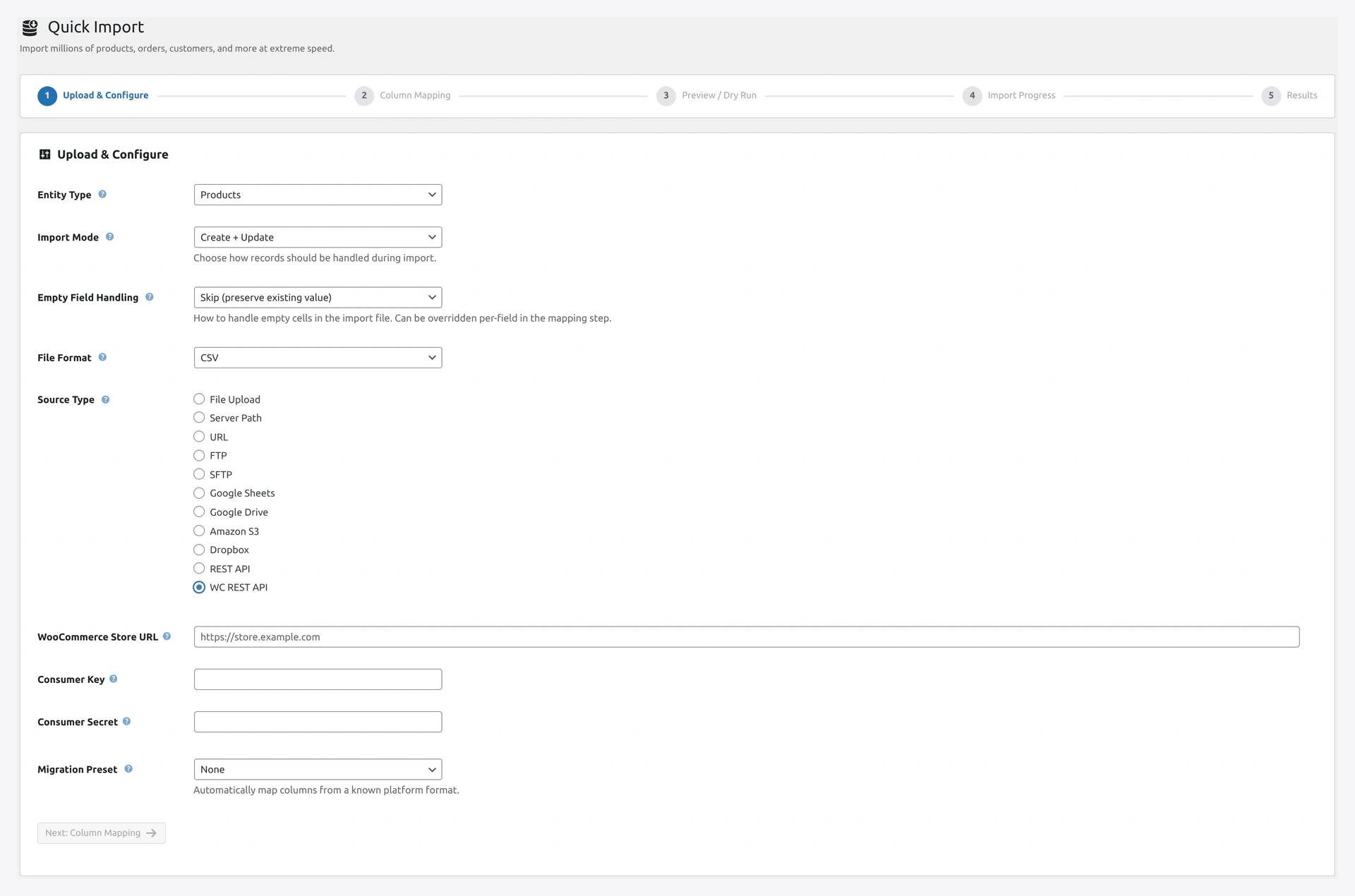 WooCommerce REST API source — pull products or orders from another WC store using consumer key/secret.
Webhook Receiver
External systems can push data to your store.
Setup
- Create a job with
source_type: webhook - Get the webhook URL and secret from the job details
- External system POSTs JSON or CSV to that URL
Webhook Call
curl -X POST "https://your-site.com/wp-json/wkaie/v1/webhook/42?secret=YOUR_SECRET" \
  -H "Content-Type: application/json" \
  -d '{
    "products": [
      {"sku": "WK-001", "name": "Shirt", "price": "29.99"},
      {"sku": "WK-002", "name": "Mug", "price": "18.50"}
    ]
  }'
The secret query parameter is required to prevent unauthorized pushes.
Response Format
Success
{
  "id": 42,
  "name": "My Job",
  ...
}
Error
Standard WordPress REST error format:
{
  "code": "wkaie_job_not_found",
  "message": "Job ID 999 does not exist.",
  "data": { "status": 404 }
}
Error Codes
| Code | HTTP | Meaning |
|---|---|---|
rest_cookie_invalid_nonce | 403 | Nonce missing or expired |
rest_forbidden | 401 | User lacks permission |
wkaie_job_not_found | 404 | Job ID does not exist |
wkaie_invalid_entity | 400 | Unsupported entity type |
wkaie_run_already_active | 409 | Job is already running |
wkaie_file_missing | 400 | Source file not found |