
Advance Import and Export vs WP All Import
If you are shopping for a WooCommerce import plugin, you have almost certainly come across WP All Import. It has been around for years and is a solid product.
This page is a fair, detailed comparison. We will tell you where WP All Import is better, where our plugin is better, and which one fits your store.
Our promise
We do not lie or exaggerate. If a feature is missing, we say so. If a competitor does it better, we say so.
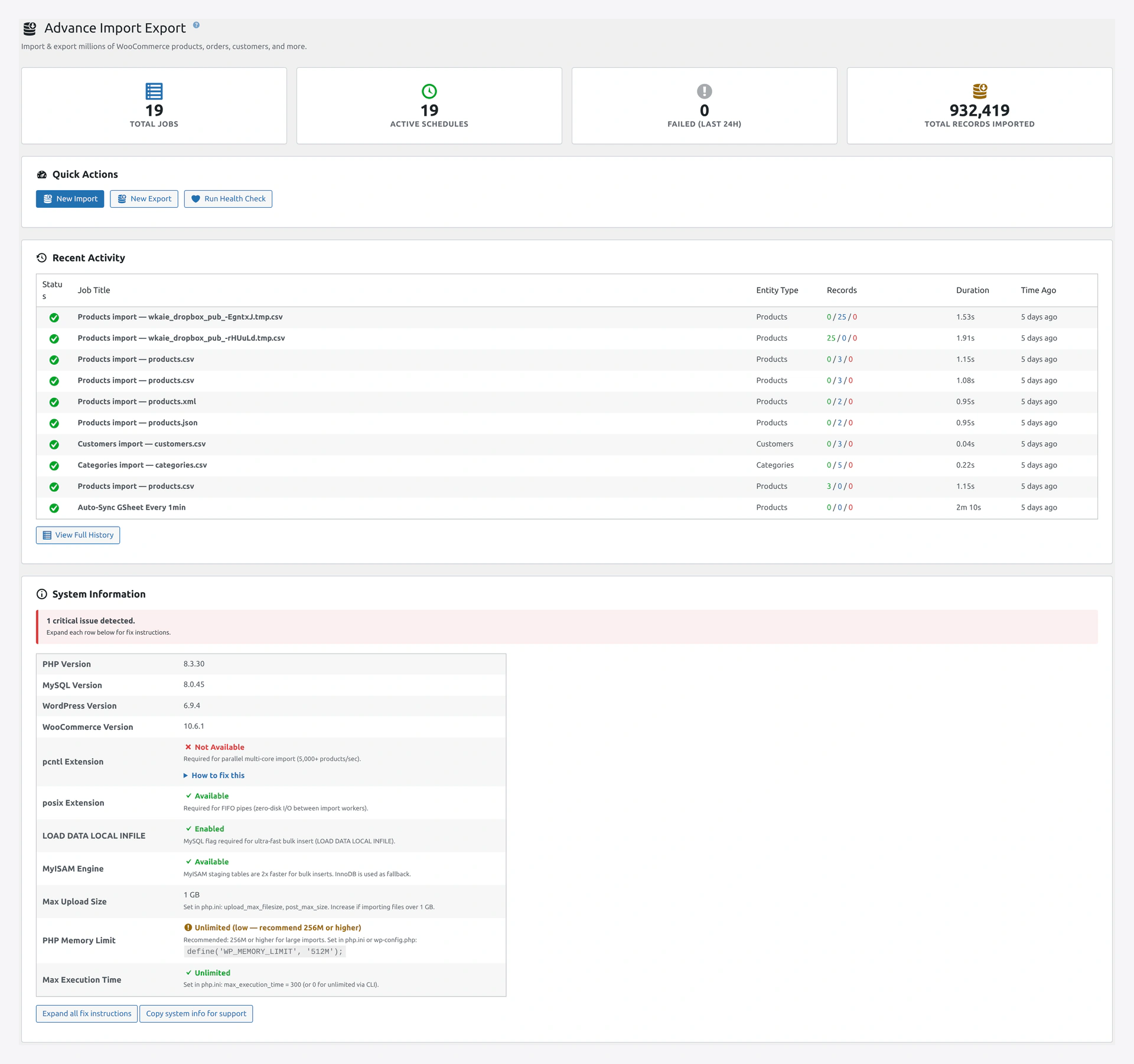 Our Dashboard — one unified view for every entity type, not a pile of separate add-ons.
At a Glance
| Category | Advance Import and Export | WP All Import |
|---|---|---|
| Entity types | 14 (products, orders, customers, coupons, reviews, posts, pages, users, categories, tags, attributes, subscriptions, bookings, memberships) | 5 (posts, pages, users, taxonomies, products via add-on) |
| Import sources | 11 (file, URL, FTP, SFTP, Google Sheets, Google Drive, Dropbox, S3, REST API, WC REST API, server path) | 4 (file, URL, FTP, local folder) |
| Export destinations | 12 (including Google Sheets, S3, Dropbox, OneDrive, email, REST API) | Not bundled — requires WP All Export (separate plugin) |
| Import modes | 5 (Create, Update, Create+Update, Delete, Replace) | 4 (Create, Update, Create+Update, Delete) |
| One-click rollback | Yes | No |
| Live Google Sheets sync | Yes | No (requires third-party integrations) |
| Migration presets | 8 (Shopify, Magento 1/2, BigCommerce, PrestaShop, OpenCart, Amazon, eBay, Google Shopping) | 0 (manual mapping every time) |
| Delta / incremental import | Yes (SHA-256 hash-based) | Limited (by date or ID only) |
| Health check / data integrity | 23 checks with auto-fix | Not included |
| REST API | 16 endpoints | 0 (no REST API) |
| WP-CLI commands | 8 command groups | Limited |
| Third-party plugin compat | 15 plugins (Yoast, RankMath, ACF, Meta Box, WPML, Polylang, Dokan, WCFM, WC Vendors, Brands, Product Bundles, Composite, Add-ons, AIOSEO) | 5 plugins (ACF, Yoast, Meta Box + some via add-ons) |
| Pricing model | One-time purchase, lifetime updates | Yearly subscription, per-site license |
| Core plugin price | One-time $99 (approx) | $199/year Pro + add-ons extra |
| Add-ons required for full functionality | None — everything included | Export plugin separate, User plugin separate, WooCommerce add-on separate |
Where WP All Import is Better
Honesty first. WP All Import has two real advantages.
1. Larger Community and More Tutorials
WP All Import has been around since 2012. There are thousands of StackOverflow answers, YouTube videos, and community forum posts. If you run into an obscure edge case, Google probably has a thread about it.
Our plugin is newer. The docs are comprehensive, but third-party community content is still being built.
2. Established Integrations with Specific Platforms
WP All Import has deep partnerships with certain marketplaces (Walmart, Etsy) through paid add-ons. If you are selling on those platforms specifically, their add-ons are mature.
We cover the big ones (Amazon, eBay, Google Shopping) but do not have dedicated marketplace add-ons for Walmart or Etsy yet.
Where We Are Better
1. All-In-One Pricing
WP All Import breaks features across multiple plugins:
- WP All Import Pro — the main plugin ($199/year)
- WooCommerce Add-On — required for products ($99/year)
- WP All Export — required to export ($99/year)
- User Add-On — required for users ($49/year)
- ACF Add-On — required for ACF ($49/year)
To get our feature parity, you pay $495/year to WP All Import. Every year. Forever.
Our plugin is one purchase that covers imports, exports, automation, rollback, health checks, and all compat layers. And it is a one-time price — no yearly renewal.
2. One-Click Rollback
If a bad import changes 5,000 product prices, WP All Import cannot undo it. You need to restore from a database backup or fix the data manually.
Our plugin saves a snapshot before every import. One click on the History page restores every changed record to its exact previous state.
This single feature pays for the plugin the first time an import goes wrong.
3. Live Google Sheets Sync
WP All Import treats Google Sheets as a URL source — you download the CSV and re-import manually.
Our plugin treats it as a live connection. Edit a cell in your Google Sheet and the store updates within minutes. No re-import. No file downloads. Your shop manager can update stock from their phone.
4. Speed on Large Catalogs
WP All Import uses a single-process model. For stores with 100,000+ products, imports can take hours.
Our plugin uses parallel processing. 1 million products in a few minutes on a proper VPS. 10x faster on large catalogs.
5. Built-In Health Check
WP All Import imports your data and trusts your data. If there are orphaned term relationships, broken upsell links, or price inconsistencies, they silently stay in your database.
Our plugin includes 23 integrity checks with one-click auto-fix. Catch problems before your customers do.
6. Migration Presets
Moving from Shopify or Magento? WP All Import makes you map every column by hand. Every time.
Our plugin ships with ready-made mappings for 8 platforms. Pick Shopify, upload your export, and 90% of columns auto-map.
7. REST API and WP-CLI
If you need to trigger imports from Zapier, GitHub Actions, or a custom app, WP All Import has no REST API. You would have to build a custom wrapper.
Our plugin has 16 REST endpoints and 8 WP-CLI command groups for full automation.
8. Scheduled Exports to Real Destinations
WP All Export can schedule exports, but only saves the file locally. You need a second plugin or a server cron to actually deliver the file anywhere.
Our plugin sends exports directly to email, FTP, SFTP, S3, Dropbox, Google Drive, OneDrive, Google Sheets, REST API, or WooCommerce REST API — all built-in, all from the schedule editor.
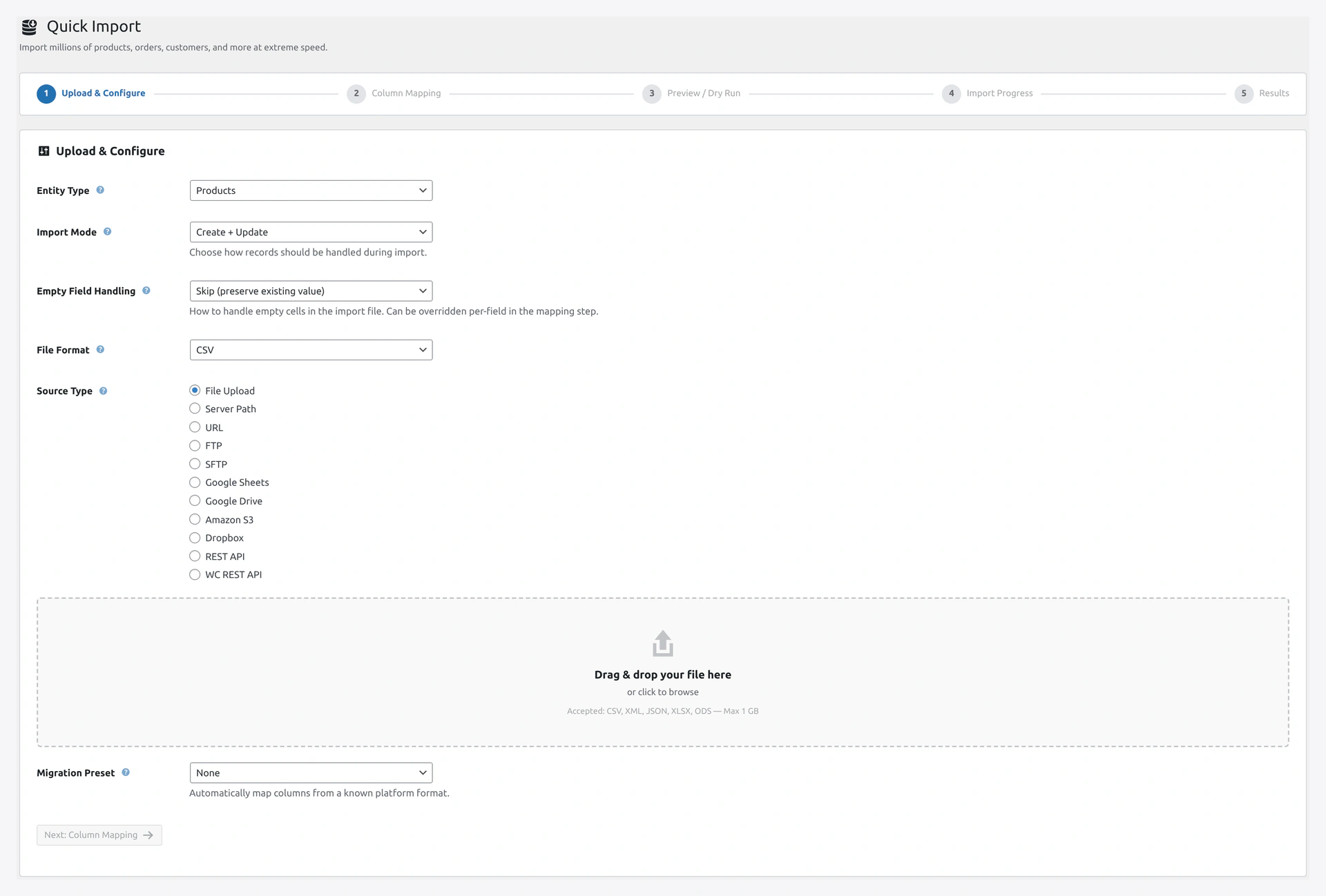 Our Quick Import wizard Step 1 — entity, mode, format, source, and migration preset all visible up front.
Feature-by-Feature Detail
Import
| Feature | Advance Import and Export | WP All Import |
|---|---|---|
| CSV | Yes | Yes |
| XML with XSLT | Yes | Yes |
| JSON (flat + nested) | Yes | Yes |
| XLSX | Yes | Yes |
| ODS (LibreOffice) | Yes | No |
| TSV | Yes | Yes |
| ZIP auto-extract | Yes | Yes |
| TAR auto-extract | Yes | No |
| Auto-delimiter detection | Yes | Yes |
| Auto-encoding detection | Yes (UTF-8, UTF-16, Latin-1) | Limited |
| Drag-drop column mapping | Yes | Yes |
| Auto-match by column name | Yes | Yes |
| Value transformations | 12 types + custom PHP | 6 types + custom PHP |
| Price rules (markup, rounding, currency) | Yes | Via custom PHP |
| Preview / dry run | Yes | Yes |
| Delta / incremental | Yes (SHA-256) | Limited (date-based) |
| Image download | Yes | Yes |
| Deferred image import | Yes | Yes (with Image Add-On) |
| Variable product handling | Yes, auto-detect | Yes |
| Variation auto-grouping | Yes | Manual |
Export
| Feature | Advance Import and Export | WP All Import (Export plugin) |
|---|---|---|
| Export included in core | Yes | No — requires WP All Export ($99/year) |
| CSV | Yes | Yes |
| XML | Yes | Yes |
| JSON | Yes | Yes |
| XLSX | Yes (via engine) | Yes |
| Streaming export | Yes | Yes |
| Scheduled export | Yes | Yes |
| Email destination | Yes (built-in) | Add-on required |
| FTP / SFTP destination | Yes (built-in) | Add-on required |
| Amazon S3 | Yes (built-in) | Add-on required |
| Google Drive / Sheets | Yes (built-in) | Add-on required |
| OneDrive | Yes (built-in) | No |
| Product feed templates | 6 built-in (Google, Facebook, Amazon, eBay, Pinterest, Bing) | Manual |
Automation
| Feature | Advance Import and Export | WP All Import |
|---|---|---|
| Scheduled jobs | Yes | Yes |
| Cron schedules | Every minute to monthly + custom cron | Daily / weekly / monthly |
| Event triggers (on product save, new order, etc.) | Yes | No |
| Job chaining (run Job B after Job A) | Yes | No |
| Live Google Sheets sync | Yes | No |
| REST API for programmatic control | 16 endpoints | No |
| Webhook receiver | Yes | No |
| WP-CLI | 8 command groups | Limited |
Safety
| Feature | Advance Import and Export | WP All Import |
|---|---|---|
| One-click rollback | Yes | No |
| Selective rollback (undo specific rows) | Yes | No |
| Rollback retention config | Yes (default 30 days) | N/A |
| Import history / logs per run | Yes | Yes |
| Pre-import validation | Yes | Yes |
| Post-import health check | Yes (23 checks) | No |
| Credentials encrypted at rest | Yes (AES-256) | Limited |
| Nonce + capability checks | Yes | Yes |
Compatibility
| Plugin | Advance Import and Export | WP All Import |
|---|---|---|
| Yoast SEO | Yes | Yes |
| RankMath | Yes | Limited |
| All in One SEO | Yes | Limited |
| ACF | Yes | Yes (Add-On required) |
| Meta Box | Yes | Limited |
| WPML | Yes | Add-on required |
| Polylang | Yes | No |
| Dokan | Yes | Limited |
| WCFM Marketplace | Yes | No |
| WC Vendors | Yes | No |
| WooCommerce Brands | Yes | Limited |
| WooCommerce Product Bundles | Yes | Limited |
| WooCommerce Composite Products | Yes | Limited |
| WooCommerce Product Add-ons | Yes | Limited |
Pricing Breakdown
Advance Import and Export for WooCommerce
- One-time purchase from Webkul or CodeCanyon
- Includes: All entity types, all sources, all destinations, REST API, WP-CLI, rollback, health check, all compat layers, lifetime updates
- Support: 3-12 months of standard support included
- No add-ons — everything is in the core
WP All Import (Comparable Setup)
To match our feature set, you need:
| Product | Price |
|---|---|
| WP All Import Pro | $199/year |
| WooCommerce Add-On | $99/year |
| User Add-On | $49/year |
| ACF Add-On | $49/year |
| WP All Export Pro | $99/year |
| Yearly subtotal | $495/year |
| 3-year total | $1,485 |
| 5-year total | $2,475 |
You pay this every year. If you let the license lapse, you lose updates (and eventually, the plugin breaks on a WordPress update).
Our plugin: pay once, use forever.
When to Pick WP All Import
Be honest with yourself. Pick WP All Import if:
- You already have a WP All Import license and know the workflow inside out
- You specifically need the Walmart or Etsy add-ons
- You need community-backed answers for very obscure edge cases
- You prefer the feel of their UI (it is a matter of taste)
When to Pick Advance Import and Export
Pick our plugin if:
- You want a one-time price instead of yearly fees
- You want rollback, so one bad import cannot ruin your day
- You want live Google Sheets sync (huge for shop managers)
- You want a health check to find broken data proactively
- You are migrating from Shopify, Magento, BigCommerce, or PrestaShop
- You need REST API or WP-CLI for automation
- You have a large catalog (100K+) and speed matters
- You use multiple third-party plugins (Yoast, ACF, Dokan, WPML, etc.) and want them to just work
- You want imports and exports in one plugin
Migration Path
If you are currently using WP All Import and want to switch, the transition is smooth:
- Export your WP All Import templates as JSON
- Install our plugin
- Use our migration preset for your source (Shopify / Magento / etc.) — most mappings auto-apply
- Any custom field mappings, copy them to our Column Mapping presets
- Run a test import on staging
- Deactivate WP All Import
Our Column Mapping page uses the same CSV conventions as WP All Import, so your existing CSVs will work without changes.
The Bottom Line
WP All Import is a well-established, mature product. It works. It is a reasonable choice.
Advance Import and Export for WooCommerce gives you more features, better safety, better automation, and costs less over time. We believe it is the better choice for most WooCommerce stores — and we are confident enough to back every purchase with a 30-day money-back guarantee.
Try it risk-free
Buy now — 30-day money-back guarantee, no questions asked. Or try the live demo first.
Related Pages
- Features — Every feature in our plugin
- Migration Presets — Shopify, Magento, BigCommerce templates
- FAQ — Frequently asked questions
- Quick Start — Your first import in 5 minutes